Executive Summary: Computer viruses remain one of the most persistent and evolving threats in the digital landscape. From classic file infector viruses and boot sector attacks to sophisticated polymorphic viruses, ransomware, and Trojan horses, understanding the full spectrum of malware types is the first step toward building an impenetrable defense. This comprehensive guide breaks down exactly how each virus type works, how it enters your system, and — most critically — what layered protection strategies, including robust antivirus software like 360 Total Security, can do to keep your Windows or macOS PC safe from every category of digital threat.
What Are Computer Viruses and How Do They Threaten Your System?
A computer virus is a type of malicious software program engineered with a singular, destructive purpose: to replicate itself, attach to legitimate files or programs, and spread from one system to another — often without the user ever realizing it. The term “virus” is frequently used as a catch-all for all malware, but in its precise technical definition, it refers specifically to self-replicating code that piggybacks on host files to propagate. The damage a virus can inflict ranges from minor annoyances like sluggish performance to catastrophic outcomes such as total data loss, financial theft, or complete system failure.
Understanding how viruses spread and what damage they cause is not merely academic — it is the foundation of every effective cybersecurity strategy. According to a 2026 Cybersecurity Threat Intelligence Report, over 450,000 new malicious programs are registered every single day, underscoring the relentless pace at which the threat landscape evolves.
The Core Mechanism: Replication and Payload
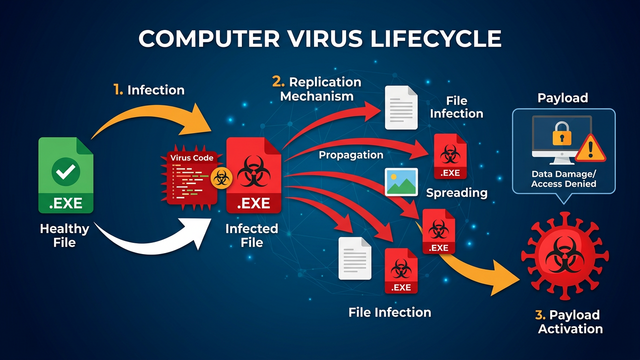
At its heart, every computer virus operates on a two-part architecture: the replication mechanism and the payload. Understanding this distinction is key to appreciating why viruses are so dangerous.
- Replication Mechanism: A virus attaches its malicious code to a legitimate host — an executable program, a document, or a system file. When the user runs that host program, the virus code executes first, silently copying itself to other files, directories, or connected drives. This self-propagation is what defines a virus and distinguishes it from other malware types. The replication phase is designed to be invisible, ensuring the virus spreads as widely as possible before detection.
- The Payload: Once sufficiently spread, or upon a specific trigger (a date, a user action, or a system condition), the virus activates its payload — the actual harmful action it was designed to perform. Payloads vary enormously: some delete or corrupt files, others encrypt data for ransom, some steal credentials, and others simply display messages. The payload is the “weapon”; the replication engine is the “delivery system.”
This separation means a virus can silently infect hundreds of files over days or weeks before its payload ever activates, making early detection through proactive scanning absolutely critical.
Common Infection Vectors and Entry Points
Knowing how viruses get into your computer is half the battle. Modern virus infection methods are diverse and increasingly sophisticated, exploiting both technical vulnerabilities and human psychology.
- Infected Downloads: Downloading software, games, media files, or documents from unverified or malicious websites is one of the most common infection vectors. Pirated software and cracked applications are particularly high-risk, as they frequently bundle hidden malware alongside the promised program.
- Malicious Email Attachments and Phishing Links: Phishing emails remain devastatingly effective. A carefully crafted email impersonating a bank, courier service, or colleague can trick users into opening an infected attachment (a .docx, .pdf, or .zip file) or clicking a link that silently downloads malware. According to a 2025 Global Phishing Trends Report, email-based attacks account for over 80% of reported malware delivery incidents.
- Software Vulnerabilities and Removable Media: Unpatched operating systems and applications contain security holes that viruses can exploit to install themselves without any user interaction — a technique known as a “drive-by” infection. Similarly, infected USB drives, external hard disks, and even SD cards can carry viruses that auto-execute when plugged into a computer, a method that remains surprisingly prevalent in corporate environments.
A Guide to File Infector Viruses and Boot Sector Viruses
Among the oldest and most foundational categories of malware, file infector viruses and boot sector viruses represent the classical architecture of digital infection. While they predate the modern internet era, both remain relevant threats today — and understanding their mechanics provides crucial insight into why deep-level antivirus scanning is non-negotiable.
File Infector Viruses: Corrupting Your Applications
A file infector virus targets executable files — the programs that make your computer do things. These viruses attach their malicious code to files with extensions like .exe, .com, and .scr. Every time an infected program is launched, the virus executes alongside it, spreading to other executables on the system.
- Spread Mechanism: The virus scans the file system for other executable files and appends or prepends its code to them. Over time, a single infected program can contaminate dozens or hundreds of applications on the same machine, and any of those files shared with another user will carry the infection forward.
- Symptoms of Infection: Users typically notice corrupted programs that crash unexpectedly, unusual changes in file sizes (a telltale sign that foreign code has been appended), dramatically slower application load times, and error messages from programs that previously worked flawlessly. A historically notorious example is the CIH virus (also known as Chernobyl), which targeted Windows 95/98 executables and, on its trigger date, overwrote the system BIOS and erased the hard drive’s first megabyte — rendering machines completely unbootable.
- Detection and Cleaning: Comprehensive antivirus scans are the primary defense. 360 Total Security employs a multi-engine scanning architecture — combining its proprietary Cloud Scan engine with the renowned Bitdefender and Avira engines — to achieve industry-leading detection rates against file infectors, including zero-day variants that have never been seen before.
Boot Sector Viruses: Attacking the Startup Process
If file infectors attack your programs, boot sector viruses attack something even more fundamental: the process by which your computer starts up. These viruses infect the Master Boot Record (MBR) — the critical section of a storage device that contains the code executed by the BIOS/UEFI before the operating system loads.
- How They Infect: Boot sector viruses typically spread via infected bootable media (historically floppy disks, now USB drives or external drives). When a computer attempts to boot from an infected device, the virus code loads into memory before the OS, giving it deep, privileged access to the entire system.
- Consequences: The results can be severe. An infected MBR can prevent the operating system from loading entirely, causing boot failures and the dreaded “Operating System Not Found” error. Data recovery becomes extremely difficult because the virus controls the very mechanism used to access the drive. Some MBR viruses also encrypt the original boot record, holding the system hostage.
- Modern Protection: Contemporary defenses rely on two complementary layers. First, UEFI Secure Boot — a firmware-level feature on modern PCs — verifies that boot code is cryptographically signed and trusted before execution, blocking unsigned malicious boot loaders. Second, antivirus software that performs boot-sector scanning during system startup can detect and neutralize MBR infections before they activate. This proactive boot-level defense is a core component of 360 Total Security‘s multi-layered protection architecture.
Understanding Macro Viruses and Polymorphic Viruses
As computing evolved, so did malware. Macro viruses and polymorphic viruses represent a significant leap in sophistication — the former hiding malicious intent inside everyday office documents, the latter using advanced cryptographic and code-mutation techniques to become virtually invisible to traditional detection methods. Together, they illustrate why modern antivirus solutions must go far beyond simple signature matching.
Macro Viruses: Malware Hidden in Documents
The revelation that a Word document or Excel spreadsheet can contain a virus surprises many users. Yet macro viruses have been exploiting this vector since the mid-1990s and remain a potent threat today. They embed malicious code within the macro scripting language of office documents (files like .doc, .xls, .ppt, and their modern XML-based equivalents). When the document is opened and macros are enabled, the malicious code executes with the full permissions of the user.
- Execution Trigger: The virus activates the moment the document is opened and the user either clicks “Enable Content” or has macros enabled by default. This makes them a staple of phishing campaigns, where attackers send convincing emails with attached documents — fake invoices, shipping notifications, or HR forms — that instruct the recipient to enable macros to “view the content properly.”
- Social Engineering Component: The effectiveness of macro viruses relies heavily on social engineering. The technical exploit is simple; the real attack vector is human trust. A 2025 Enterprise Security Survey found that macro-enabled document attacks were responsible for over 35% of successful corporate network breaches in the preceding year.
- Defense Strategy: The primary defense is to disable macros by default in all Microsoft Office applications — a setting that is now the default in modern Office versions. Additionally, using antivirus software with real-time scanning of office documents provides a critical safety net, catching malicious macro code even if a user inadvertently enables it. 360 Total Security scans documents in real time as they are opened, providing an immediate alert before any malicious macro can execute.
Polymorphic Viruses: The Shape-Shifting Threat
Traditional antivirus software identifies malware by its signature — a unique string of code that acts like a fingerprint. Polymorphic viruses were engineered specifically to defeat this approach. With each new infection, a polymorphic virus mutates its own code, changing its appearance while keeping its core malicious payload functionally identical.
- Mutation Techniques: Polymorphic engines use several techniques to change the virus’s signature: encrypting the payload with a different key each time, inserting meaningless “garbage” or NOP (no-operation) instructions to pad the code, reordering independent instructions, and substituting equivalent code sequences. The result is that each copy of the virus looks completely different at the binary level, even though it does the same thing.
- Why Signature Detection Fails: Because the virus’s binary fingerprint changes with every infection, a traditional signature database — no matter how comprehensive — cannot keep up. By the time a new signature is written and distributed, the virus has already mutated into thousands of new variants. This is why relying solely on signature-based detection is a dangerously outdated strategy.
- Advanced Detection Technologies: Defeating polymorphic viruses requires a fundamentally different approach. Heuristic analysis examines code structure for suspicious patterns rather than specific signatures. Behavioral analysis monitors what a program actually does at runtime — if it starts encrypting files, modifying system registries, or attempting network connections it shouldn’t, it is flagged regardless of its appearance. Cloud-based threat intelligence allows security vendors to identify and respond to new variants in near-real-time. 360 Total Security integrates all three of these technologies, using behavioral analysis and cloud intelligence to identify malicious behavior patterns rather than relying on static code signatures alone.
The Menace of Worms, Trojans, and Ransomware
While technically distinct from viruses in their propagation methods, computer worms, Trojan horses, and ransomware are among the most destructive and widely encountered threats in the modern threat landscape. Each operates on a different principle and demands a specific defensive response — making a comprehensive, multi-layered security approach essential for any PC user.
Computer Worms: The Self-Replicating Network Threat
The critical distinction between a virus and a computer worm lies in independence. A virus needs a host file to attach to and spread; a worm is entirely self-contained and can propagate autonomously across networks without any user interaction or host program.
- Network Exploitation: Worms typically exploit vulnerabilities in network services, operating systems, or applications to copy themselves from one machine to another. Once inside a network, a worm can spread to every connected device within minutes, consuming bandwidth, degrading network performance, and creating backdoors for further exploitation.
- Historical Impact: The scale of worm damage is staggering. The Conficker worm (2008) infected an estimated 9–15 million computers worldwide, creating a massive botnet. WannaCry (2017), which combined worm propagation with ransomware payload, infected over 200,000 systems across 150 countries in a single day, causing estimated damages exceeding $4 billion. A 2026 Network Security Threat Report projects that worm-based attacks leveraging AI-assisted vulnerability scanning will increase by 60% over the next two years.
- Protection Requirements: Defending against worms requires a strong, properly configured firewall to block unauthorized network connections, timely software and OS updates to patch the vulnerabilities worms exploit, and network intrusion detection capabilities. Isolating infected machines immediately upon detection is critical to preventing lateral spread.
Trojan Horses: Deception as a Weapon
Named after the legendary wooden horse of Greek mythology, a Trojan horse (or simply “Trojan”) is malware that disguises itself as a legitimate, desirable program to trick users into willingly installing it. Unlike viruses and worms, Trojans do not self-replicate; their power lies entirely in deception.
- Disguise Tactics: Trojans masquerade as free software, game cracks, system utilities, media players, or even fake antivirus programs. Once installed, they operate silently in the background, performing their true purpose while the user believes they have installed something useful.
- Malicious Capabilities: The payload of a Trojan can be devastating. Common Trojan functions include creating a backdoor for remote attacker access (Remote Access Trojans, or RATs), acting as spyware to log keystrokes and steal passwords, downloading and installing additional malware, enrolling the machine in a botnet, or serving as the delivery mechanism for ransomware.
- Sandbox Defense: Because Trojans are designed to look legitimate, static analysis alone is often insufficient. 360 Total Security‘s Sandbox feature is a particularly powerful countermeasure: it allows suspicious programs to execute in a completely isolated virtual environment, where their behavior can be safely observed without any risk to the real system. If the program attempts malicious actions inside the sandbox, it is blocked and flagged before it ever touches your actual files or system settings.
Ransomware: Digital Kidnapping for Extortion
Ransomware is arguably the most financially devastating category of malware in operation today. Its mechanism is brutally simple: it encrypts the victim’s files using strong cryptographic algorithms, rendering them completely inaccessible, and then demands a ransom payment — typically in cryptocurrency like Bitcoin — in exchange for the decryption key.
- Delivery and Encryption: Ransomware is most commonly delivered via Trojan droppers, malicious email attachments, exploit kits targeting unpatched vulnerabilities, or through compromised Remote Desktop Protocol (RDP) connections. Once active, modern ransomware can encrypt thousands of files within minutes, targeting documents, images, databases, and backups. The encryption used (typically AES-256 combined with RSA-2048) is mathematically unbreakable without the key.
- Financial and Operational Damage: According to a 2026 Global Ransomware Damage Report, the total global cost of ransomware attacks is projected to exceed $275 billion annually by 2031. Beyond the ransom itself, organizations face costs from downtime, data recovery, reputational damage, and regulatory penalties. For individuals, the loss of irreplaceable personal files — family photos, financial records, creative work — can be devastating.
- Multi-Layered Defense: No single defense is sufficient against ransomware. The strategy must be layered: regular offline backups (the 3-2-1 rule: 3 copies, 2 different media, 1 offsite) are the ultimate recovery mechanism, as they allow restoration without paying the ransom. Simultaneously, real-time protection that monitors and blocks unauthorized mass file encryption processes — a key capability of modern security suites like 360 Total Security — can stop a ransomware attack in its tracks before significant damage occurs.
How to Protect Your Computer from All Types of Viruses
Effective cybersecurity in the modern era is not about defending against a single type of threat — it is about constructing a layered defense strategy that addresses every attack vector simultaneously. This means combining reliable, feature-rich security software with educated, disciplined computing habits. No single tool or practice is sufficient alone; true protection comes from the synergy of multiple overlapping defenses.
Building Your First Layer: Robust Security Software
The foundation of any PC security strategy is a reputable, actively maintained antivirus solution with real-time protection. This is non-negotiable. Without it, every other precaution you take is undermined by the absence of a safety net.
360 Total Security offers a compelling free solution for Windows and macOS desktop users, distinguished by its multi-engine architecture. Rather than relying on a single detection engine, it combines:
- Its own 360 Cloud Scan Engine for real-time, cloud-powered threat intelligence
- The Bitdefender engine, consistently rated among the world’s best for malware detection
- The Avira engine, renowned for its comprehensive virus database and low false-positive rate
- A System Repair engine for fixing damage caused by malware
- A QVM AI engine for heuristic and behavioral detection of unknown threats
The following table compares key protective features between 360 Total Security and the built-in Windows Defender:
| Feature | 360 Total Security (Free) | Windows Defender (Built-in) |
|---|---|---|
| Real-Time File Scanning | ✅ Yes (Multi-Engine) | ✅ Yes (Single Engine) |
| Number of Scan Engines | ✅ 5 Engines (360 Cloud, Bitdefender, Avira, QVM AI, System Repair) | ⚠️ 1 Engine (Microsoft) |
| Behavioral Analysis / Heuristics | ✅ Advanced (QVM AI) | ✅ Basic |
| Sandbox for Suspicious Programs | ✅ Yes | ❌ No |
| Ransomware Protection | ✅ Yes (Real-time blocking) | ✅ Controlled Folder Access (manual setup required) |
| System Optimization & Cleanup | ✅ Yes (Integrated tools) | ❌ No |
| Boot Sector Scanning | ✅ Yes | ⚠️ Limited |
| System Fortress / Process Firewall | ✅ Yes | ❌ No |
| System Performance Impact | ✅ Lightweight | ✅ Lightweight |
| Cost | ✅ Free (Premium available) | ✅ Free (Built-in) |
The Human Firewall: Essential Safe Computing Practices
Technology alone cannot protect a user who ignores fundamental security hygiene. The human element remains the most exploited vulnerability in any security system. Adopting these habits transforms you from a liability into an active participant in your own defense:
- Keep Everything Updated: The single most impactful security action you can take is keeping your operating system, browsers, and all installed software up to date. The majority of successful malware attacks exploit known, already-patched vulnerabilities — meaning that an updated system is immune to them. Enable automatic updates wherever possible.
- Practice Healthy Skepticism: Treat every unsolicited email, unexpected attachment, and unfamiliar download link with suspicion. Verify the sender’s email address carefully (not just the display name). Never click links in emails asking you to log in to an account — navigate directly to the website instead. Apply the principle of least privilege: if you don’t need a program or permission, don’t grant it.
- Back Up Your Data Regularly: Implement the 3-2-1 backup rule: maintain at least 3 copies of important data, on 2 different types of storage media, with 1 copy stored offsite or in the cloud. Crucially, at least one backup should be offline (disconnected from your network) — ransomware actively seeks out and encrypts connected backup drives. A recent, clean backup makes ransomware attacks a recoverable inconvenience rather than a catastrophe.
Advanced Proactive Measures and Tools
Beyond the basics, a set of advanced practices and software features can dramatically reduce your attack surface and provide early warning of threats before they cause damage:
- Use a Standard User Account for Daily Tasks: Running your computer as an administrator for everyday activities gives any malware that infects your system administrator-level privileges — the keys to the kingdom. Create a standard user account for daily use and reserve the administrator account for software installation and system changes only. This simple step can contain the damage of many infection types.
- Leverage Advanced Security Features: 360 Total Security‘s System Fortress and Process Firewall features provide an additional proactive layer. System Fortress monitors and blocks unauthorized modifications to critical system areas — registry keys, startup entries, browser settings — that malware commonly targets. The Process Firewall controls which programs are allowed to execute and communicate, blocking unauthorized processes before they can cause harm.
// Example: Registry keys commonly targeted by malware that System Fortress monitors: HKEY_LOCAL_MACHINE\SOFTWARE\Microsoft\Windows\CurrentVersion\Run HKEY_CURRENT_USER\SOFTWARE\Microsoft\Windows\CurrentVersion\Run HKEY_LOCAL_MACHINE\SYSTEM\CurrentControlSet\Services HKEY_LOCAL_MACHINE\SOFTWARE\Microsoft\Windows NT\CurrentVersion\Winlogon - Schedule Regular Full System Scans and Perform System Maintenance: Real-time protection catches threats as they arrive, but a scheduled full system scan — performed weekly or bi-weekly — can uncover dormant threats that may have slipped through or arrived via offline media. Additionally, 360 Total Security‘s integrated cleanup and optimization tools remove junk files, fix system vulnerabilities, and maintain peak system performance, ensuring your PC runs efficiently and securely. Visit the 360 Total Security official website to download the free version and start building your layered defense today.
Frequently Asked Questions (FAQ)
Q1: What is the difference between a computer virus, a worm, and a Trojan?
A computer virus attaches itself to a legitimate host file and requires that file to be executed in order to replicate and spread. A worm is self-contained and can spread autonomously across networks without any host file or user interaction, exploiting network vulnerabilities directly. A Trojan horse does not self-replicate at all — it disguises itself as legitimate software to trick users into installing it, after which it performs malicious actions like creating backdoors or stealing data. While all three are types of malware, their propagation methods and primary objectives are fundamentally different.
Q2: Can I get a virus just by opening an email?
Simply opening a plain-text email in a modern, updated email client is generally safe. However, the risk arises from opening attachments (especially Office documents with macros, executable files, or compressed archives) or clicking links within the email that lead to malicious websites or trigger drive-by downloads. HTML-formatted emails can also, in rare cases, exploit browser vulnerabilities if your email client renders HTML. The safest practice is to never open attachments or click links from unexpected or unverified senders, and to ensure your email client and antivirus software are always up to date.
Q3: Is free antivirus software good enough, or do I need a paid version?
A reputable free antivirus solution can provide substantial protection for most home users. 360 Total Security’s free version, for example, includes multi-engine scanning (Bitdefender + Avira + 360 Cloud), real-time protection, a sandbox, and system optimization tools — a feature set that surpasses many paid competitors. Paid or premium versions typically add features like a VPN, password manager, advanced identity theft protection, and priority customer support. For most individual PC users, a well-chosen free solution with real-time protection is significantly better than no protection at all.
Q4: What should I do if I think my computer is already infected with a virus?
If you suspect an infection, take these steps immediately: (1) Disconnect from the internet to prevent the malware from communicating with its command server or spreading to other devices. (2) Boot into Safe Mode (Windows: hold Shift while clicking Restart, then select Troubleshoot > Advanced Options > Startup Settings) to prevent most malware from loading. (3) Run a full system scan with your antivirus software — if you don’t have one installed, download 360 Total Security from a clean device, transfer it via USB, and install it. (4) Follow the software’s remediation recommendations to quarantine or remove detected threats. (5) Change your passwords from a clean device after the infection is resolved, as credentials may have been compromised.
Q5: How does ransomware encryption work, and can files be recovered without paying the ransom?
Modern ransomware uses asymmetric encryption: it generates a unique public-private key pair for each victim. The public key (used to encrypt files) is embedded in the ransomware; the private key (needed to decrypt) is held only by the attacker and released upon ransom payment — or not at all. Because the encryption algorithms used (typically AES-256 + RSA-2048) are mathematically sound, decryption without the key is computationally infeasible. File recovery without paying the ransom is possible only if: (a) you have a clean, recent offline backup; (b) law enforcement has seized the attacker’s servers and released decryption keys (this has happened with some ransomware families, and free decryptors are available at nomoreransom.org); or (c) the ransomware was poorly implemented with a recoverable flaw. This is why proactive prevention and regular backups are so critical — they are the only reliable recovery path.
Author Bio: This article was written by a Senior Technical Writer and Cybersecurity Content Specialist with over a decade of experience translating complex security concepts into actionable guidance for everyday PC users and IT professionals alike. Specializing in malware analysis, endpoint protection strategies, and security software evaluation, the author has contributed to numerous industry publications and cybersecurity awareness programs. All technical content is reviewed for accuracy against current threat intelligence and vendor documentation.
Learn more about 360 Total Security