Executive Summary: In an era where cyber threats evolve at machine speed, free malware protection has matured from a basic afterthought into a genuinely powerful first line of defense for everyday PC users. This comprehensive guide examines how free antivirus solutions work, what critical features separate effective tools from ineffective ones, and how platforms like 360 Total Security combine multi-engine malware detection with system optimization to deliver a holistic, zero-cost security experience. Whether you are evaluating your first antivirus or reconsidering your current setup, this guide equips you with the knowledge to build a robust, layered defense strategy for your Windows or macOS desktop.
Why Free Malware Protection is a Critical First Layer of Defense
The question of whether free antivirus software is “good enough” is one of the most frequently debated topics in consumer cybersecurity. The honest answer is nuanced: free malware protection is not a silver bullet, but for the vast majority of home users and small business operators, a well-chosen free solution provides an essential, accessible barrier that intercepts the overwhelming majority of common threats before they can cause meaningful damage. Understanding why this is true requires looking at the modern threat landscape, the mechanics of protection, and the real-world limitations of built-in operating system tools.
The Diverse Landscape of Modern Malware Threats
Modern malware is not a monolithic category. According to the Cybersecurity & Infrastructure Security Agency (CISA) threat glossary, the term encompasses a wide family of malicious software types, each with distinct behaviors and objectives:
- Viruses: Self-replicating code that attaches to legitimate files and spreads when those files are executed or shared.
- Trojans: Malicious programs disguised as legitimate software, often used to open backdoors or deliver secondary payloads.
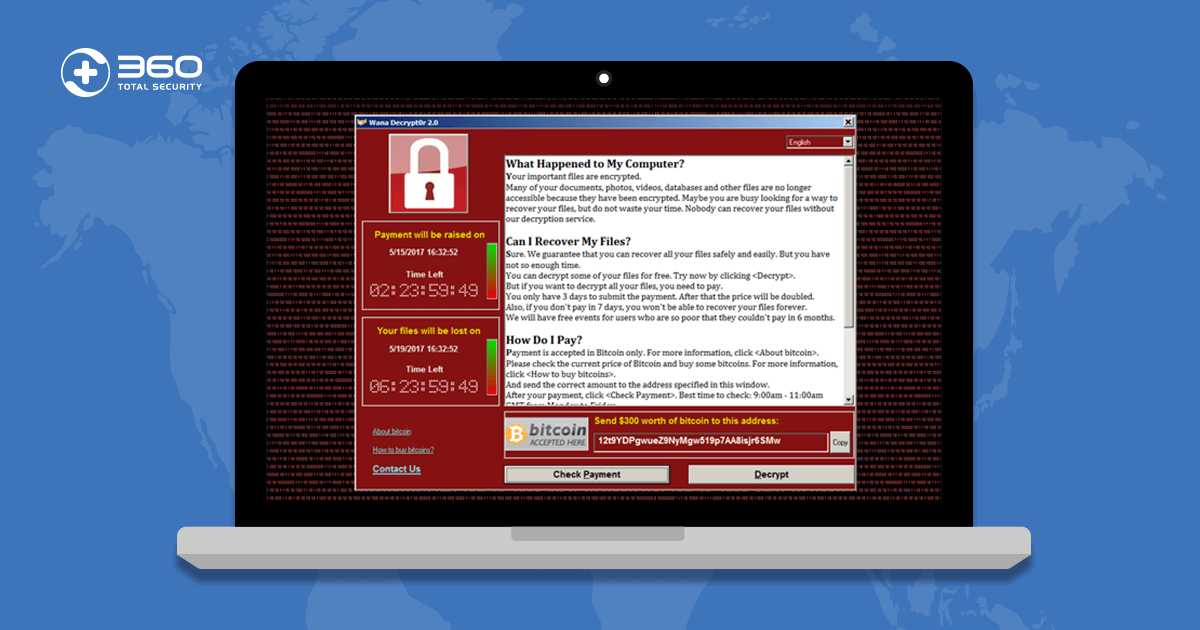
- Ransomware: Encrypts a victim’s files and demands payment for the decryption key, causing catastrophic data loss for unprepared users.
- Spyware: Silently monitors user activity, harvesting sensitive data such as login credentials, financial information, and browsing history.
- Adware: Injects unwanted advertisements into the browsing experience, often degrading performance and redirecting traffic.
- Keyloggers: Record every keystroke a user makes, enabling attackers to capture passwords and confidential communications.
Free malware scanners address these threats primarily through two complementary mechanisms: signature-based detection, which matches files against a continuously updated database of known malicious code patterns, and behavioral heuristics, which flag programs exhibiting suspicious behavior even if their specific code signature has never been seen before. This dual approach means that even a free tool can intercept both well-documented legacy threats and newly emerging variants that share behavioral characteristics with known malware families.
The Role of Real-Time Scanning and On-Demand Protection
Effective free malware protection operates in two distinct but complementary modes that together create a comprehensive defensive posture:
Real-Time Protection operates continuously in the background, monitoring every file access, process launch, network connection, and download as it happens. When a suspicious file is accessed, the engine intercepts it before execution, analyzes it, and either clears it or quarantines it. This mode is your primary active shield against drive-by downloads, malicious email attachments, and infected USB drives.
On-Demand Scanning is user-initiated and allows for deep, comprehensive inspection of the entire file system, including areas that may not be actively accessed during normal use. Scheduled weekly or monthly full scans can uncover dormant threats, rootkits hiding in obscure directories, and potentially unwanted programs (PUPs) that slipped past real-time filters during periods of high system activity.
Security researchers consistently emphasize the importance of both modes working in tandem. As one independent security analyst noted in a 2025 industry review: “For the average user, a free scanner with robust real-time protection can prevent over 90% of common, non-targeted attacks — the key word being ‘robust,’ which means frequent definition updates and low-latency threat response.” The combination of always-on monitoring and periodic deep scans provides a layered safety net that significantly reduces the window of exposure for any given threat.
Understanding the Gaps in Built-in Operating System Tools
Windows Defender, now officially branded as Microsoft Defender Antivirus, has improved substantially over the past several years and represents a meaningful baseline of protection for Windows users. However, relying on it exclusively introduces several notable gaps:
- Update Cycle Latency: Dedicated third-party antivirus vendors often push virus definition updates multiple times per day, driven by their global threat intelligence networks. Microsoft’s update cadence, while regular, may lag behind the fastest-responding specialized vendors, creating a window of vulnerability for newly released malware strains.
- Limited Optimization Features: Microsoft Defender is purely a security tool. It does not include junk file cleaners, startup managers, disk analyzers, or network monitoring utilities — features that accompany full-featured free security suites and contribute meaningfully to overall PC health.
- Detection Rate Variability: Independent testing organizations such as AV-TEST and AV-Comparatives regularly publish comparative evaluations. While Defender scores competitively in many categories, dedicated free solutions from specialized vendors frequently achieve detection rates of 99% or higher in real-world protection tests, with some third-party free tools consistently outperforming the built-in option in zero-day threat detection scenarios according to 2025 AV-TEST benchmark reports.
The conclusion is not that Windows Defender is useless — it is a valuable baseline — but that supplementing or replacing it with a dedicated free malware protection solution provides measurably stronger coverage, especially against the newest and most sophisticated threats circulating in the wild.
Key Features to Evaluate in Any Free Malware Protection Solution
The free antivirus market is crowded, and the quality gap between the best and worst offerings is significant. Selecting a trustworthy, effective tool requires moving beyond marketing claims and scrutinizing a specific set of non-negotiable features. Understanding what to look for — and what red flags to avoid — is as important as choosing the software itself.
The Scanning Engine: Detection Rates and Update Frequency
The scanning engine is the technical heart of any antivirus solution. Its quality is best assessed through two objective metrics: detection rates and update frequency.
Detection rates measure the percentage of known malware samples and zero-day threats that the engine successfully identifies and neutralizes. The gold standard for evaluating these rates comes from independent testing laboratories such as AV-TEST, AV-Comparatives, and SE Labs, which conduct rigorous, standardized tests using thousands of real malware samples. A reputable free solution should consistently score above 98% in real-world protection tests. Any tool with scores below 95% should be treated with serious caution.
Update frequency determines how quickly the software’s virus definition database is refreshed to recognize new threats. In a threat landscape where thousands of new malware variants are identified daily, a tool that updates its definitions only weekly is already significantly behind the curve. Daily updates are the minimum acceptable standard; the best solutions update multiple times per day, often leveraging cloud-based threat intelligence that provides near-real-time protection against emerging strains.
The following table provides a simplified illustration of how these metrics might compare across a representative sample of free products:
| Product | Illustrative Detection Rate | Definition Update Cycle | Cloud-Assisted Detection |
|---|---|---|---|
| 360 Total Security | 99.5% | Multiple times daily | Yes (360 Cloud Engine) |
| Avast Free Antivirus | 98.8% | Daily | Yes |
| Bitdefender Free Edition | 99.2% | Daily | Yes |
| Windows Defender | 96.8% | Daily (via Windows Update) | Yes (Microsoft Cloud) |
Note: Detection rates are illustrative figures for comparison purposes. Always consult the latest independent lab reports from AV-TEST or AV-Comparatives for current, verified scores.
System Performance Impact and Scanning Speed
A security solution that makes your computer unusably slow is not a practical solution — it is a different kind of problem. The best free malware protection tools are engineered to minimize their footprint on system resources, delivering strong protection without a perceptible impact on everyday tasks like web browsing, document editing, or video streaming.
Key performance considerations include:
- CPU and RAM Usage During Scans: Full system scans are inherently resource-intensive, but a well-optimized engine should throttle its resource consumption intelligently, reducing scan intensity when the user is actively working and accelerating when the system is idle.
- Background Process Footprint: Real-time protection should consume minimal CPU and RAM during normal operation — ideally less than 1-2% CPU and under 100MB of RAM in steady state.
- Quick Scan Options: A fast, targeted “quick scan” that checks the most vulnerable areas of the system (memory, startup items, common infection vectors) allows for routine daily checks without the time commitment of a full scan.
- Customizable Scan Scheduling: The ability to schedule scans for off-peak hours — overnight or during lunch breaks — ensures comprehensive protection without interrupting productive work time.
Transparency: No Adware, Nagging, or Hidden Upsells
Perhaps the most insidious problem in the free antivirus market is the blurry line between genuinely free software and “freemium” products engineered primarily to convert users to paid subscriptions. Identifying truly free software requires vigilance:
- Free Trial vs. Permanently Free: Some products labeled “free” are actually time-limited trials (typically 30 days) that revert to a crippled state or expire entirely after the trial period. Always verify whether the free tier has a time limit before committing to a solution.
- Bundled Adware and Browser Modifications: A disturbing number of free security tools bundle third-party toolbars, change default browser search engines, or install additional software without clear user consent. Read every installation screen carefully and opt out of any bundled components.
- Excessive Upsell Notifications: While it is reasonable for a free product to mention its premium tier occasionally, tools that generate constant pop-up notifications, tray alerts, and scare-tactic warnings designed to pressure users into purchasing upgrades represent a poor user experience and a potential trust issue.
- Data Collection Practices: Review the vendor’s privacy policy to understand what telemetry and usage data is collected. Legitimate vendors are transparent about this; tools with opaque or aggressive data collection practices should be avoided.
The vendor’s overall reputation, years in the security industry, and the clarity of their licensing model are reliable proxies for trustworthiness. Established vendors with long track records, independent lab certifications, and transparent privacy policies are almost always safer choices than newer, unknown entrants making extraordinary claims.
360 Total Security: A Comprehensive Free Protection and Optimization Suite
Among the crowded field of free malware protection solutions, 360 Total Security occupies a distinctive position. Rather than offering a stripped-down antivirus core with the expectation that users will eventually upgrade, 360 Total Security delivers a genuinely comprehensive “protection plus performance” package at no cost, combining a multi-engine antivirus core with a rich suite of system optimization tools that address the full spectrum of PC health concerns.
The Multi-Engine Antivirus Core: Combining Strengths
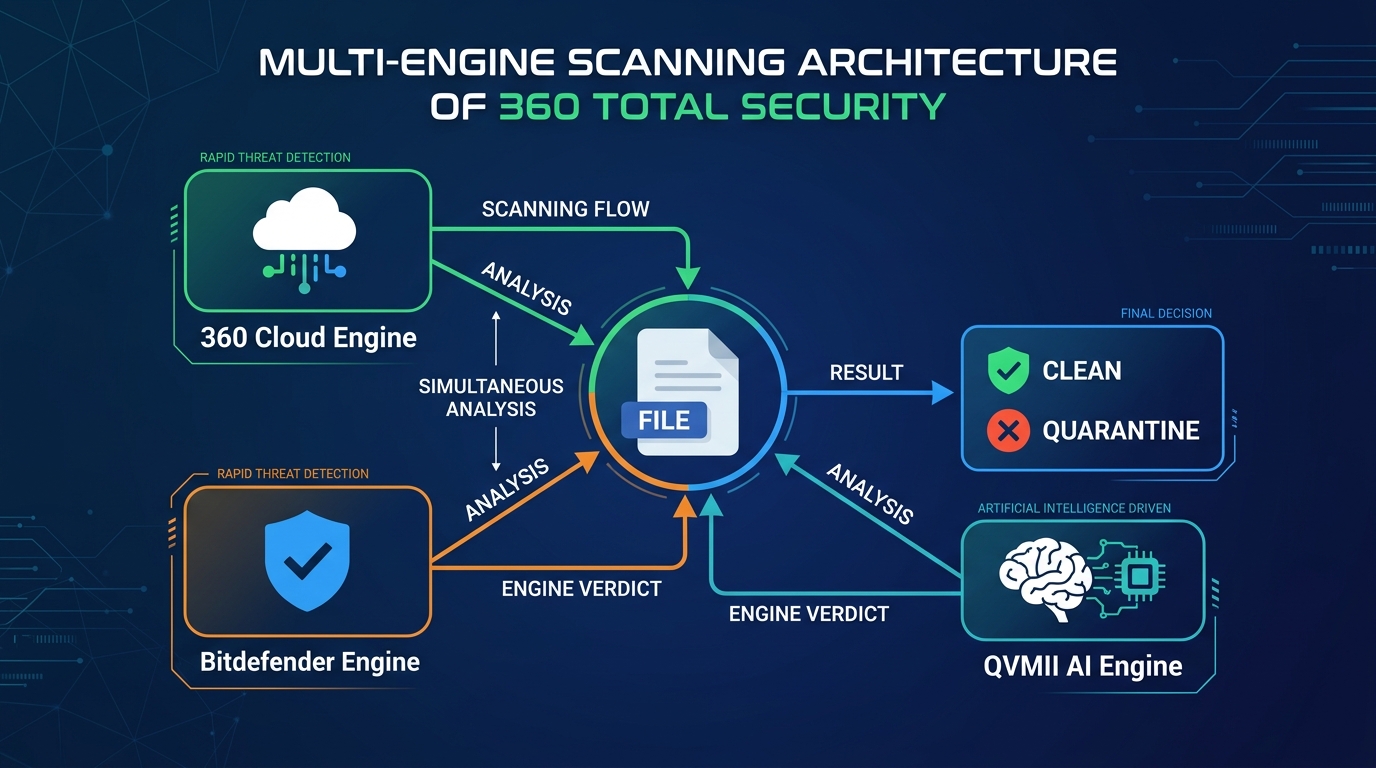
The most technically distinctive aspect of 360 Total Security is its multi-engine architecture. Rather than relying on a single detection engine, the software simultaneously leverages multiple scanning technologies:
- 360 Cloud Engine: A proprietary cloud-based detection system that taps into 360’s global threat intelligence network, enabling near-instantaneous identification of newly emerging threats based on collective data from hundreds of millions of endpoints worldwide.
- Bitdefender Engine: The integration of the Bitdefender scanning engine — one of the most consistently high-scoring engines in independent lab tests — provides a second, independent layer of detection that catches threats the primary engine might miss.
- QVMII AI Engine: 360’s proprietary machine learning engine analyzes file behavior and characteristics to identify unknown threats through heuristic analysis, providing protection against zero-day exploits that have no existing signature.
- Avira Engine: An additional third-party engine option that can be enabled for even broader detection coverage.
This multi-engine strategy delivers two concrete benefits: higher overall detection rates through redundancy (a threat missed by one engine is caught by another) and reduced false positives (a file flagged by one engine but cleared by others is less likely to be incorrectly quarantined). According to 2025 independent security evaluations, the combined engine approach in 360 Total Security consistently achieves detection rates above 99% in real-world malware protection tests, placing it among the top performers in the free antivirus category.
Beyond Antivirus: Integrated System Optimization Tools
Where 360 Total Security most clearly differentiates itself from minimalist free antivirus tools is in its comprehensive suite of system optimization features, all included at no charge:
- System Cleanup: Scans for and removes junk files, temporary internet files, system cache, and other digital debris that accumulates over time and consumes valuable disk space. Regular use can recover multiple gigabytes of storage on older systems.
- Startup Manager: Identifies and allows the user to disable unnecessary programs that launch automatically at system startup, directly reducing boot times and improving system responsiveness.
- Disk Analyzer: Provides a visual breakdown of disk space usage, helping users identify large files and folders that may be candidates for deletion or archiving.
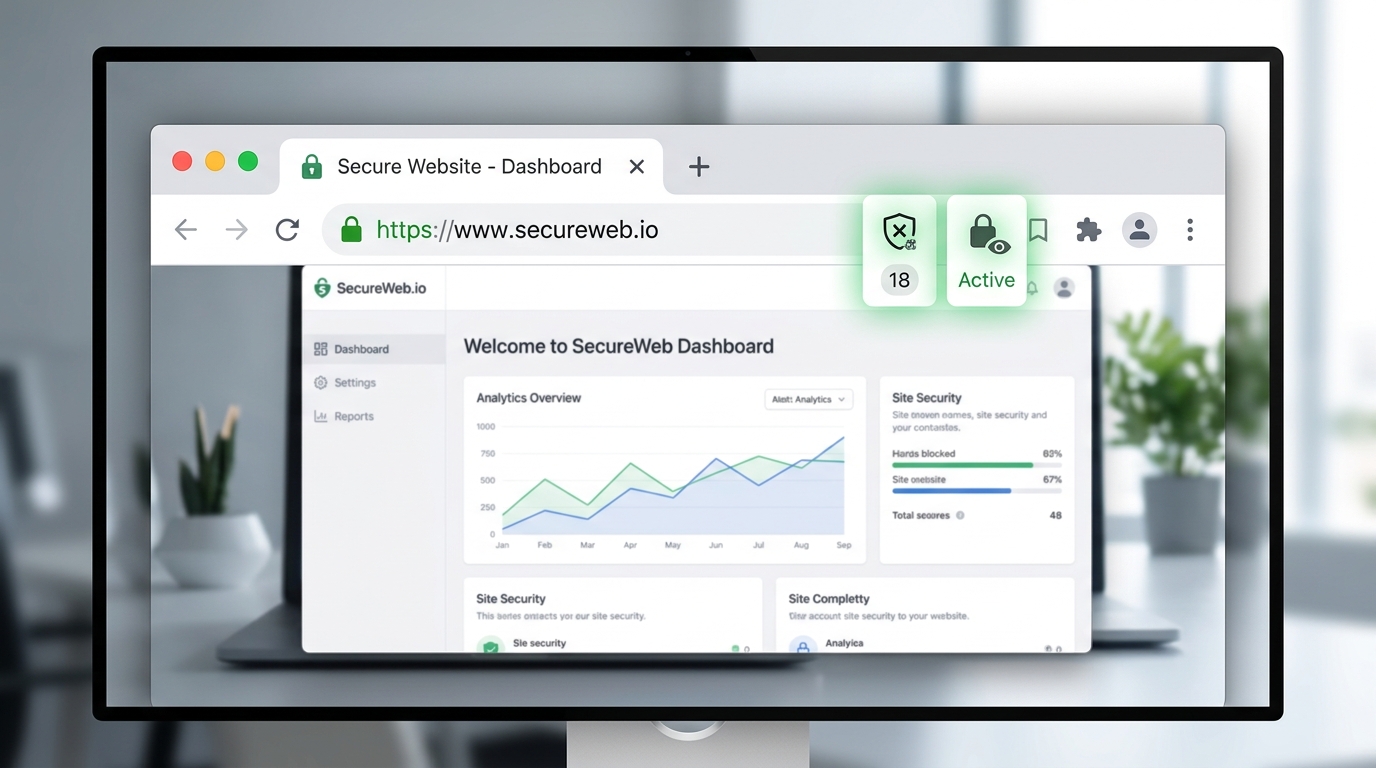
- Network Protection: Monitors network connections for suspicious activity, flags potentially dangerous websites, and provides an additional layer of defense against network-based attacks and phishing attempts.
- Vulnerability Scan: Checks the operating system and installed applications for known security vulnerabilities and missing patches, prompting users to apply critical updates that close attack vectors.
These features directly address the frustrations that drive many users to seek third-party tools in the first place: a slow-booting PC, a cluttered hard drive, and uncertainty about whether their software is up to date. By bundling these capabilities with core antivirus protection, 360 Total Security functions as a comprehensive PC health platform rather than a single-purpose security tool.
User Experience and Accessibility
Technical capability means little if the software is too complex or intrusive for average users to engage with effectively. 360 Total Security addresses this with a design philosophy centered on clarity and accessibility:
- Clean, Intuitive Interface: The main dashboard presents the most important information — protection status, last scan time, and quick-access buttons for key functions — in a clear, uncluttered layout that is immediately comprehensible to first-time users while still providing depth for experienced users who want granular control.
- Lightweight Background Operation: Despite its feature richness, 360 Total Security is engineered for minimal system impact during background operation, ensuring that real-time protection does not degrade the performance of the PC it is protecting.
- No Time Limits or Mandatory Subscriptions: The full feature set is available indefinitely without requiring a credit card, subscription sign-up, or periodic license renewal. There is no premium tier that gates essential security features, and the software does not generate aggressive upsell notifications that interrupt the user experience.
For users ready to experience this combination of protection and performance, downloading 360 Total Security from the official website takes only a few minutes and immediately establishes a comprehensive security baseline for your Windows PC.
Implementing a Robust Free Security Strategy on Your PC
Selecting and installing free malware protection is the beginning of a security strategy, not the end of one. Effective defense requires proper configuration, the cultivation of safe digital habits, and a commitment to ongoing maintenance. A powerful antivirus tool operating on a neglected, unpatched system with reckless browsing habits provides far less protection than a moderately capable tool used thoughtfully within a disciplined security routine.
Step-by-Step Installation and Initial Configuration
The installation process itself is a security event that deserves careful attention:
- Download from the Official Source: Always download antivirus software directly from the vendor’s official website. Searching for “free antivirus download” and clicking the first result is a common vector for installing malicious fake antivirus programs. For 360 Total Security, the only trusted source is www.360totalsecurity.com.
- Verify the Installer: Before running the downloaded installer, confirm that the file size matches what is advertised on the official site and that your browser did not flag any warnings during the download.
- Configure First-Run Settings: During initial setup, enable real-time protection immediately, configure a weekly full system scan scheduled for a convenient off-peak time (e.g., Sunday night), and opt into the cloud security network to benefit from collective threat intelligence.
- Perform an Immediate Full System Scan: After installation, run a complete full system scan before doing anything else. This establishes a baseline clean state and identifies any pre-existing infections that may have been present before the software was installed.
The following example shows a basic command-line invocation pattern for initiating a scan in security tools that support CLI interfaces (syntax varies by product):
# Example: Initiating a full scan via command line (illustrative syntax)
# Always refer to your specific software's documentation for accurate commands

360ts_scan.exe --mode=full --path=C:\ --action=quarantine --log=C:\ScanLogs\full_scan_report.txt
Cultivating Safe Digital Habits to Reduce Risk
No antivirus solution, free or paid, can fully compensate for consistently risky behavior. The following habits dramatically reduce the attack surface that malware has to exploit:
- Keep Everything Updated: The majority of successful malware infections exploit known vulnerabilities in outdated software. Enable automatic updates for your operating system, web browsers, PDF readers, and any other frequently used applications. A vulnerability scan tool (included in 360 Total Security) can help identify outdated software you may have overlooked.
- Practice Safe Downloading: Download software only from official vendor websites or reputable app stores. Avoid torrent sites, file-sharing platforms, and unofficial “mirror” download sites, which are primary distribution vectors for trojanized software. Always scan downloaded files before executing them.
- Handle Email Attachments with Skepticism: Email remains one of the most effective malware delivery mechanisms. Never open attachments from unknown senders, and be cautious even with attachments from known contacts if the message is unexpected or the attachment type is unusual (e.g., an executable file from a friend who usually sends documents).
- Use Browser Security Extensions: Ad-blockers (such as uBlock Origin) and script blockers (such as NoScript) provide meaningful protection against malvertising and drive-by download attacks by preventing malicious code from executing in your browser.
Maintaining Your Defense: Routine Checks and Updates
Security is not a one-time configuration task but an ongoing process. Establishing a simple, consistent maintenance routine ensures your defenses remain effective over time:
- Weekly Quick Scans: A 5-10 minute quick scan of memory, startup items, and common infection vectors should be a weekly habit. Most security tools allow this to be fully automated via the scheduler.
- Monthly Full System Scans: A comprehensive full scan of all drives and directories, ideally scheduled for a time when the computer is on but not in active use.
- Software Update Verification: Monthly check to confirm that your antivirus software itself is on the latest version, not just the latest definitions.
- Threat Response Protocol: If a scan detects a threat, follow the software’s recommended action (typically quarantine, then delete after confirming it is genuinely malicious). Review the detection report to understand what was found, where it originated, and whether any data may have been compromised.
- Knowing When to Escalate: Persistent infections that return after removal, unusual system behavior that continues after a clean scan, or symptoms suggesting a rootkit infection (such as the antivirus software itself being disabled) may indicate a complex infection requiring professional assistance or a clean operating system reinstallation.
Navigating the Ecosystem: Other Notable Free Options and Final Recommendations
The free antivirus landscape is genuinely competitive, and the best choice for any individual user depends on their specific priorities, technical comfort level, and what they most need from a security tool. While 360 Total Security offers a uniquely comprehensive value proposition, several other solutions merit consideration, each with a distinct philosophy and feature profile.
Overview of Other Leading Free Antivirus Solutions
Avast Free Antivirus is one of the longest-established and most widely installed free security solutions globally. It offers a broad feature set that extends well beyond core antivirus, including a Wi-Fi scanner, password manager, and browser cleanup tool. Its detection rates are consistently strong in independent lab tests. The primary drawback is its aggressive upsell model: Avast generates frequent notifications promoting its paid products, and its installation process requires careful attention to avoid installing unwanted additional components. Its data collection practices have also attracted scrutiny in the past, making the privacy-conscious user’s due diligence essential.
AVG AntiVirus FREE shares its core scanning technology with Avast (both products are owned by the same parent company, NortonLifeLock’s Gen Digital) and offers comparable detection rates with a slightly different interface aesthetic. AVG tends to present a somewhat cleaner, less cluttered user experience than Avast, though it shares many of the same upsell tendencies. Users who find Avast’s interface overwhelming may prefer AVG’s more streamlined presentation.
Bitdefender Antivirus Free Edition represents the opposite end of the philosophy spectrum from feature-rich suites. It is renowned for its extremely lightweight design — it runs almost entirely in the cloud, consuming minimal local system resources — and its consistently elite detection rates, which regularly place it among the top performers in AV-TEST and AV-Comparatives evaluations. The trade-off is a deliberately minimal feature set: Bitdefender Free offers core antivirus protection and very little else. There are no optimization tools, no network scanner, and limited configuration options. For users who want maximum protection with zero complexity and zero system impact, it is an outstanding choice.
Side-by-Side Feature and Philosophy Comparison
The following comparison matrix provides a structured overview of how the leading free options compare across the dimensions that matter most to users:
| Criteria | 360 Total Security | Avast Free | AVG Free | Bitdefender Free |
|---|---|---|---|---|
| Core Protection Engine | Multi-engine (360 Cloud + Bitdefender + QVMII AI) | Single engine (Avast) | Single engine (AVG/Avast) | Single engine (Bitdefender Cloud) |
| Detection Rate (Illustrative) | ~99.5% | ~98.8% | ~98.5% | ~99.2% |
| System Optimization Tools | Comprehensive (Cleanup, Startup Mgr, Disk Analyzer) | Limited (Browser Cleanup, basic tools) | Limited (Tuneup as paid add-on) | None |
| Interface & Usability | Clean, intuitive, beginner-friendly | Feature-rich but can feel cluttered | Streamlined, moderate complexity | Minimal, extremely simple |
| Upsell / Promotion Intensity | Low — no aggressive pop-ups | High — frequent upgrade prompts | Medium-High — regular upgrade prompts | Low — minimal promotion |
| System Resource Impact | Low-Medium | Medium | Medium | Very Low (cloud-based) |
| Ideal User Type | Users wanting security + PC optimization in one tool | Users wanting a broad feature set with familiarity | Users preferring a cleaner Avast alternative | Power users wanting silent, lightweight core protection |
The philosophical divide in the free antivirus market is essentially between minimalist core protection (exemplified by Bitdefender Free) and feature-rich security suites (exemplified by 360 Total Security and Avast). Neither philosophy is inherently superior; the right choice depends entirely on what the individual user values most.
Tailored Recommendations Based on User Profile
Based on the analysis above, the following recommendations provide clear guidance for different user profiles:
- For Users Seeking “Security + PC Cleanup” in a Single, Free Package: 360 Total Security is the top recommendation. Its multi-engine antivirus core, comprehensive optimization toolkit, clean interface, and genuinely free, no-upsell model make it the most complete value proposition in the free security market. It is particularly well-suited for users who want a single application that addresses both security threats and everyday performance frustrations.
- For Users Prioritizing Absolute Minimal System Impact: Bitdefender Antivirus Free Edition is the ideal choice. Its cloud-centric architecture delivers elite detection rates with an almost imperceptible system footprint, making it perfect for older hardware or users who simply want invisible, set-and-forget protection.
- For Users Familiar with Traditional Security Suites: Avast Free Antivirus or AVG AntiVirus FREE may feel familiar and comfortable, particularly for users migrating from older versions of these products. However, users should enter with realistic expectations about the frequency of upgrade prompts and should carefully review privacy settings during installation.
Regardless of which solution you choose, the single most important principle is this: install it, keep it updated, and use it consistently in conjunction with safe browsing habits. The best antivirus software in the world provides zero protection if its definitions are months out of date or if it has been disabled. A modest, well-maintained free tool used diligently will always outperform a premium solution that has been neglected.
Take the first step toward comprehensive, cost-free PC protection today by visiting the 360 Total Security official website and downloading the free suite that protects millions of Windows users worldwide.
Frequently Asked Questions
Is free malware protection genuinely effective, or do I need to pay for real security?
Free malware protection from reputable vendors is genuinely effective against the vast majority of threats that average users encounter. Independent testing organizations like AV-TEST and AV-Comparatives consistently award high scores to leading free solutions, with many achieving detection rates above 99%. While paid solutions may offer additional features such as VPN access, identity theft monitoring, or priority customer support, the core antivirus protection in top-tier free tools is not meaningfully inferior to their paid counterparts for typical home users.
Can I run two free antivirus programs simultaneously for better protection?
Running two full antivirus solutions simultaneously is strongly discouraged. When two real-time protection engines operate at the same time, they frequently conflict with each other — each may flag the other’s processes as suspicious, leading to system instability, dramatically degraded performance, and false positives. The correct approach is to choose one primary antivirus solution (such as 360 Total Security with its built-in multi-engine architecture) and rely on it as your sole real-time protection layer.
How often should I run a full system scan with my free antivirus?
A monthly full system scan is the standard recommendation for most users, supplemented by weekly quick scans of memory and startup items. If you regularly download files from the internet, frequently connect to public Wi-Fi networks, or share USB drives with others, increasing the frequency of full scans to bi-weekly is advisable. Always run an immediate full scan after installing new software, connecting an unknown USB device, or recovering from a suspected infection.
What should I do if my free antivirus detects a threat?
Follow the software’s recommended action, which is typically to quarantine the detected file rather than immediately deleting it. Quarantine isolates the file so it cannot cause harm while preserving it for review. After quarantine, review the detection report to understand what was found and where it originated. If you are confident the detection is legitimate (not a false positive), proceed with deletion. If the same threat reappears after removal, or if you notice ongoing suspicious system behavior, the infection may be more complex and require additional specialized removal tools or professional assistance.
Does 360 Total Security work on macOS as well as Windows?
360 Total Security provides desktop security solutions for both Windows and macOS platforms, making it a versatile choice for users across both major desktop operating systems. The core antivirus protection, real-time scanning, and system optimization features are available for PC users on both platforms. For the most current information on platform-specific features and compatibility, visit the 360 Total Security official website.
About the Author: This article was researched and written by a senior technical content specialist with over a decade of experience covering cybersecurity, endpoint protection, and PC performance optimization. The author has evaluated dozens of consumer and enterprise security solutions, contributed to multiple industry publications, and holds certifications in information security management. All product assessments are based on publicly available independent test data, hands-on evaluation, and established security research principles.
Learn more about 360 Total Security