Executive Summary: Finding truly affordable antivirus protection means far more than hunting for the lowest price tag. This comprehensive guide dissects the real total cost of ownership across free and paid solutions, evaluates top contenders for home users, small businesses, and power users, and reveals the smart behavioral and technical strategies that multiply the effectiveness of any security investment. Whether you are deciding between Microsoft Defender and a premium suite, or scaling endpoint protection across a growing team, this guide delivers the data-driven, expert-backed framework you need to make the right decision without overspending.
What Makes an Antivirus Truly Affordable?
The word “affordable” is one of the most misused terms in the cybersecurity software market. Vendors routinely advertise introductory prices that balloon upon renewal, bundle features most users will never touch, and obscure the real cost of inadequate protection through data breaches or system slowdowns. True affordability is a holistic calculation — one that weighs initial price, renewal rates, feature relevance, system performance impact, and the financial exposure created by any gaps in protection.
Beyond the Price Tag: Calculating Total Cost of Ownership
When evaluating antivirus software, the sticker price is only the beginning of the financial story. According to a 2026 Cybersecurity Consumer Report, major antivirus brands increase their annual renewal rates by an average of 40–60% after the first promotional year, meaning a product advertised at $19.99 can quietly become a $49.99 annual commitment. This renewal trap is one of the most common sources of unexpected IT expenditure for home users and small businesses alike.
Multi-device coverage adds another dimension to the calculation. A single-device license at $30 per year sounds economical until you factor in a household with two laptops, a desktop, and a shared family PC. Vendors offering five-device plans at $50 per year frequently deliver dramatically better value, even if the headline price appears higher.
The “freemium” model introduces its own category of hidden costs. Free tiers from major vendors are often engineered as conversion funnels: persistent upsell notifications, feature paywalls triggered at critical moments, and — most controversially — the monetization of anonymized user data. A 2025 privacy audit of leading free antivirus platforms found that several collected browsing history, installed application lists, and hardware identifiers for sale to third-party data brokers. The product is free; you are the product.
Finally, consider the value of integrated optimization tools. Antivirus software that actively manages startup programs, cleans junk files, and monitors system health extends hardware longevity and prevents the gradual performance degradation that forces premature hardware upgrades — a cost that rarely appears in any security budget but is very real.
| Feature Category | Typical Free Tier | Typical Paid Tier |
|---|---|---|
| Real-Time Malware Scanning | ✅ Basic | ✅ Advanced (AI/Cloud) |
| Ransomware Protection | ⚠️ Limited or absent | ✅ Full (Folder Shield) |
| Firewall | ❌ Usually absent | ✅ Included |
| Phishing / Web Protection | ⚠️ Basic browser extension | ✅ Deep URL scanning |
| PC Optimization Tools | ⚠️ Teaser / upsell bait | ✅ Full suite |
| Technical Support | ❌ Community forums only | ✅ Priority email/chat |
| Ad-Free Experience | ❌ Persistent upsell ads | ✅ Clean interface |
| Data Collection / Monetization | ⚠️ Often present | ✅ Typically opt-out or absent |
The Core Protection Features You Can’t Compromise On
Regardless of budget, certain protection layers are non-negotiable. Real-time malware scanning backed by a frequently updated virus definition database forms the absolute foundation. Independent testing organizations AV-Test and AV-Comparatives consistently demonstrate that products updating definitions multiple times per day detect significantly higher percentages of zero-day threats than those relying on weekly or on-demand updates. In 2025 evaluations, top-performing products achieved protection rates above 99.8% against widespread malware, while budget products with stale databases fell as low as 94% — a gap that represents millions of undetected threats at scale.
Beyond the definition database, three additional layers constitute the minimum viable security stack: a software firewall to monitor inbound and outbound network traffic, phishing protection to intercept fraudulent URLs before credentials are entered, and ransomware defense — typically implemented as controlled folder access that prevents unauthorized processes from encrypting personal files. Any solution that omits one of these three elements should be considered incomplete, regardless of its price.
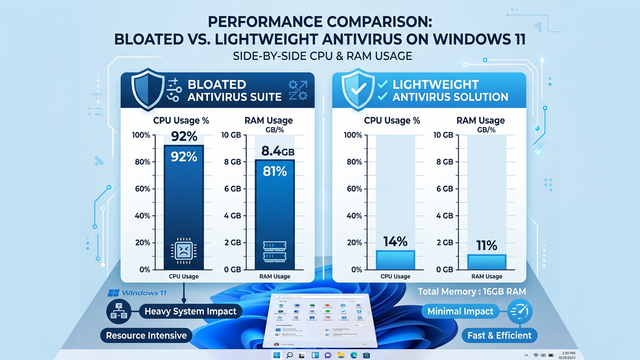
System performance impact is the silent dealbreaker that marketing materials rarely address honestly. A security suite that consumes 15–20% of CPU during background scans does not just feel slow — it actively reduces productivity, shortens battery life on laptops, and creates user frustration that leads to the worst outcome of all: the antivirus being disabled. Lightweight architecture is therefore not a luxury feature; it is a core security requirement.
Identifying Your Actual Needs vs. Marketing Hype
The antivirus industry has mastered the art of feature inflation. “Ultimate” and “Premium” suites routinely bundle password managers, VPN services, parental controls, identity theft monitoring, and cloud storage — features that sound impressive in a feature matrix but that most home users either already have through other services or will never use. Paying a 60% price premium for a bundled VPN that offers only 500MB of daily data, or a password manager that is inferior to free alternatives like Bitwarden, is a poor allocation of security budget.
The practical framework is simple: separate “must-have” core security (real-time scanning, firewall, phishing protection, ransomware defense) from “nice-to-have” extras. System tune-up and cleanup tools occupy an interesting middle ground — they are not strictly security features, but they directly support security by ensuring the operating system and security software itself run efficiently. Features like VPN, parental controls, and identity monitoring should only be factored into the purchase decision if you do not already have dedicated, superior solutions for those needs.
Conducting a brief audit of your currently installed software before purchasing any security suite will almost always reveal redundant tools. Many users discover they are paying for a bundled password manager while already using a superior standalone product, or for a VPN they have never activated. Stripping away this redundancy is the fastest path to genuine affordability.
Top Free Antivirus Solutions: Are They Safe and Effective?
The free antivirus landscape has matured considerably. What was once a category defined by stripped-down, barely functional scanners has evolved into a genuinely competitive space where several free solutions provide meaningful protection for users with basic security needs. However, “free” is never truly free — understanding the business model behind any no-cost security product is essential to using it safely and making an informed decision about when to upgrade.
The Built-in Champion: Evaluating Microsoft Defender
Microsoft Defender Antivirus — formerly Windows Defender — has undergone a remarkable transformation over the past five years. Once dismissed by security professionals as a token gesture, it has evolved into a genuinely competent integrated security solution for Windows 10 and Windows 11. In 2025 AV-Test evaluations, Microsoft Defender consistently achieved perfect or near-perfect scores in the Protection category, detecting 100% of widespread malware samples and 99.6% of zero-day threats in multiple consecutive test cycles — results that rival several paid competitors.
Its strengths are substantial and unique: it costs absolutely nothing, is deeply integrated into the Windows operating system, imposes minimal system overhead, and updates automatically through Windows Update without requiring any user intervention. For users who keep Windows fully updated and practice reasonable browsing hygiene, Defender provides a genuinely solid security baseline.
Its weaknesses are equally real. Advanced users will find it less configurable than third-party alternatives, with limited scheduling options and no granular control over scan behavior. Its protection, while good, can be slightly less aggressive in blocking novel threats compared to vendors whose entire business model depends on detection superiority. It also lacks the supplementary tools — PC optimization, cleanup, and performance monitoring — that add holistic value to a security suite.
Leading Third-Party Free Options: Avast, AVG, and Others
Third-party free antivirus products from companies like Avast and AVG operate on a freemium model that deserves careful scrutiny. These companies provide genuine antivirus protection at no charge, but the business model funding that generosity involves a combination of advertising within the interface, aggressive upselling of paid features, and — most controversially — the collection and monetization of user data. In 2020, Avast faced significant regulatory and reputational consequences after investigations revealed its subsidiary Jumpshot was selling detailed user browsing data to corporate clients. While Avast subsequently shut down Jumpshot and revised its data practices, the episode illustrated the fundamental tension inherent in the free security software model.
As cybersecurity analyst and privacy researcher Dr. Sarah Chen noted in a 2025 industry commentary: “When evaluating free security software, users must ask a fundamental question: if I am not paying for the product, what am I contributing to the vendor’s revenue model? Data is the most common answer, and users deserve full transparency about exactly what is collected, how it is processed, and who ultimately benefits from it.”
360 Total Security stands out meaningfully in the free antivirus category. Rather than relying on aggressive upselling or opaque data monetization, it combines a powerful multi-engine antivirus core — incorporating both the Bitdefender and Avira engines alongside its own 360 Cloud engine — with genuinely useful PC optimization tools including disk cleanup, startup manager, and system speed boost. This holistic approach delivers more tangible daily value than most free competitors, whose optimization features are typically locked behind paywalls. For Windows users seeking a free solution that goes beyond basic scanning without the aggressive commercial pressure common in the category, 360 Total Security represents a compelling and transparent choice.
When a Free Antivirus is NOT Enough
Free antivirus solutions are appropriate for a specific user profile: a single adult with moderate browsing habits, no sensitive financial transactions beyond basic online banking, and no dependents sharing the device. The moment any of these conditions change, the calculus shifts toward a paid solution.
Active online traders, remote workers handling confidential client data, and households with children accessing the internet independently all face threat profiles that exceed what free tiers are designed to address. Online financial activity attracts sophisticated phishing campaigns and banking trojans that require advanced URL scanning and transaction monitoring. Sensitive work data demands ransomware protection with folder-level access controls. Children online require content filtering and screen time management that no free suite provides adequately.
Perhaps the most dangerous risk associated with free antivirus is security complacency — the assumption that because protection software is installed and running, the device is comprehensively secured. Free solutions are designed to handle the most common, widespread threats. They are not designed to provide the layered, proactive defense that sophisticated or targeted attacks require.
| Usage Scenario | Free Antivirus Sufficient? | Recommended Action |
|---|---|---|
| Casual browsing, streaming, social media | ✅ Yes | Microsoft Defender or 360 Total Security Free |
| Online banking (basic) | ⚠️ Marginal | Consider Internet Security tier |
| Active stock/crypto trading | ❌ No | Paid suite with banking protection |
| Remote work with sensitive client data | ❌ No | Paid suite with ransomware + VPN |
| Family PC with children | ❌ No | Paid suite with parental controls |
| Small business endpoint | ❌ No | Business endpoint protection platform |
Best Value Paid Antivirus for Home Users
For users whose needs exceed what free solutions can reliably deliver, the paid antivirus market offers a wide spectrum of options — from overpriced “Ultimate” suites laden with redundant features to lean, high-performance “Internet Security” packages that represent genuine value. Navigating this spectrum intelligently requires understanding what the mid-tier packages actually deliver, how multi-device licensing changes the value equation, and how to use independent lab test data to cut through marketing claims.
Evaluating the Mid-Tier ‘Internet Security’ Packages
The “Internet Security” tier — positioned above basic antivirus but below premium “Total Security” or “Ultimate” suites — consistently represents the best value for the majority of home users. These packages typically add a robust two-way software firewall, advanced phishing and malicious URL blocking, secure browser modes for financial transactions, and enhanced ransomware protection over their entry-level counterparts. What they generally omit — VPN, password manager, identity monitoring — are precisely the features most users either already have or do not need.
Price-to-performance analysis consistently validates this tier. According to 2026 consumer security market data, Internet Security packages from leading vendors average $35–$55 per year for a single device, compared to $70–$100 for premium suites. The incremental security benefit of the premium tier rarely justifies the price difference for a typical household without specific advanced needs.
| Product | Price (1 Device/Year) | Key Added Features vs. Basic AV | AV-Test Protection Score (2025) |
|---|---|---|---|
| Bitdefender Internet Security | ~$42/yr | Firewall, Anti-Phishing, Ransomware Remediation, Webcam Protection | 6.0 / 6.0 |
| Kaspersky Standard | ~$38/yr | Firewall, Safe Money Browser, Anti-Phishing, Network Monitor | 6.0 / 6.0 |
| Norton 360 Standard | ~$50/yr | Smart Firewall, SafeCam, Dark Web Monitoring, 10GB Cloud Backup | 6.0 / 6.0 |
| 360 Total Security Pro | Competitive / Affordable | Enhanced Cloud Engine, Ad-Free, Priority Support, Full Optimization Suite | Consistently High |
The Importance of Multi-Device Licensing and Family Plans
The single most impactful factor in antivirus value for households is multi-device licensing. The average home in 2025 contains 3.8 internet-connected personal computing devices — desktops, laptops, and Macs — each representing a potential entry point for malware. Purchasing individual single-device licenses for each is both administratively burdensome and financially inefficient.
A five-device family plan at $50 per year delivers protection at $10 per device annually — a fraction of the $30–$50 per device cost of individual licenses. Beyond the arithmetic, centralized management of a family plan allows a technically proficient household member to monitor protection status across all devices, ensuring that a less tech-savvy family member’s laptop does not become the weakest link in the household’s security posture.
When comparing multi-device plans, prioritize vendors that allow you to freely mix device types — Windows PCs and Macs — under a single subscription without requiring separate platform-specific licenses. This flexibility is increasingly standard among top-tier vendors and should be treated as a baseline expectation rather than a premium feature.
Spotlight on Independent Lab Test Performance
Independent testing laboratories AV-Test and AV-Comparatives provide the most reliable, vendor-neutral data available for evaluating antivirus effectiveness. Both organizations evaluate products across three dimensions: Protection (detection rates against real-world and zero-day threats), Performance (system impact during scanning and idle operation), and Usability (false positive rates — how often legitimate software is incorrectly flagged). A product that scores highly across all three dimensions is genuinely delivering value; a product that achieves high protection scores at the cost of severe system slowdowns is trading one problem for another.
When using lab results to guide purchasing decisions, prioritize products that have maintained consistently high scores across multiple consecutive test cycles rather than those that peaked in a single evaluation. Consistency indicates a mature, well-maintained detection engine rather than a product that was temporarily optimized for testing periods.
360 Total Security’s paid Pro version exemplifies the value proposition of the mid-tier category. Building on its already strong free foundation — which incorporates multiple detection engines including Bitdefender and Avira — the Pro upgrade delivers an enhanced cloud protection engine for faster zero-day response, a completely ad-free interface that eliminates the commercial friction of the free tier, and priority technical support. For users who have already validated the platform through the free version and want to remove its limitations without paying for features they will never use, the Pro upgrade represents a transparent and cost-effective path. Visit the 360 Total Security official website to explore current pricing and feature details.
Antivirus for Businesses and Power Users: Affordable Enterprise-Grade Tools
Small businesses and power users managing multiple machines face a fundamentally different security challenge than individual home users. The need for centralized visibility, consistent policy enforcement across endpoints, advanced threat controls, and compliance reporting transforms antivirus from a personal tool into an IT management discipline. Historically, enterprise-grade capabilities came with enterprise-grade price tags that excluded small and medium-sized businesses. That barrier has largely dissolved with the rise of cloud-managed endpoint protection platforms.
Key Features Needed Beyond Home User Protection
The defining capability that separates business endpoint protection from home antivirus is the centralized management console. The ability to deploy protection to new endpoints remotely, monitor real-time threat status across the entire fleet, push definition updates simultaneously, and generate consolidated security reports from a single web-based dashboard is not a luxury for businesses — it is a fundamental operational requirement. Without it, maintaining consistent protection across even ten devices becomes an unmanageable manual burden.
Beyond centralized management, business environments require advanced threat controls that home solutions typically omit. Sandboxing — the ability to execute suspicious files in an isolated virtual environment before allowing them to run on production systems — provides a critical defense against novel malware that evades signature-based detection. Exploit prevention technology specifically targets the memory-based attack techniques used by sophisticated threat actors to compromise systems through vulnerabilities in legitimate software. Device control, particularly USB port management, prevents the introduction of malware through removable media — a threat vector that remains surprisingly prevalent in business environments.
Reporting and compliance capabilities round out the business security requirement. The ability to generate audit-ready security reports demonstrating protection status, threat history, and policy compliance is increasingly required by cyber insurance underwriters and industry compliance frameworks. Vendors that provide automated, exportable reports in standard formats deliver tangible administrative value beyond pure threat detection.
Scalable Cloud-Based Solutions for Growing Teams
The shift from perpetual software licenses to subscription-based cloud management has been transformative for small business security economics. Under the legacy model, businesses paid large upfront license fees, maintained on-premise management servers, and faced significant upgrade costs with each major version release. The subscription model converts these irregular capital expenditures into predictable operational costs, improves cash flow planning, and eliminates the infrastructure overhead of on-premise management servers entirely.
Cloud-managed endpoint protection platforms enable remote installation of agents on new endpoints without physical access, automatic propagation of policy updates and definition files across the entire fleet, and real-time threat visibility from any internet-connected device. For businesses with remote or distributed workforces — a reality that has become standard rather than exceptional — cloud management is not merely convenient; it is the only operationally viable approach.
Scalability is the final critical advantage. Cloud platforms allow businesses to add or remove endpoint licenses on demand, paying only for active devices. This elasticity is particularly valuable for businesses with seasonal staffing fluctuations or rapid growth phases, where the ability to scale protection in lockstep with headcount changes without procurement delays or contract renegotiations provides meaningful operational agility.
Top Affordable Contenders for SMBs
The small and medium business endpoint protection market is anchored by several established players with strong track records. ESET PROTECT Entry provides a clean cloud console, low system impact, and strong detection performance at competitive per-endpoint pricing, making it a reliable choice for technically proficient IT administrators. Sophos Central offers an exceptionally intuitive management interface with strong synchronized security features that allow endpoint and network protection to communicate and respond to threats collaboratively. Bitdefender GravityZone Business Security delivers industry-leading detection performance in a scalable cloud platform with flexible licensing tiers that accommodate businesses from five to thousands of endpoints.
360 Total Security Enterprise presents a compelling alternative, particularly for businesses that view endpoint security and IT operations management as inseparable disciplines. Its unified platform addresses not only malware defense but also system health monitoring, software patch management, and hardware performance optimization across the entire endpoint fleet. This holistic approach reduces the number of separate management tools required, simplifies the IT management stack, and delivers operational efficiency gains that translate directly into cost savings. For SMBs seeking to maximize the value of their security investment by consolidating multiple IT management functions into a single affordable platform, 360 Total Security Enterprise merits serious evaluation.
| Platform | Approx. Cost Per Endpoint/Year | Management Console | Key Advanced Features | Support Level |
|---|---|---|---|---|
| ESET PROTECT Entry | ~$30–$40 | Cloud-based, clean UI | HIPS, Device Control, Remote Management | Email + Phone |
| Sophos Central Endpoint | ~$35–$50 | Excellent cloud console | Synchronized Security, Exploit Prevention, EDR Add-on | Email + Chat |
| 360 Total Security Enterprise | Competitive | Unified cloud platform | Patch Management, System Health, USB Control, Threat Defense | Priority + Dedicated |
Maximizing Your Protection: Tips to Pair with Any Antivirus
Even the highest-rated antivirus software is not an impenetrable shield. Sophisticated social engineering attacks, zero-day exploits, and user error can compromise systems regardless of the protection software installed. The most resilient security posture is built on a defense-in-depth philosophy: layering antivirus protection with smart behavioral habits, system hardening measures, complementary free tools, and a robust backup strategy. Most of these layers cost nothing beyond time and attention, yet they dramatically amplify the effectiveness of whatever antivirus solution you have chosen.
Essential Behavioral Hygiene for Ultimate Safety
Software vulnerabilities are the primary attack surface exploited by malware, ransomware, and remote access tools. The single most impactful security action available to any user is maintaining a rigorous, automated software update regimen. Operating system patches, browser updates, and plugin updates (particularly Java, Adobe Reader, and media players) close the known vulnerabilities that attackers actively scan for and exploit. According to a 2025 threat intelligence report, over 60% of successful malware infections exploited vulnerabilities for which patches had been available for more than 30 days — meaning the majority of successful attacks are preventable through timely updates alone.
Phishing remains the dominant initial access vector for both consumer and enterprise attacks. Developing a disciplined skepticism toward unsolicited emails, unexpected attachments, and urgent requests for credential entry is a skill that no software can fully replicate. Practical habits include hovering over links before clicking to verify the actual destination URL, treating any email that creates urgency around account access or financial action as suspicious by default, and verifying unexpected requests from known contacts through a separate communication channel before acting.
Strong, unique passwords and two-factor authentication (2FA) constitute the final behavioral pillar. Password reuse across multiple accounts transforms a single data breach into a cascading compromise across every service sharing that credential. A reputable password manager — Bitwarden is free and open-source; 1Password and Dashlane offer polished paid alternatives — eliminates the cognitive burden of maintaining unique passwords while dramatically reducing credential-based attack exposure. Enabling 2FA on email, banking, and any account containing sensitive data adds an authentication layer that defeats credential theft even when passwords are compromised.
Leveraging Built-in and Free System Security Tools
Windows 10 and 11 include several underutilized security features that provide meaningful protection at zero additional cost. Controlled Folder Access, accessible through Windows Security under Ransomware Protection, prevents unauthorized applications from modifying files in designated protected folders — effectively blocking the file encryption behavior that defines ransomware attacks. Enabling this feature and adding your Documents, Pictures, and Desktop folders to the protected list takes under five minutes and provides a significant ransomware mitigation layer.
SmartScreen — integrated into both Windows and Microsoft Edge — evaluates downloaded files and visited URLs against Microsoft’s reputation database, blocking known malicious content before it executes. Ensuring SmartScreen is enabled at both the Windows and browser level costs nothing and adds a meaningful pre-execution filter that complements your antivirus’s real-time scanning.
Operating under a standard user account rather than an administrator account for daily computing tasks is one of the most effective and least practiced security measures available. Malware executing under a standard user context has dramatically limited ability to modify system files, install persistent services, or disable security software compared to malware running with administrator privileges. Reserving the administrator account for explicit software installation and system configuration tasks significantly constrains the blast radius of any successful infection.
A reputable browser extension ad-blocker — uBlock Origin is the gold standard, being open-source, highly effective, and extremely lightweight — prevents malvertising (malicious advertisements that deliver malware through legitimate websites) and drive-by download attacks. In an era where even major news websites have served malicious advertisements to millions of users, an ad-blocker functions as a meaningful security tool rather than merely a convenience.
Creating a Robust Backup and Recovery Plan
The 3-2-1 Backup Rule is the most important data protection principle that most users have heard of and fewer actually implement. The rule is simple: maintain 3 copies of your data, on 2 different storage media types, with 1 copy stored off-site (or in cloud storage). This architecture ensures that no single failure — ransomware encryption, hard drive failure, fire, or theft — can result in permanent data loss. Against ransomware specifically, an offline or air-gapped backup that the ransomware cannot reach and encrypt is the definitive recovery mechanism, rendering the attacker’s leverage completely ineffective.
Windows File History provides a built-in, automated backup solution that continuously saves versions of files in your Libraries, Desktop, Contacts, and Favorites to an external drive or network location. Mac users have Time Machine, which provides equivalent continuous versioned backup functionality. Both tools are free, reliable, and require only initial configuration to operate automatically. The critical requirement is that the backup destination — particularly for ransomware resilience — should be disconnected from the computer when not actively backing up, or stored in a cloud service that maintains versioned file history (such as OneDrive with Version History enabled).
System optimization software like 360 Total Security supports this backup strategy in a practical and often overlooked way. By regularly cleaning junk files, temporary data, and redundant system files, it frees the disk space that backup processes require to store adequate file history. Its startup manager ensures that backup services — Windows File History, cloud sync clients, and third-party backup agents — are not inadvertently disabled by other software or system changes, guaranteeing that your backup runs reliably on schedule.
For users who want to supplement built-in tools with a simple, scriptable backup solution, the following Windows batch file provides a basic automated document backup to an external drive:
@echo off
REM Simple Document Backup Script - Run via Task Scheduler
REM Replace D:\Backup with your external drive path

SET SOURCE=%USERPROFILE%\Documents
SET DESTINATION=D:\Backup\Documents_%DATE:~-4,4%%DATE:~-7,2%%DATE:~-10,2%

echo Starting backup of Documents folder...
echo Source: %SOURCE%
echo Destination: %DESTINATION%

xcopy "%SOURCE%" "%DESTINATION%" /E /I /H /Y /C

echo.
echo Backup completed: %DATE% %TIME%
echo Backup saved to: %DESTINATION%
pause
Schedule this script through Windows Task Scheduler to run automatically on a daily or weekly basis, ensuring your most critical files are consistently protected without requiring manual intervention. Pair this with 360 Total Security‘s disk cleanup features to maintain adequate free space for backup storage, and you have a comprehensive, low-cost data protection strategy that complements your antivirus at every layer.
Frequently Asked Questions
Is free antivirus software safe enough for everyday use in 2025?
For users with basic computing habits — casual browsing, streaming, social media, and standard email — a well-maintained free antivirus like Microsoft Defender or 360 Total Security Free provides a genuinely adequate security baseline. The critical caveat is that free solutions are designed for common, widespread threats and require users to compensate for their limitations through strong behavioral hygiene. Users who regularly conduct financial transactions, handle sensitive data, or share devices with less tech-savvy family members should seriously evaluate a paid Internet Security tier.
What is the most important feature to look for in an affordable antivirus?
Real-time malware detection backed by frequent definition updates is the non-negotiable foundation. Beyond that, ransomware protection — specifically controlled folder access or equivalent technology — is the single most valuable additional feature for home users given the catastrophic and often irreversible consequences of a ransomware infection. Phishing protection and a software firewall round out the essential feature set. Any solution that delivers these four capabilities reliably and with low system impact represents genuine value regardless of its price.
How much should I realistically expect to pay for good antivirus protection?
For a single PC, a mid-tier Internet Security package from a reputable vendor typically costs $35–$55 per year after the introductory promotional period. For households with multiple devices, a five-device family plan at $50–$70 per year delivers far better per-device value. The key is to look beyond introductory pricing and evaluate the standard renewal rate, which is the price you will actually pay in year two and beyond. Introductory discounts of 50–70% are common marketing tactics; the renewal rate is the true cost of ownership.
Can antivirus software slow down my computer significantly?
Poorly optimized antivirus software absolutely can impose meaningful system performance penalties, particularly during scheduled full-system scans. However, modern lightweight solutions — including 360 Total Security — are specifically engineered to minimize background resource consumption, conducting the majority of analysis in the cloud rather than on the local processor. When evaluating antivirus options, the “Performance” score in AV-Test and AV-Comparatives evaluations provides objective, standardized data on system impact. Prioritizing products that score 5.5 or 6.0 out of 6.0 in the Performance category ensures that your security investment does not come at the cost of your productivity.
Do small businesses really need a dedicated business antivirus, or can they use home versions?
Home antivirus solutions are explicitly not designed or licensed for business use, and the practical limitations quickly become apparent in a business context. The absence of a centralized management console means that maintaining consistent protection across even five devices requires manual intervention on each machine individually. There is no consolidated threat visibility, no policy enforcement capability, and no compliance reporting. Business endpoint protection platforms — many of which are now available at very competitive per-endpoint pricing through cloud subscription models — provide these essential capabilities and are the appropriate solution for any organization managing more than one or two devices.
About the Author: This article was researched and written by a Senior Technical Writer specializing in cybersecurity, software evaluation, and digital privacy. With over a decade of experience analyzing security products for both consumer and enterprise audiences, the author draws on independent lab data, vendor documentation, and real-world deployment experience to provide actionable, vendor-neutral guidance. All product evaluations are based on publicly available independent test results and documented feature sets.
Learn more about 360 Total Security