Executive Summary: In an era where cyber threats are evolving at an unprecedented pace, understanding how to protect your Windows or macOS desktop is no longer optional — it is essential. This comprehensive cybersecurity guide for PC users covers the most critical threat vectors of 2025–2026, practical defense strategies, and how enterprise-grade tools like 360 Total Security can serve as your first and most reliable line of defense against malware, ransomware, phishing, and system vulnerabilities.
Why PC Cybersecurity Has Never Been More Critical
According to a 2026 Global Cybersecurity Threat Report, cybercriminals launched an estimated 2,200 attacks per day targeting desktop and laptop users worldwide — a 38% increase compared to just two years prior. The modern threat landscape is no longer dominated by simple viruses. Today’s attackers deploy sophisticated, multi-layered campaigns that combine social engineering, zero-day exploits, and fileless malware to bypass traditional defenses.
For everyday PC users — whether running Windows 10, Windows 11, or macOS — the risks are real and immediate. From ransomware that encrypts your personal files to spyware silently harvesting your banking credentials, the consequences of a single security lapse can be devastating. Understanding the threat landscape is the foundational step toward building a resilient personal cybersecurity posture.
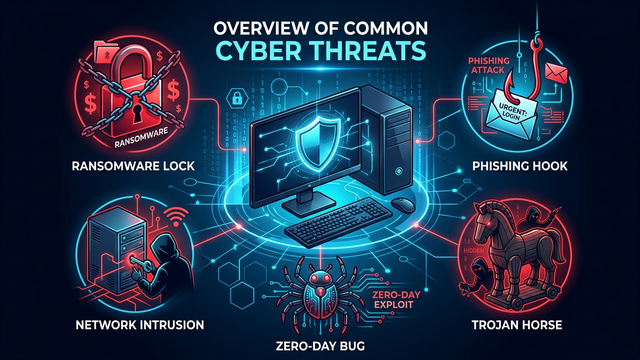
The Most Common Threats Targeting Desktop Users in 2025–2026
- Ransomware: Encrypts user files and demands payment for decryption keys. Variants like LockBit 4.0 and BlackCat have been documented targeting home users and small businesses alike.
- Phishing and Spear-Phishing: Deceptive emails and websites designed to steal login credentials, credit card numbers, and personal data.
- Trojans and Remote Access Tools (RATs): Malicious software disguised as legitimate applications that grant attackers unauthorized remote control of your PC.
- Adware and Potentially Unwanted Programs (PUPs): Software that degrades system performance, hijacks browsers, and exposes users to further malicious content.
- Zero-Day Exploits: Attacks that leverage previously unknown vulnerabilities in operating systems or popular software before patches are available.
- Fileless Malware: Attacks that operate entirely in system memory, leaving no traditional file footprint and evading signature-based detection.
Building Your First Layer of Defense: Antivirus and Real-Time Protection
The cornerstone of any desktop security strategy is a robust, real-time antivirus solution. However, not all antivirus software is created equal. A 2025 independent lab evaluation by AV-Comparatives highlighted that the most effective PC security suites combine signature-based detection, behavioral analysis, heuristic scanning, and cloud-based threat intelligence to achieve detection rates exceeding 99.5% against known and emerging threats.
360 Total Security integrates multiple award-winning antivirus engines — including Bitdefender and Avira engines alongside its proprietary QVM AI engine — to deliver comprehensive, multi-layered protection for Windows and macOS desktops. This multi-engine approach ensures that even the most evasive threats are identified and neutralized before they can cause harm.
Key Features to Look for in a Desktop Antivirus Solution
| Feature | Why It Matters | 360 Total Security Support |
|---|---|---|
| Real-Time Protection | Blocks threats the moment they attempt to execute | ✅ Yes |
| Behavioral Analysis | Detects zero-day and fileless malware by monitoring suspicious behavior | ✅ Yes |
| Ransomware Shield | Prevents unauthorized encryption of personal files | ✅ Yes |
| System Performance Optimization | Ensures security tools do not degrade PC speed | ✅ Yes |
| Vulnerability Scanner | Identifies unpatched software and OS weaknesses | ✅ Yes |
| Sandbox Analysis | Safely executes suspicious files in an isolated environment | ✅ Yes |
| Privacy Cleaner | Removes browsing history, cookies, and sensitive cached data | ✅ Yes |
Practical Steps to Harden Your PC Against Cyber Attacks
Installing antivirus software is a critical first step, but a truly secure PC requires a holistic approach. The following hardening practices are recommended by cybersecurity professionals and align with the NIST Cybersecurity Framework 2.0 guidelines published in 2025.
Step 1: Keep Your Operating System and Software Updated
The majority of successful cyberattacks exploit known vulnerabilities in outdated software. Enabling automatic updates for Windows or macOS, as well as for all installed applications, closes these attack vectors before they can be exploited. Use the following command on Windows to check for pending updates via PowerShell:
# Check for Windows Updates via PowerShell
Get-WindowsUpdate

# Install all available updates
Install-WindowsUpdate -AcceptAll -AutoReboot
Step 2: Enable and Configure Your Firewall
Both Windows Defender Firewall and macOS Application Firewall provide essential network-level protection. Ensure your firewall is active and configured to block unsolicited inbound connections. On Windows, verify firewall status with:
# Check Windows Firewall status via Command Prompt
netsh advfirewall show allprofiles

# Enable Windows Firewall for all profiles
netsh advfirewall set allprofiles state on
Step 3: Use Strong, Unique Passwords and Enable Multi-Factor Authentication (MFA)
Credential theft remains one of the leading causes of account compromise. A 2026 Verizon Data Breach Investigations Report found that over 74% of breaches involved the use of stolen or weak credentials. Use a reputable password manager to generate and store complex, unique passwords for every account, and enable MFA wherever possible to add a critical second layer of verification.
Step 4: Be Vigilant Against Phishing Attempts
Phishing emails are increasingly sophisticated, often mimicking trusted brands with near-perfect visual accuracy. Before clicking any link in an email, verify the sender’s actual email address, hover over links to preview the destination URL, and never download attachments from unknown sources. When in doubt, navigate directly to the official website rather than following email links.
Step 5: Regularly Back Up Your Data
The 3-2-1 backup rule remains the gold standard: maintain 3 copies of your data, on 2 different media types, with 1 copy stored offsite (such as an encrypted cloud backup). This strategy ensures that even in the event of a successful ransomware attack, your data can be fully recovered without paying a ransom.
Understanding System Vulnerabilities and How to Address Them
A vulnerability is any weakness in software, hardware, or configuration that can be exploited by an attacker. According to the 2025 National Vulnerability Database (NVD) Annual Report, over 28,000 new Common Vulnerabilities and Exposures (CVEs) were published in a single year — an average of more than 76 new vulnerabilities discovered every single day.
For desktop users, the most critical vulnerability categories include:
- Unpatched Operating System Components: Particularly in legacy Windows versions still running on millions of machines globally.
- Outdated Browser Plugins and Extensions: Flash, Java, and poorly maintained browser extensions are frequent attack entry points.
- Misconfigured User Account Privileges: Running day-to-day tasks under an administrator account significantly amplifies the damage potential of any malware infection.
- Weak Remote Desktop Protocol (RDP) Configurations: Exposed RDP ports with weak credentials are a primary vector for ransomware deployment.
Using 360 Total Security’s Vulnerability Scanner
360 Total Security includes a built-in Vulnerability Scanner that automatically audits your Windows PC for missing security patches, outdated software, and risky system configurations. The scanner cross-references your installed software versions against a continuously updated threat intelligence database, providing one-click remediation for identified issues. This feature alone can dramatically reduce your attack surface without requiring deep technical knowledge.
Privacy Protection: Safeguarding Your Personal Data on PC
Beyond malware protection, modern cybersecurity must address the growing threat to personal privacy. Advertisers, data brokers, and malicious actors all have strong incentives to collect your personal data. A 2025 Privacy Rights Clearinghouse study found that the average internet user’s personal data is held by over 540 distinct data broker profiles.
Effective privacy protection on your PC involves:
- Regularly clearing browser cookies, cache, and browsing history to limit tracking data accumulation.
- Reviewing and restricting application permissions — particularly for applications requesting access to your camera, microphone, or file system.
- Using encrypted DNS services (such as DNS-over-HTTPS) to prevent ISP-level tracking of your browsing activity.
- Monitoring startup programs and background processes to identify and remove unauthorized software silently running on your system.
360 Total Security’s Privacy Cleaner and System Optimizer tools automate many of these tasks, providing scheduled cleaning routines and real-time alerts when new applications attempt to add themselves to your system startup sequence.
Cybersecurity Best Practices for Remote Workers and Home Office PC Users
The dramatic shift toward remote and hybrid work models has fundamentally changed the desktop threat landscape. According to a 2026 IBM Security Cost of a Data Breach Report, organizations with a majority remote workforce experienced breach costs averaging $1.07 million higher than those with primarily on-site employees — largely due to the security challenges of home network environments.
If you use your PC for remote work, the following additional precautions are strongly recommended:
- Use a corporate-approved VPN for all work-related network traffic to encrypt data in transit and prevent interception on unsecured home or public networks.
- Separate work and personal activities across different user accounts or, ideally, different physical devices to contain the blast radius of any potential compromise.
- Secure your home router by changing default credentials, enabling WPA3 encryption, and keeping router firmware updated.
- Be especially cautious with video conferencing links — meeting invitation phishing (particularly targeting platforms like Zoom and Microsoft Teams) surged by over 200% in 2025 according to Proofpoint threat intelligence data.
Choosing the Right Security Solution: What Makes 360 Total Security Stand Out
With dozens of antivirus products competing for desktop users’ attention, making an informed choice requires looking beyond marketing claims to actual performance data, feature depth, and system impact. 360 Total Security has consistently distinguished itself through several key differentiators:
- Multi-Engine Architecture: Combines five protection engines (360 Cloud Engine, 360 QVMII AI Engine, Avira, Bitdefender, and System Repair) for industry-leading detection coverage.
- Lightweight Performance: Engineered to deliver maximum protection with minimal system resource consumption, ensuring your PC remains fast and responsive.
- Comprehensive System Tools: Goes beyond antivirus to include disk cleanup, startup optimization, patch management, and privacy protection in a single integrated suite.
- Free Core Protection: Offers robust free-tier protection, making enterprise-grade security accessible to all PC users regardless of budget.
- Dedicated Windows and macOS Support: Purpose-built for desktop operating systems, with deep OS-level integration that enables more effective threat detection and remediation.
Ready to elevate your PC’s defenses? Download 360 Total Security for free today and experience comprehensive, multi-layered desktop protection trusted by over 500 million users worldwide.
Frequently Asked Questions (FAQ)
Q1: Is free antivirus software sufficient to protect my PC in 2025–2026?
Free antivirus solutions can provide meaningful baseline protection, particularly those — like 360 Total Security’s free tier — that include real-time scanning, behavioral detection, and vulnerability assessment. However, for users handling sensitive financial data, conducting remote work, or storing irreplaceable personal files, upgrading to a premium suite with ransomware shields, advanced firewall management, and priority threat response is strongly advisable.
Q2: How often should I run a full system scan on my PC?
While real-time protection continuously monitors your system for active threats, scheduling a comprehensive full system scan at least once per week is recommended best practice. Full scans examine every file and process on your system, catching dormant threats that may have evaded real-time detection. Most modern antivirus solutions, including 360 Total Security, allow you to schedule these scans during off-hours to minimize performance impact.
Q3: Can malware infect a macOS computer, or is it only a Windows problem?
This is a dangerous and persistent myth. macOS malware is a very real and growing threat. According to a 2025 Malwarebytes State of Malware Report, detections on macOS increased by over 60% year-over-year, with adware, trojans, and spyware being the most prevalent categories. macOS users should absolutely run dedicated security software. 360 Total Security offers a dedicated macOS version providing the same multi-engine protection available to Windows users.
Q4: What should I do immediately if I suspect my PC has been infected with malware?
If you suspect an active infection, take the following steps immediately: (1) Disconnect your PC from the internet and any local network to prevent lateral spread or data exfiltration. (2) Boot into Safe Mode to prevent malware from loading at startup. (3) Run a full system scan with your installed security software. (4) If the infection persists, use a bootable rescue disk from a trusted security vendor. (5) After remediation, change all passwords from a clean, uninfected device and monitor your financial accounts for suspicious activity.
Q5: Does installing multiple antivirus programs provide better protection?
No — running multiple full antivirus suites simultaneously is strongly discouraged. Competing real-time protection engines can conflict with each other, causing system instability, significant performance degradation, and false positives. The correct approach is to choose a single, comprehensive security suite (such as 360 Total Security, which already integrates multiple detection engines internally) and ensure it is kept fully updated. Supplementing with dedicated, non-conflicting tools such as an anti-malware scanner run on-demand is acceptable.
About the Author: This article was researched and written by a Senior Cybersecurity Technical Writer with over 12 years of experience covering endpoint security, threat intelligence, and digital privacy for enterprise and consumer audiences. Specializing in translating complex security concepts into actionable guidance for everyday PC users, the author has contributed to leading technology publications and cybersecurity awareness programs across North America, Europe, and Asia-Pacific.
Learn more about 360 Total Security