Executive Summary: Choosing the right antivirus software is one of the most consequential decisions you can make for your digital safety and PC performance. This comprehensive guide cuts through the marketing noise to examine what truly defines an effective security solution in today’s threat landscape — from independent lab detection rates and real-time scanning efficiency to integrated system optimization tools and scenario-specific recommendations. Whether you are a casual home user, a performance-focused gamer, or a small business owner managing multiple endpoints, this guide provides a structured, evidence-based framework to help you select antivirus software that delivers genuine protection, respects your system’s resources, and offers outstanding value — including powerful free options like 360 Total Security.
What Makes an Antivirus Solution Truly ‘Best’ in Today’s Digital Landscape?
The definition of the “best” antivirus has undergone a fundamental transformation. A decade ago, a high virus detection rate was the singular benchmark. Today, the calculus is far more complex. A truly superior antivirus solution must deliver a holistic suite of capabilities — encompassing real-time threat neutralization, minimal system performance impact, proactive behavioral intelligence, and an intuitive user experience — all at a price point that reflects genuine value. Understanding these criteria is the essential first step before evaluating any specific product.
Core Protection Capabilities: The Non-Negotiables
At its foundation, every antivirus product must excel at its primary mission: detecting and neutralizing threats. This capability is best measured not by vendor marketing claims, but by rigorous independent laboratory testing.
- Verified High Detection Rates: Independent organizations like AV-Comparatives and AV-Test conduct systematic, real-world protection tests that evaluate how antivirus products perform against live malware, ransomware, spyware, and zero-day exploits. According to a 2026 AV-Comparatives Real-World Protection Test summary, top-tier products consistently achieve protection rates exceeding 99.5% against prevalent threats, with the leading solutions maintaining near-perfect scores across multiple consecutive test periods. Always cross-reference any product you consider against these publicly available reports before making a decision.
- Efficient Real-Time Scanning: Real-time protection is the continuous monitoring layer that intercepts threats the moment they attempt to execute. The critical differentiator between good and mediocre solutions is efficiency — the best engines achieve comprehensive coverage while consuming minimal CPU and RAM resources, ensuring your daily workflows remain uninterrupted.
- Proactive Behavioral Analysis and Heuristic Detection: Signature-based detection — matching known malware fingerprints against a database — is no longer sufficient. Modern threats frequently employ polymorphic code designed to evade signature scans. Heuristic analysis and behavioral monitoring address this gap by observing how code behaves rather than what it looks like, enabling the detection of novel, previously unseen threats before they can cause damage. This proactive layer is non-negotiable in a threat environment where new malware variants emerge by the thousands daily.
Beyond Detection: The Modern Security Ecosystem
A complete security solution extends well beyond a scanning engine. The modern threat surface — encompassing network intrusions, phishing attacks, and web-based exploits — demands a layered defensive architecture.
- Integrated Firewall: A dedicated firewall monitors both inbound and outbound network traffic, blocking unauthorized connection attempts and preventing malware from communicating with command-and-control servers. This is a critical second line of defense that complements real-time scanning.
- Secure Browsing and Phishing Protection: Browser extensions or built-in web shields that flag malicious URLs, block phishing pages, and provide safe indicators for online banking and shopping have become essential. Phishing remains one of the most statistically successful attack vectors, making this feature a high-priority consideration for any user who conducts financial transactions online.
The table below clarifies the distinction between essential baseline features and the advanced capabilities found in premium or comprehensive free suites:
| Feature Category | Essential (Baseline) | Advanced (Comprehensive Suite) |
|---|---|---|
| Malware Detection | Signature-based scanning | Behavioral analysis + AI/ML heuristics + cloud intelligence |
| Real-Time Protection | On-access file scanning | Multi-layer real-time monitoring (file, web, email, network) |
| Firewall | Basic (relies on OS firewall) | Dedicated bi-directional firewall with application control |
| Web Protection | Basic URL blocking | Anti-phishing, safe banking mode, download reputation checks |
| System Tools | None or basic scanner | Disk cleaner, startup manager, driver updater |
| Privacy Tools | None | VPN, password manager, webcam protection |
| Support | Community forums only | 24/7 dedicated technical support |
The Performance vs. Protection Balance
Perhaps the most practically significant dimension of antivirus evaluation is its impact on system performance. A security product that degrades your PC’s responsiveness creates a perverse incentive for users to disable it — the worst possible outcome.
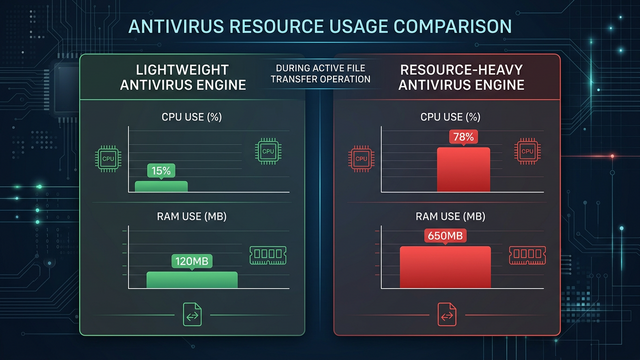
- Lightweight vs. Resource-Heavy Engines: Modern security engines vary dramatically in their system footprint. Lightweight engines, which leverage cloud-based scanning and efficient local processes, can deliver industry-leading protection while consuming a fraction of the CPU and RAM of legacy, locally-intensive scanners. For professionals running video editing software, 3D rendering tools, or development environments, this distinction is not academic — it directly impacts productivity.
- Gaming Mode and Silent Mode: For PC gamers, antivirus interference is a persistent frustration. Scan notifications mid-match, background update processes competing for CPU cycles, and scheduled scans triggering during gameplay can measurably reduce frame rates and introduce input latency. Community discussions across major PC gaming forums consistently highlight that users frequently disable their antivirus entirely during gaming sessions — a dangerous practice that a well-designed “Game Mode” or “Silent Mode” completely eliminates. This feature automatically detects full-screen application launches, suppresses all notifications, and defers non-critical background tasks until the session ends.
Why Do Many Users Prioritize Free Antivirus Software, and What Are the Trade-Offs?
Free antivirus software represents the first line of defense for hundreds of millions of PC users worldwide. Its prevalence is not merely a function of cost-consciousness — many free solutions deliver genuinely robust protection that satisfies the security requirements of the vast majority of home users. However, making an informed choice requires a clear-eyed understanding of both the legitimate value and the real limitations inherent to the free model.
The Legitimate Value Proposition of Free Antivirus
The case for free antivirus is stronger than many paid-product marketing campaigns would suggest.
- Award-Winning Core Protection at Zero Cost: Several free antivirus solutions consistently achieve top ratings from independent testing laboratories, demonstrating that the free tier does not necessarily mean inferior malware detection. The protection gap between free and paid products is often found in supplementary features rather than core detection capabilities.
- Accessibility for All Users: The zero-cost barrier ensures that even users with the tightest budgets can access meaningful protection. 360 Total Security exemplifies this value proposition by offering its robust multi-engine antivirus protection — powered by both its proprietary engine and integration with the Avira and Bitdefender engines — alongside cloud-based threat intelligence and a comprehensive system cleanup toolset, entirely for free. This makes enterprise-grade security intelligence accessible to everyday users without any financial commitment.
- Supplementary Utility Tools: Many free suites bundle practical tools such as disk space analyzers, startup program managers, and browser cleanup utilities that add tangible day-to-day value beyond pure security.
Common Limitations and Potential Risks of Free Versions
Transparency demands an honest acknowledgment of where free antivirus software typically falls short compared to paid alternatives.
- Upsell Notifications: Free versions frequently generate prompts encouraging users to upgrade to a paid tier. While understandable as a business model, poorly implemented upsell notifications can become intrusive and erode the user experience. Evaluating how aggressively a vendor promotes its paid product within the free interface is a worthwhile pre-download consideration.
- Absent Advanced Features: Features that are standard in paid suites — including a dedicated software firewall, a no-log VPN, a password manager, dark web monitoring, and robust parental controls — are typically absent from free versions. Users whose threat model includes these risks should evaluate whether the feature gap justifies the cost of a premium subscription.
- Limited Technical Support: Free-tier users are generally directed to community forums and self-service knowledge bases rather than direct support channels. For users who encounter complex malware infections or configuration conflicts, the absence of dedicated support can be a meaningful limitation.
The Privacy Consideration with Free Security Software
The most nuanced aspect of free antivirus software involves data practices. Understanding the privacy model is essential for making an informed choice.
- Anonymized Threat Intelligence: Many free security products improve their threat detection capabilities by contributing anonymized telemetry data — such as file hashes of suspicious programs encountered on user devices — to a collective threat intelligence cloud. This is a legitimate and widely-used practice that benefits the entire user base by enabling faster identification of emerging threats. The key distinction is that reputable vendors collect only anonymized, non-personal technical data, never user content or personally identifiable information.
- Choosing Transparent Vendors: The critical safeguard is selecting vendors who publish clear, comprehensible privacy policies that explicitly describe what data is collected, how it is used, and how users can opt out. A review of 360 Total Security’s publicly available privacy policy indicates a commitment to transparency regarding its data collection practices, distinguishing between technical telemetry used for product improvement and the strict prohibition on collecting personal user content. Before installing any free security product, invest five minutes in reading its privacy policy — the quality and clarity of that document is itself a trust signal.
How Can an Antivirus Also Act as a System Optimization Tool?
The relationship between PC security and PC performance is more intimate than most users realize. A system burdened by junk files, outdated drivers, and unnecessary startup programs is not only slower — it is measurably more vulnerable. This insight has driven the evolution of modern security suites toward an integrated model that treats system health and security as two dimensions of the same problem, addressable through a single unified platform.
The Direct Link Between System Clutter and Security
Understanding why optimization is a security imperative, not merely a convenience feature, reframes how you should evaluate a security suite’s toolset.
- Outdated Software as Attack Vectors: Unpatched applications, obsolete browser extensions with deprecated security models, and accumulated temporary files can all serve as entry points for exploitation. Many high-profile attacks leverage known vulnerabilities in outdated software versions — vulnerabilities that have often been patched in current releases. A system that stays current and clean is inherently a smaller attack surface.
- Bloatware and Adware Risks: Pre-installed trial software, bundled browser toolbars, and manufacturer-installed applications frequently contain adware components, aggressive tracking mechanisms, or outdated code with known security flaws. Identifying and removing this category of software is simultaneously a performance improvement and a security hardening action.
Key Optimization Features to Look For
When evaluating a security suite’s optimization capabilities, focus on these high-impact tools:
- Startup Manager: Windows systems accumulate startup entries over time as installed applications register themselves to launch at boot. A startup manager provides a clear, categorized view of all startup programs with resource impact indicators, enabling users to disable unnecessary entries and meaningfully reduce boot times — often by 30-60 seconds on a cluttered system.
- Disk Cleaner: Beyond the obvious removal of temporary files and browser cache, a sophisticated disk cleaner targets outdated Windows Update installation files (which can consume gigabytes of space), Windows Error Reporting logs, thumbnail caches, and application residue from uninstalled programs. Safely reclaiming this space improves both storage availability and file system performance.
Beyond Cleaning: Proactive System Health Monitoring
The most sophisticated integrated suites extend beyond reactive cleaning to proactive health monitoring.
- Driver Update Management: Outdated device drivers are a frequently overlooked vulnerability category. Hardware manufacturers regularly release driver updates that address not only performance issues but also security vulnerabilities in the driver’s interaction with the operating system kernel. An integrated driver update checker automates the identification of outdated drivers and streamlines the update process.
- Network Monitoring: Built-in network speed test tools and connection monitors help users identify whether performance degradation stems from a local system issue or a network problem, and can flag unusual outbound connection patterns that may indicate malware activity.
- 360 Total Security as an Integrated Model: 360 Total Security exemplifies this integrated approach by bundling its multi-engine antivirus protection with a comprehensive ‘Cleanup’ module for junk file removal and a ‘Speedup’ module for startup and service optimization, allowing users to manage both security and performance from a single, streamlined interface. This consolidation eliminates the need to install separate utility applications and ensures that security and performance management work in concert rather than in conflict. Download 360 Total Security for free to experience this unified approach firsthand.
What Are the Critical Factors for Choosing Antivirus for Different User Scenarios?
There is no universally optimal antivirus product — the best choice is inherently contextual. A solution that perfectly serves a casual home user may be entirely unsuitable for a competitive PC gamer or a small business managing ten remote employees. A scenario-based evaluation framework cuts through the noise and directs your attention to the features that will actually matter in your specific situation.
For the Casual Home User and Families
The home user’s primary requirements center on simplicity, reliability, and comprehensive household coverage.
- Ease of Use and Automation: Non-technical users benefit most from a “set and forget” architecture where the software handles updates, scans, and threat responses automatically without requiring manual intervention. Clear, plain-language alerts that explain what was found and what action was taken — without demanding technical decisions — are essential.
- Parental Controls and Safe Browsing: Households with children require content filtering, screen time management, and safe search enforcement across all devices. This feature set transforms a security product into a comprehensive family digital safety platform.
- Multi-Device Licensing: Modern households operate multiple PCs, and a single-device license quickly becomes inadequate. Solutions offering family plans that cover multiple Windows and macOS devices under a single subscription provide significant value and administrative simplicity.
For PC Gamers and Power Users
For the gaming community, antivirus software has historically been a source of friction. The requirements for this segment are uncompromising.
- Automatic Gaming Mode: The absolute baseline requirement for any antivirus targeting gamers is a proven, automatic Gaming Mode that detects full-screen application launches, immediately suppresses all notifications and pop-ups, defers scheduled scans, and reduces background resource consumption — all without requiring manual activation. Any solution that forces the user to remember to enable a gaming mode before each session will inevitably be disabled entirely.
- Minimal Performance Overhead: Independent performance impact benchmarks from AV-Comparatives and similar organizations measure the slowdown introduced by antivirus software during common tasks including file copying, application launching, and web browsing. For gaming, the critical metrics are CPU overhead and RAM consumption during idle monitoring — both should be negligible on any modern system running a well-optimized security engine.
For Small Businesses and Remote Workers
The threat landscape for small and medium-sized businesses (SMBs) is categorically different from the home environment, demanding enterprise-adjacent capabilities at accessible price points.
- Centralized Endpoint Management: When multiple employees use company devices, IT administrators require a management console that provides a unified view of all endpoint security statuses, enables remote policy deployment, and allows centralized threat response. Managing security device-by-device at scale is operationally untenable.
- Ransomware Protection and Rollback: Ransomware represents the most financially devastating threat category for SMBs. Dedicated ransomware shields that monitor for encryption behavior patterns and maintain protected backup copies of critical files — enabling rollback to pre-encryption states — are a critical investment. A 2026 Cybersecurity Ventures report projects that ransomware damages to businesses will continue to escalate, making this protection layer a business continuity necessity rather than a luxury.
- Secure VPN for Remote Access: As noted by IT security consultant Marcus Delray: “For SMBs, the ability to remotely quarantine a threat on an employee’s laptop without requiring physical access is worth every penny of the investment in a managed endpoint solution. One contained incident can prevent a company-wide breach.” Business-tier suites that bundle a reliable VPN for securing remote connections over public Wi-Fi further reduce the attack surface for distributed teams.
Implementing and Maintaining Your Chosen Security Solution: A Practical Guide
Selecting the right antivirus software is only the first step. The effectiveness of any security solution is heavily dependent on how it is installed, configured, and maintained over time. Poor implementation practices can negate the benefits of even the most capable software, while disciplined security hygiene creates a compounding protective effect.
Best Practices for Installation and Initial Configuration
A methodical installation process prevents the most common sources of post-installation problems.
- Remove Previous Antivirus Software Completely: Running two antivirus products simultaneously is one of the most common causes of system instability, performance degradation, and security gaps. Before installing a new solution, use the previous vendor’s dedicated removal tool (not just the standard uninstaller) to ensure all drivers, services, and registry entries are fully purged. Windows Defender will automatically re-enable itself as a fallback during the transition period.
- Run an Initial Full System Scan: Immediately after installation, run a comprehensive full-system scan to establish a clean baseline. This scan may take 30-90 minutes on a typical system but is essential for identifying any pre-existing infections before configuring real-time protection. Following this, configure a recurring weekly quick scan schedule for ongoing maintenance.
- Configure Real-Time Protection and Exclusions: Review the real-time protection settings to ensure all critical monitoring layers (file system, web, email) are active. For trusted applications that generate false positives or performance conflicts — such as development compilers or video editing tools — configure targeted exclusions to prevent unnecessary scanning overhead on known-safe processes.
// Example: Adding a folder exclusion in a typical antivirus configuration
// Navigate to: Settings > Real-Time Protection > Exclusions > Add Folder
// Recommended exclusion path format for development environments:
C:\Users\[Username]\Projects\
C:\Program Files\[TrustedApplication]\
// Always verify the application is legitimate before adding exclusions
Ongoing Security Hygiene and Awareness
Technology provides the infrastructure for security, but sustained protection requires active user participation.
- Automatic Updates Are Non-Negotiable: The threat landscape evolves continuously, with new malware variants emerging constantly. An antivirus operating on outdated virus definitions is materially less effective than one with current signatures. Ensure automatic updates for both the application software and the threat database are enabled and verify periodically that updates are occurring successfully.
- The Human Layer: No antivirus software can fully compensate for risky user behavior. Phishing emails, malicious download links, compromised software cracks, and social engineering attacks are specifically designed to bypass technical defenses by exploiting human judgment. Cultivating basic digital literacy — verifying sender addresses, avoiding unsolicited attachments, downloading software only from official sources — remains the single most impactful security practice available to any user.
- Periodic Optimization Maintenance: Integrate the use of your security suite’s optimization tools into a regular maintenance routine — monthly disk cleanups and quarterly startup audits create a virtuous cycle where a cleaner, faster system is simultaneously a more secure one.
Troubleshooting Common Issues
Even well-configured security software occasionally generates friction. Knowing how to respond systematically prevents both overreaction and under-reaction.
- Handling False Positives: A false positive occurs when your antivirus incorrectly flags a legitimate, safe file as malicious. Before taking any permanent action, upload the flagged file to VirusTotal (virustotal.com) for a second opinion scan across 70+ antivirus engines. If the consensus indicates the file is safe, you can restore it from quarantine and add it to your exclusions list. Report the false positive to your vendor to improve future detection accuracy.
- Diagnosing Performance Conflicts: If you suspect your antivirus is causing slowdowns, use Windows Task Manager or Resource Monitor to observe CPU and disk usage during the problematic periods. Identify whether the antivirus process is the primary consumer. If confirmed, check for pending updates (which often resolve performance issues), review exclusion configurations for high-I/O applications, and consult the vendor’s knowledge base for known conflicts with your specific software environment.
- Finding Legitimate Help: For complex issues, prioritize the vendor’s official support channels, their moderated community forums, and established technology publications. Be cautious of third-party “tech support” websites that appear in search results — a significant proportion of these are scams targeting users who have searched for antivirus help.
Final Security Checklist and Making Your Informed Decision
After exploring the full spectrum of considerations — from detection methodology and performance impact to scenario-specific requirements and implementation best practices — the final step is translating this knowledge into a concrete, personalized decision. The following checklist and recommendation framework are designed to cut through analysis paralysis and guide you to a confident, well-reasoned choice.
Your Pre-Purchase/Download Evaluation Checklist
Before committing to any antivirus solution, systematically verify the following:
- Protection Verification: Has the product been independently tested by AV-Comparatives, AV-Test, or SE Labs within the last 12 months? Does it achieve protection rates above 99% with a low false positive rate? Independent validation is the only reliable substitute for marketing claims.
- Performance Impact: Is the product certified as “lightweight” by independent performance benchmarks? Does it include an automatic Gaming Mode or Silent Mode that activates without user intervention during full-screen applications?
- Feature Alignment: Does the product include the specific features your situation demands — dedicated firewall, disk cleanup tools, VPN, parental controls? Is the user interface approachable for your technical comfort level? Will you actually use it?
- Value Assessment: Does the free version adequately cover your core security needs, or do the premium features of a paid tier address genuine gaps in your threat model? If considering a paid product, does it offer multi-device coverage that justifies the per-device cost compared to single-device alternatives?
Tailored Recommendations Based on Core Priorities
Based on the evaluation framework developed throughout this guide, the following recommendations align solution types with specific user profiles:
- For Maximum Value and Integrated Optimization: Users seeking powerful, free core protection paired with excellent system cleanup and performance tools should strongly consider 360 Total Security. It successfully bridges the gap between essential antivirus defense and proactive PC performance management — offering multi-engine scanning, cloud threat intelligence, disk cleanup, and startup optimization — without any financial cost. For budget-conscious users who refuse to compromise on capability, it represents an exceptional value proposition.
- For Gamers and Performance-Centric Users: Prioritize solutions with independently verified lightweight performance profiles and a proven, automatic gaming mode. Verify via community benchmarks that the product introduces no measurable FPS reduction or input latency in your primary game titles before committing.
- For Multi-Device Households and Small Offices: Evaluate solutions offering easy-to-manage multi-license plans that cover all device types in your ecosystem. Prioritize products with centralized management visibility and strong ransomware protection as baseline requirements.
| User Profile | Top Priority | Must-Have Features | Best Solution Type | Example |
|---|---|---|---|---|
| Budget-Conscious User | Maximum protection at zero cost | Real-time scanning, cloud intelligence, cleanup tools | Free Suite with Integrated Optimization | 360 Total Security (Free) |
| PC Gamer / Power User | Zero performance impact during gaming | Auto Gaming Mode, lightweight engine, minimal background overhead | Lightweight Premium or Optimized Free Suite | Gaming-certified security suite |
| Family Manager | Household-wide protection and child safety | Parental controls, multi-device license, safe browsing | Family Premium Suite | Multi-device family subscription |
| SMB / Remote Worker | Endpoint management and ransomware defense | Centralized console, ransomware rollback, business VPN | Business Endpoint Security Suite | Business-tier managed endpoint solution |
The cybersecurity landscape will continue to evolve, but the principles guiding a sound antivirus selection decision remain constant: demand independent verification, insist on performance transparency, align features with your actual threat model, and choose vendors who demonstrate accountability through clear policies and responsive support. Your antivirus software is not a one-time purchase — it is an ongoing security partnership. Choose it with the same diligence you would apply to any critical infrastructure decision.
Ready to experience comprehensive, free PC protection with integrated system optimization? Download 360 Total Security today and see what a truly integrated security and performance platform looks like in practice.
Frequently Asked Questions
Is free antivirus software genuinely safe to use, or is it a security risk itself?
Reputable free antivirus software from established vendors is entirely safe and often delivers protection rates comparable to paid alternatives in independent laboratory tests. The key is choosing products from transparent vendors with clear privacy policies and verifiable independent test results. Products like 360 Total Security have demonstrated consistent performance in third-party evaluations. The risk lies not in the free model itself, but in downloading security software from unverified sources or products with opaque data practices — always download directly from the official vendor website.
How much does antivirus software actually slow down a modern PC?
On modern hardware (a PC with a multi-core processor and SSD storage manufactured within the last 4-5 years), a well-optimized antivirus engine should produce a performance impact that is imperceptible during normal use. Independent performance benchmarks from AV-Comparatives consistently show that leading products introduce slowdowns of less than 5% on standard tasks. The meaningful performance impact is typically observed on older hardware with spinning hard drives, where real-time scanning of file access operations creates measurable latency. If you experience significant slowdowns on modern hardware, it is generally a configuration issue rather than an inherent product limitation.
Do I need a separate firewall if my antivirus includes one?
For the vast majority of home users, the firewall included in a comprehensive security suite — combined with the firewall built into Windows or macOS — provides entirely adequate network protection. The integrated approach also ensures the firewall and antivirus engine share threat intelligence, creating a more cohesive defensive posture. Separate, standalone firewalls are primarily relevant for advanced users with specific network architectures or businesses requiring granular policy enforcement beyond what consumer suites provide.
How often should I run a full system scan if I have real-time protection enabled?
With active real-time protection monitoring all file system activity, a weekly quick scan (targeting the most vulnerable areas: downloads folder, temporary files, running processes) is sufficient for most users. A comprehensive full-system scan monthly or quarterly provides an additional layer of assurance and can catch dormant threats that arrived before your current security solution was installed. Avoid running full scans during periods of intensive use — scheduling them for overnight or low-activity periods prevents performance interference.
What should I do immediately if my antivirus detects a threat?
Do not panic, and do not immediately delete the flagged item. First, allow your antivirus to quarantine the file — quarantine isolates the threat without permanently deleting it, preserving your ability to recover it if it turns out to be a false positive. Second, upload the file hash or the quarantined file to VirusTotal for a consensus second opinion. If multiple engines confirm the threat, authorize permanent deletion and run a full system scan to check for related infections. If the consensus indicates it is safe, restore from quarantine and report the false positive to your vendor. Document the incident with screenshots for future reference.
About the Author: This article was researched and written by a senior technical writer specializing in cybersecurity, endpoint protection, and PC performance optimization. With over a decade of experience analyzing security software for enterprise and consumer audiences, the author draws on independent laboratory data, community feedback, and hands-on product evaluation to provide actionable, vendor-neutral guidance. The author’s work has informed security decision-making for both individual users and IT teams across multiple industries.
Learn more about 360 Total Security