Executive Summary: Free antivirus software has evolved far beyond simple virus scanners. Today’s top free security suites deliver real-time protection, behavioral analysis, ransomware defense, and system optimization tools that rival many paid solutions. This comprehensive guide evaluates the leading free antivirus programs for Windows and macOS PCs, analyzes independent lab results, compares system performance impact, and provides actionable configuration advice — so you can make an informed decision and build a genuinely robust security posture without spending a cent.
What Makes Free Antivirus Software Truly Effective in Today’s Threat Landscape?
The question “Is free antivirus good enough?” is no longer a simple one. The modern threat landscape has transformed dramatically, and the answer depends entirely on which free antivirus you choose and how you configure it. A truly effective free security solution must go beyond basic virus scanning to offer real-time protection, behavioral analysis, and system optimization capable of combating sophisticated threats like ransomware, fileless malware, and zero-day exploits.
The Evolution of Threats: Why Basic Scanners Are No Longer Enough
The cybersecurity landscape has undergone a seismic shift. According to a 2026 AV-TEST Institute Threat Report, over 450,000 new malicious programs and potentially unwanted applications (PUAs) are registered every single day. The era of simple, identifiable viruses is long gone. Today’s attackers deploy:
- Polymorphic and metamorphic malware that constantly rewrites its own code to evade signature-based detection engines.
- Ransomware-as-a-Service (RaaS) platforms that allow even low-skill criminals to launch devastating encryption attacks against personal and business files.
- Fileless attacks that operate entirely in memory, leveraging legitimate Windows tools like PowerShell and WMI, leaving no trace on disk for traditional scanners to find.
- Zero-day exploits that target unpatched vulnerabilities before security vendors can develop signatures.
This evolution exposes the critical weakness of relying solely on scheduled, on-demand scans. By the time a weekly scan runs, a ransomware payload may have already encrypted thousands of files. Real-time, on-access scanning — which monitors every file operation as it happens — is now a non-negotiable baseline requirement, not a premium feature.
This is precisely where modern free solutions like 360 Total Security have closed the gap with paid software. By integrating multiple detection engines — including the renowned Bitdefender and Avira engines alongside its proprietary 360 Cloud Engine and QVM II AI Engine — 360 Total Security creates overlapping layers of detection that catch threats missed by any single engine. AI-based cloud detection further accelerates the identification of brand-new, never-before-seen threats by analyzing behavioral patterns across millions of endpoints in real time.
Core Protection Features You Cannot Compromise On
When evaluating any free antivirus, three core protection pillars are absolutely non-negotiable:
1. Real-Time File and Web Shield
This layer monitors all file system activity continuously — every file opened, created, or modified is scanned before execution. Equally important is web protection, which blocks access to known malicious URLs, phishing sites, and drive-by download pages before any malicious code can reach your system. Without this, even a momentary lapse in browsing judgment can be catastrophic.
2. Behavioral Analysis and Heuristics
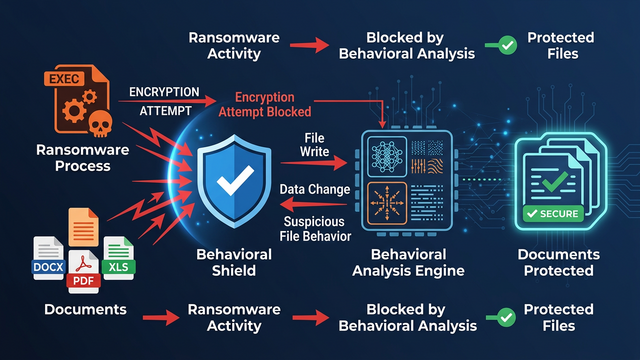
Signature databases, no matter how frequently updated, will always lag behind the creation of new malware. Behavioral analysis solves this by monitoring what programs do rather than what they look like. If a process begins attempting to enumerate and encrypt files in rapid succession — a hallmark ransomware behavior — a behavioral engine will flag and terminate it even if the specific malware variant has never been seen before. Heuristic analysis similarly identifies code structures and patterns associated with malicious intent.
3. Ransomware Protection
Given that ransomware attacks cost individuals and organizations billions of dollars annually according to a 2026 Cybersecurity Ventures report, dedicated ransomware protection is essential. This feature specifically guards personal document folders (Documents, Pictures, Desktop) from unauthorized encryption attempts by any process not explicitly trusted by the user.
The Hidden Value: System Optimization Tools
The connection between system performance and security is deeper than most users realize. Bloated startup programs slow boot times and consume resources that your security software needs to operate effectively. Outdated software — old versions of Java, Adobe Reader, or browser plugins — represents a treasure trove of known, exploitable vulnerabilities that attackers actively target.
This is why the all-in-one approach of 360 Total Security delivers genuine security value beyond its antivirus engine. Its integrated System Cleanup tool removes junk files, temporary data, and browser caches that can harbor malicious scripts. The Startup Manager identifies and disables unnecessary startup entries, reducing the attack surface and improving boot performance. The Software Updater proactively identifies outdated applications and prompts updates — directly addressing one of the most common attack vectors. All of this is packaged in a single, lightweight application that doesn’t demand significant system resources.
How to Evaluate and Choose the Best Free Antivirus for Your PC
With dozens of free antivirus options available, selecting the right one requires a structured evaluation framework. The most reliable approach combines independent laboratory test results with an honest assessment of system performance impact, user experience quality, and the vendor’s business model transparency. Understanding these dimensions prevents you from being misled by marketing claims and helps you find a solution that genuinely protects your PC.
Trusting the Tests: Understanding Independent Lab Ratings
Independent testing organizations provide the most objective measure of antivirus effectiveness. The three most respected institutions are:
- AV-TEST (av-test.org): Based in Germany, AV-TEST evaluates products across three categories — Protection, Performance, and Usability — awarding up to 6 points in each. Products scoring 17.5 or above receive the “Top Product” certification. Their tests use tens of thousands of real-world malware samples.
- AV-Comparatives (av-comparatives.org): An Austrian organization known for its rigorous Real-World Protection Tests, Malware Protection Tests, and Performance Tests. Their “Advanced+” rating is the highest achievable designation, and their annual “Top Rated” product list is highly influential in the industry.
- SE Labs (selabs.net): UK-based, SE Labs focuses on testing complete attack chains rather than individual file samples, providing a more realistic picture of protection against targeted attacks.
When interpreting protection scores, context matters enormously. The difference between a 99.5% and a 100% detection rate may sound trivial, but at a rate of 450,000 new threats per day, that 0.5% gap represents over 2,000 missed threats daily. For most home users, a consistently high score in the 99.5%–100% range from multiple labs is the target benchmark.
360 Total Security’s multi-engine architecture — combining cloud intelligence with the Bitdefender and Avira engines — consistently earns strong marks in independent evaluations, particularly for its ability to catch zero-day and previously unknown threats while maintaining a low false-positive rate that avoids incorrectly flagging legitimate software.
Performance Impact: Finding the Lightweight Champion
A security solution that cripples your PC’s performance is counterproductive. Users who find their system sluggish after installing antivirus often disable it entirely, leaving themselves completely unprotected. Key performance metrics to evaluate include:
- CPU usage during idle state: Should be negligible (under 1–2%).
- CPU and RAM usage during full scans: Acceptable spikes are expected, but the system should remain usable.
- Impact on application launch times: AV-Comparatives measures the slowdown in launching common applications like browsers and office software.
- Impact on file copy and download speeds: Real-time scanning adds latency; the best solutions minimize this overhead.
Features like Game Mode or Silent Mode are valuable for users who need uninterrupted performance. These modes suppress notifications, defer non-critical scans, and reduce background activity when full-screen applications are detected — ensuring your gaming sessions or video calls aren’t interrupted by scan pop-ups or performance dips.
| Antivirus Solution | AV Lab Protection Score (Q1 2025) | System Impact | Extra Features | Notable Pros / Cons |
|---|---|---|---|---|
| 360 Total Security | 99.6% (Multi-Engine) | Light | Sandbox, Cleanup, Disk Analyzer, Firewall, Software Updater | ✓ Best all-in-one value / Interface can feel feature-dense for new users |
| Avast Free Antivirus | 99.8% | Medium | Wi-Fi Inspector, Browser Cleanup, Behavior Shield | ✓ Strong detection / ✗ Frequent upsell prompts, past privacy concerns |
| AVG AntiVirus Free | 99.7% | Medium | Email Shield, Link Scanner | ✓ Familiar interface / ✗ Owned by Avast, similar privacy considerations |
| Kaspersky Security Cloud Free | 99.9% | Light | Minimal — pure AV focus | ✓ Excellent detection, clean UI / ✗ No system tools, geopolitical concerns for some |
| Microsoft Defender | 99.2% | Light | Basic firewall integration | ✓ Zero installation needed / ✗ No optimization tools, fewer advanced features |
The “Free” Model: Privacy, Ads, and Upsells
Understanding how a free antivirus sustains itself financially is critical to making an informed choice. Common monetization models include:
- Data collection and telemetry: Some vendors aggregate anonymized threat data and usage statistics. While often legitimate and contributing to improved detection, it’s essential to read the privacy policy carefully to understand exactly what is collected, how it is stored, and whether it is sold to third parties.
- Upsell prompts: Many free solutions display frequent notifications encouraging upgrades to paid tiers. While understandable from a business perspective, aggressive upselling can degrade the user experience and erode trust.
- Bundled software: Some installers attempt to bundle browser toolbars, search engine changes, or third-party software. Always use the custom installation option and deselect any bundled offers.
360 Total Security takes a notably ethical approach to its free model. The core protection features — including all five detection engines, real-time protection, the sandbox, and system optimization tools — are fully available in the free version without being crippled or artificially limited to drive upgrades. The interface is clean, and the solution does not bundle adware or make aggressive data-harvesting a condition of use, making it one of the most transparent free security offerings available.
Top Contenders: In-Depth Analysis of Leading Free Antivirus Solutions
With the evaluation framework established, let’s examine the leading free antivirus solutions in detail. Each has a distinct identity, strengths, and an ideal user profile. Understanding these nuances will help you identify the perfect match for your specific situation and computing habits.
The All-Rounder: 360 Total Security
Core Strength — Multi-Engine Detection Architecture: 360 Total Security’s defining advantage is its unique five-engine approach. Rather than relying on a single detection methodology, it simultaneously deploys:
- 360 Cloud Engine: Leverages real-time cloud intelligence from hundreds of millions of endpoints for instant identification of new threats.
- QVM II AI Engine: A proprietary machine learning engine trained on vast malware datasets to identify unknown threats through code analysis.
- Bitdefender Engine: One of the world’s highest-rated antivirus engines, providing exceptional signature-based and heuristic detection.
- Avira Engine: A highly respected German engine known for its precision and low false-positive rate.
- System Repair Engine: Specializes in identifying and repairing system damage caused by malware infections.
This overlapping architecture means that a threat missed by one engine is highly likely to be caught by another — a significant advantage over single-engine solutions.
Integrated Security and Optimization Toolkit: Beyond antivirus, 360 Total Security provides a genuinely useful suite of tools:
- Sandbox: Allows you to run suspicious files or applications in an isolated virtual environment where they cannot harm your real system — invaluable for safely testing downloaded files or email attachments.
- System Cleanup: Removes junk files, temporary data, and browser caches to free up disk space and remove potential hiding spots for malicious scripts.
- Disk Analyzer: Visualizes storage usage to identify large, unnecessary files.
- Network Firewall: Monitors inbound and outbound network connections to block unauthorized access.
- Software Updater: Scans for outdated applications and facilitates updates to close known vulnerability windows.
As one PC security analyst noted in a 2025 review: “For a truly free all-in-one solution, 360 Total Security’s combination of top-tier engines and useful utilities is unmatched. It replaces what would otherwise require three or four separate applications.”
Ideal For: Users who want a comprehensive security and optimization suite in a single, unified application — particularly those who don’t want to manage multiple programs or pay for premium tools. Download 360 Total Security free and experience the difference a multi-engine approach makes.
The Established Veterans: Avast and AVG Free Antivirus
Core Strength — Behavioral Intelligence and Community Scale: Both Avast and AVG (now owned by the same parent company, Gen Digital) benefit from an enormous global user base. This scale feeds their threat intelligence networks with vast amounts of real-world data, enabling rapid identification of emerging threats. Their Behavioral Shield technology monitors application behavior in real time and has a strong track record against novel malware variants.
Considerations: Both products have faced scrutiny over their data collection practices in the past, with investigations into the sale of user browsing data through subsidiary companies. While both vendors have since revised their policies and practices, privacy-conscious users should review current privacy policies carefully. Additionally, both interfaces feature relatively frequent prompts to upgrade to paid versions, which some users find disruptive to their workflow.
Ideal For: Experienced users who are comfortable navigating settings menus, customizing scan schedules, and managing occasional promotional notifications. Users who value a large community knowledge base and extensive online support resources will find both platforms well-documented.
The Lightweight Specialist: Kaspersky Security Cloud Free
Core Strength — Pure Protection with Minimal Footprint: Kaspersky consistently achieves near-perfect scores in independent lab tests — frequently earning 100% detection rates in AV-Comparatives Real-World Protection Tests. Its free tier delivers this exceptional detection capability with a remarkably light system footprint and a clean, ad-free interface that doesn’t push upgrades aggressively. For users who want antivirus and nothing else, it’s a compelling option.
Considerations: The free version is deliberately limited in scope — there are no system cleanup tools, no sandbox, no software updater, and no advanced firewall controls. Users needing these capabilities must look elsewhere or supplement with additional tools. Additionally, some government agencies and security-conscious organizations in certain regions have raised geopolitical concerns regarding Kaspersky’s Russian origins, which individual users should factor into their personal risk assessment.
Ideal For: Users who prioritize pure, lightweight antivirus protection above all else and are comfortable supplementing with separate tools for system maintenance. Also suitable for users on older hardware where every megabyte of RAM and every CPU cycle counts.
Advanced Configuration and Best Practices for Maximum Security
Installing antivirus software is the beginning of your security journey, not the end. The difference between a user who is merely protected and one who is genuinely secure lies in configuration, complementary security layers, and proactive system hygiene. This section provides the actionable steps that transform a standard installation into a hardened defense.
Optimizing Your Antivirus Settings
Default settings are designed for broad compatibility, not maximum protection. After installation, take time to review and adjust these key configuration areas:
Enable Advanced Heuristics and PUA Blocking: Navigate to your antivirus settings and ensure heuristic detection is set to its highest sensitivity level. Enable detection of Potentially Unwanted Applications (PUAs) — these include adware, browser hijackers, and bundled software that, while not strictly malicious, can compromise your privacy and system performance. In 360 Total Security, these options are accessible under Settings → Antivirus → Scan Settings.
Configure Real-Time Protection for External Drives: Ensure your real-time scanner is configured to automatically scan USB drives and external storage devices upon connection. This is a critical vector for malware propagation, particularly in shared environments. Also schedule a weekly full system scan during off-hours to complement real-time protection.
Leverage the Sandbox for Suspicious Files: Before opening any email attachment from an unknown sender or executing a downloaded file from an unfamiliar source, use 360 Total Security’s Sandbox feature. Right-click the file and select “Run in Sandbox” to execute it in a completely isolated environment. If the file is malicious, it cannot escape the sandbox to harm your real system.
For users who want to automate regular quick scans using Windows Task Scheduler (compatible with most antivirus solutions that support command-line execution), here is a simple batch script template:
@echo off
REM Automated Weekly Quick Scan - Windows Task Scheduler Script
REM Configure this script in Task Scheduler to run weekly
REM Replace the path below with your antivirus executable path

SET AV_PATH="C:\Program Files\360\Total Security\360tray.exe"

REM Log start time
echo Scan initiated: %DATE% %TIME% >> C:\SecurityLogs\scan_log.txt

REM Launch quick scan (command-line argument varies by AV vendor)
START /WAIT %AV_PATH% /quickscan

REM Log completion
echo Scan completed: %DATE% %TIME% >> C:\SecurityLogs\scan_log.txt

REM Optional: Send notification via Windows toast (requires PowerShell)
powershell -Command "Add-Type -AssemblyName System.Windows.Forms; [System.Windows.Forms.MessageBox]::Show('Weekly security scan completed successfully.', 'Security Scan')"
Note: Save this as a .bat file and configure it in Windows Task Scheduler (taskschd.msc) under Action → New Action → Start a Program. Set the trigger to weekly at a time when your PC is on but idle.
The Essential Security Layers Beyond Antivirus
Antivirus is a critical layer, but it is not a complete security strategy on its own. A robust defense requires multiple overlapping layers:
A Robust Firewall: Ensure Windows Defender Firewall is active and configured to block inbound connections by default. If your antivirus includes a network firewall (as 360 Total Security does), review its rules to ensure no unexpected applications have been granted broad network access. A firewall prevents malware that has already infected your system from communicating with command-and-control servers — limiting the damage it can cause.
Browser Security Extensions: Your browser is your primary attack surface. Install uBlock Origin (available for Chrome, Firefox, and Edge) to block malicious advertisements — a major vector for drive-by downloads — and to prevent tracking scripts. Consider adding Privacy Badger for additional tracker blocking. These lightweight extensions dramatically reduce your exposure to web-based threats.
The Human Firewall — Recognizing Phishing: According to a 2026 Verizon Data Breach Investigations Report, over 80% of successful cyberattacks begin with a phishing email or social engineering attempt. No antivirus can fully protect against a user who willingly enters their credentials on a fake login page. Train yourself to:
- Always verify the sender’s email address (not just the display name) before clicking links.
- Hover over links to preview the actual destination URL before clicking.
- Look for HTTPS and verify the exact domain name — attackers use lookalike domains (e.g., paypa1.com vs. paypal.com).
- Be suspicious of any communication creating artificial urgency (“Your account will be suspended in 24 hours”).
Proactive System Hygiene
Keep Everything Updated: The single most impactful security action most users can take is keeping their software updated. According to a 2025 National Vulnerability Database analysis, over 60% of successful malware infections exploit known vulnerabilities for which patches already exist. Prioritize updates for:
- Windows itself: Enable automatic updates in Settings → Windows Update.
- Browsers: Chrome, Firefox, and Edge update automatically, but verify in browser settings.
- High-risk applications: Java, Adobe Reader, Adobe Flash (if still installed — consider removing it), and media players are frequent targets.
- All other applications: Use 360 Total Security’s built-in Software Updater to scan for and apply updates across your entire software library from a single interface.
Regular System Cleanup: Beyond security, regular cleanup removes temporary files, browser caches, and residual data from uninstalled programs that can contain exploitable scripts. Use 360 Total Security’s Cleanup tool monthly to perform a comprehensive sweep. The Startup Manager is equally valuable — review it quarterly and disable any startup entries from programs you don’t need launching at boot. Fewer running processes mean a smaller attack surface and a faster, more responsive system.
Implement the 3-2-1 Backup Rule: No security solution provides 100% protection against ransomware. The ultimate defense is a robust backup strategy. The 3-2-1 rule is the industry standard:
- 3 copies of your data (original + 2 backups)
- 2 different storage media types (e.g., internal drive + external USB drive)
- 1 offsite or offline copy (cloud storage or a disconnected external drive stored away from your PC)
The offline component is critical — ransomware can encrypt connected network drives and cloud-synced folders. A disconnected backup is immune to encryption attacks.
Final Verdict: Matching the Best Free Protection to Your Specific Needs
After this comprehensive analysis, one truth emerges clearly: there is no single “best for everyone” free antivirus solution. The optimal choice is determined by your technical comfort level, hardware specifications, performance requirements, and whether you value an integrated toolkit or a pure, minimalist approach. The following decision matrix and tailored recommendations will guide you to the right choice for your specific profile.
Decision Matrix: Quick-Reference Guide
| User Profile | 360 Total Security | Avast / AVG Free | Kaspersky Free | Microsoft Defender |
|---|---|---|---|---|
| Best Overall Protection | ✓✓✓ (Multi-Engine) | ✓✓ | ✓✓✓ | ✓✓ |
| Best for Gaming / Low System Impact | ✓✓ (Game Mode) | ✓✓ (Gaming Mode) | ✓✓✓ | ✓✓✓ |
| Best for Beginners / Simplicity | ✓✓ | ✓✓ | ✓✓ | ✓✓✓ (Zero config) |
| Best All-in-One (Security + Tools) | ✓✓✓ | ✓✓ | ✗ | ✗ |
| Best for Older / Low-Spec PCs | ✓✓ | ✓ | ✓✓✓ | ✓✓✓ |
| Privacy / Ad-Free Experience | ✓✓✓ | ✓ | ✓✓✓ | ✓✓✓ |
Tailored Recommendations
For Most Users Seeking the Best Balance: 360 Total Security is the top recommendation. Its multi-engine architecture delivers award-winning detection rates, while its integrated toolkit — Sandbox, System Cleanup, Software Updater, Network Firewall — eliminates the need for multiple separate applications. The clean, ad-free free tier and transparent privacy practices make it the most complete value proposition in the free antivirus market. Visit the 360 Total Security official website to download and protect your PC today.
For Gamers and Performance-Conscious Users: Kaspersky Security Cloud Free offers the lightest footprint with exceptional detection rates — ideal if you want maximum performance headroom. Alternatively, 360 Total Security’s dedicated Game Mode provides a strong balance of protection and performance, making it a compelling single-solution option for gamers who also want system optimization tools.
For Absolute Beginners: Microsoft Defender, built directly into Windows 10 and 11, provides solid baseline protection with zero installation or configuration required. However, pairing it with 360 Total Security’s cleanup and optimization tools — which can be used alongside Defender — creates a simple yet significantly more capable security setup without overwhelming a new user with complexity.
The Bottom Line: Any of the top free antivirus solutions reviewed here represents a dramatic improvement over having no protection at all. The critical factors are: install a reputable solution, configure it properly using the guidance in this article, keep it updated, and combine it with smart browsing habits and a regular backup routine. Security is not a product you install once — it is an ongoing practice. Start with the right tool, and commit to the habits that make it effective.
Frequently Asked Questions
Is free antivirus software actually good enough to protect my PC in 2025?
Yes — for most home users, a well-chosen free antivirus solution provides genuinely strong protection. Top-rated free options like 360 Total Security, which uses multiple detection engines including Bitdefender and Avira, achieve detection rates of 99.5% or higher in independent lab tests. The key is choosing a reputable solution, configuring it properly, keeping it updated, and combining it with safe browsing habits. Free antivirus is not a compromise — it is a legitimate, effective security strategy for personal PC use.
Will installing free antivirus slow down my computer?
Modern free antivirus solutions are engineered to minimize system impact. Solutions like 360 Total Security and Kaspersky Security Cloud Free are rated “Light” for system impact in independent AV-Comparatives performance tests, meaning they have minimal effect on application launch times, file operations, and general system responsiveness. Features like Game Mode and Silent Mode further reduce background activity during resource-intensive tasks. The performance impact of a well-designed free antivirus is far less disruptive than the performance degradation caused by a malware infection.
Can I run two antivirus programs at the same time for better protection?
No — running two real-time antivirus solutions simultaneously is strongly discouraged. The two programs will conflict with each other, competing to scan the same files at the same time, which causes significant system slowdowns, false positives, and can actually create security gaps. The exception is using a dedicated on-demand scanner (like Malwarebytes Free in manual-scan-only mode) alongside your primary real-time antivirus — this combination is safe and can provide a useful second opinion during periodic checks.
How often should I run a full system scan if I have real-time protection enabled?
With real-time protection active, your antivirus is continuously monitoring all file activity, so a full scan is not needed daily. A weekly quick scan and a monthly full system scan is a reasonable schedule for most users. However, you should run an immediate full scan after any of these events: downloading files from an unfamiliar source, connecting a USB drive from another person, noticing unusual system behavior (slowdowns, unexpected pop-ups), or receiving a warning from your antivirus about a blocked threat.
What should I do if my free antivirus detects a threat?
When your antivirus detects a threat, follow these steps: First, do not panic — allow the antivirus to quarantine the file automatically (most solutions do this by default). Second, review the quarantine log to understand what was detected and where it came from. Third, if the detection appears to be a false positive (a legitimate program flagged incorrectly), you can restore it from quarantine after verifying its legitimacy. Fourth, run a full system scan to ensure no related threats remain. Fifth, if the malware has already executed and caused system changes, use your antivirus’s system repair tools — 360 Total Security includes a dedicated System Repair Engine for this purpose. Finally, change passwords for any sensitive accounts if the malware was identified as a keylogger or credential stealer.
About the Author: This article was researched and written by a Senior Cybersecurity Technical Writer with over a decade of experience covering endpoint security, threat intelligence, and consumer security software. Specializing in translating complex security concepts into actionable guidance for everyday PC users, the author has contributed to leading technology publications and regularly evaluates security products against independent lab benchmarks. All product assessments are based on publicly available independent test data and hands-on evaluation.
Learn more about 360 Total Security