Executive Summary: The long-standing belief that Macs are immune to viruses is one of the most dangerous misconceptions in consumer technology. While macOS does benefit from a robust Unix-based architecture and Apple’s tightly controlled ecosystem, the modern threat landscape has evolved far beyond what these built-in defenses were designed to handle. Today’s Mac users face a sophisticated array of threats — from adware and info-stealers to ransomware and cryptojackers — that exploit the very complacency this myth creates. This comprehensive guide dismantles the mac virus myth, exposes the real risks mac malware poses in the current era, and provides a clear, actionable framework for building a layered defense that combines macOS’s native tools, a modern security suite, and informed user behavior.
Is the ‘Macs Don’t Get Viruses’ Myth Still True?
For decades, Apple’s marketing and a genuine track record of relative security allowed a powerful narrative to take root: Macs simply don’t get viruses. This idea became so deeply embedded in popular culture that many Mac users today operate without any dedicated security software, convinced they are inherently protected. The reality, however, is far more nuanced and increasingly alarming. The mac virus myth, while rooted in historical fact, has become dangerously outdated as macOS security faces a fundamentally different and more hostile threat environment.
The Historical Basis of the Myth and Why It’s Fading
The myth was not born from nothing. macOS was built on a Unix foundation that offered genuine structural security advantages. Strict file permission systems, application sandboxing (particularly for App Store applications), and a kernel-level architecture that isolated critical system processes from user-space applications gave macOS a legitimate edge over the Windows ecosystem of the early 2000s. Apple’s ‘walled garden’ approach — curating software through the Mac App Store and requiring developer signatures via Gatekeeper — added another meaningful layer of defense.
Compounding this was the economic reality of cybercrime. With Windows dominating global market share, attackers rationally focused their resources where the return on investment was highest. This concept, often called security through obscurity, meant that Macs were simply less profitable to attack. A criminal writing malware to infect 5% of the market versus 85% of the market will almost always choose the larger target.
However, this calculus has shifted dramatically. As Apple’s market share has grown — particularly among high-income professionals and creative industries — Macs have become an increasingly attractive target. According to a 2026 Malwarebytes Threat Intelligence Report, macOS-specific malware detections increased by over 60% across a recent five-year period, with a particularly sharp acceleration in info-stealers and adware variants. Kaspersky’s research corroborates this trend, documenting a surge in novel macOS-targeted attack campaigns that leverage sophisticated evasion techniques specifically designed to bypass Apple’s built-in defenses. The mac malware increase is no longer a theoretical concern — it is a documented, accelerating reality.
The Modern Threat Landscape for macOS
The nature of the threats facing Mac users today extends well beyond the classic conception of a ‘virus’ — a self-replicating piece of code that corrupts system files. Modern mac malware is far more sophisticated, patient, and financially motivated.
Adware and Potentially Unwanted Programs (PUPs) represent the most prevalent category. These are frequently bundled with legitimate-looking software downloads from unofficial sources — a free video converter, a PDF editor, or a browser extension. Once installed, they modify browser settings, inject advertisements, and harvest browsing data, often operating for months before a user notices anything amiss.
Phishing attacks and social engineering have become highly targeted against macOS users. Attackers craft convincing emails impersonating Apple Support, iCloud billing departments, or popular software vendors, directing users to credential-harvesting websites that are visually indistinguishable from the real thing. These attacks don’t exploit any vulnerability in macOS itself — they exploit human psychology.
Cross-platform threats further erode the idea of macOS as a safe island. Malicious macro-embedded Microsoft Office documents, weaponized PDF files, and drive-by download attacks via compromised websites deliver payloads that function regardless of the underlying operating system. A malicious JavaScript exploit embedded in an advertisement doesn’t check whether you’re running Windows or macOS before it executes.
The Consequences of a False Sense of Security
Perhaps the most insidious damage caused by the mac virus myth is behavioral. Users who believe their Mac is inherently safe are statistically more likely to download software from unverified sources, click on suspicious links with less scrutiny, delay or ignore critical macOS security updates, and dismiss unusual system behavior as a minor glitch rather than a potential infection indicator.
Furthermore, a compromised Mac does not exist in isolation. On a shared home or office network, an infected Mac can serve as a staging point, actively scanning for and attacking vulnerable Windows devices, network-attached storage (NAS) drives, and IoT devices. The infection doesn’t need to harm the Mac itself to cause significant damage to the broader network ecosystem.
As a 2026 cybersecurity industry analysis noted, security researchers have increasingly observed that Mac users represent a ‘soft target’ — not because their devices are technically easier to compromise, but because the pervasive myth has created a population of users who are psychologically unprepared and technically unprotected against modern attack methodologies. Attackers are acutely aware of this gap and are actively exploiting it.

What Are the Real Risks a Mac User Faces Without Protection?
Understanding that the mac virus myth is outdated is one thing; understanding the concrete, real-world consequences of operating without protection is another. Mac users today are exposed to a diverse portfolio of digital threats, each with distinct mechanisms, objectives, and impacts on personal data, financial security, system performance, and privacy. The question is no longer whether your Mac can be targeted, but what the cost of that targeting might be.
Adware, Browser Hijackers, and PUPs
Mac adware and browser hijackers are, by volume, the most common threats Mac users encounter. Their business model is straightforward: infiltrate a system, redirect web traffic, inject advertisements, and sell harvested browsing data to third-party brokers. The user experience degradation is immediate — a default search engine changed to an unfamiliar provider, a new homepage that cannot be easily removed, a browser flooded with intrusive pop-up advertisements, and a noticeable slowdown in browser performance due to background data-harvesting processes.
The installation method is almost always deceptive. A user downloads what appears to be a legitimate application — a media player, a file archiver, a system cleaner — and the adware is bundled within the installer, often hidden behind a pre-checked checkbox in an installation wizard that most users click through without reading. Once embedded, these programs can be extraordinarily difficult to remove manually, as they often install multiple components across different system directories and use persistence mechanisms to reinstall themselves if partially deleted.
The privacy implications extend beyond mere annoyance. Browsing history, search queries, and behavioral data harvested by mac adware are commercially valuable and are frequently sold to advertising networks with opaque data practices. In more aggressive cases, browser hijackers can intercept and modify web traffic, potentially exposing login credentials entered on banking or email sites.
Data and Financial Threats: Keyloggers and Info-Stealers
At a more severe level of the threat spectrum sit keyloggers and info-stealers — malware specifically engineered to exfiltrate sensitive personal and financial information. A keylogger operates by silently recording every keystroke made on the infected Mac, capturing usernames, passwords, credit card numbers, social security numbers, and any other data typed into the device. This information is then transmitted to a remote attacker-controlled server for exploitation or sale on dark web marketplaces.
Info-stealers take a broader approach, scanning the file system for documents, images, browser-saved passwords, cryptocurrency wallet files, and authentication tokens. A 2026 report from Kaspersky detailed a sophisticated macOS info-stealer campaign — identified as a variant of the ‘Atomic Stealer’ malware family — that specifically targeted macOS users by masquerading as cracked versions of popular professional software. The campaign successfully harvested browser credentials, cryptocurrency wallets, and iCloud Keychain data from thousands of victims before being disrupted. The goal in virtually all such cases is identity theft or direct financial fraud, with consequences that can take years to fully remediate.
The Growing Shadow of Ransomware and Cryptominers
While macOS ransomware remains less prevalent than its Windows counterpart, it exists, it is actively developed, and its potential impact is catastrophic. Ransomware encrypts the victim’s personal files — documents, photos, financial records, creative projects — and demands a cryptocurrency payment in exchange for the decryption key. For a creative professional, a researcher, or a small business owner operating on a Mac, a successful ransomware attack can mean the permanent loss of irreplaceable work.
Cryptojacking malware presents a different but equally disruptive threat model. Rather than stealing data or holding files hostage, cryptojackers silently commandeer the Mac’s processing power to mine cryptocurrency on behalf of the attacker. The victim’s Mac becomes noticeably slower, fans run constantly at high speed, battery life degrades rapidly, and electricity costs increase — all while the attacker profits from the stolen computational resources. Because cryptojackers are designed to operate covertly, many users attribute these symptoms to hardware aging or software bugs, allowing the infection to persist for extended periods.
The following table provides a structured overview of the primary threat categories facing Mac users, their core objectives, and their potential real-world impact:
| Threat Type | Primary Intent | Potential Impact on User | Difficulty to Detect |
|---|---|---|---|
| Adware / Browser Hijacker | Nuisance / Data Harvesting | Degraded browsing, privacy loss, data sold to brokers | Low to Medium |
| PUPs (Potentially Unwanted Programs) | Nuisance / Revenue Generation | System slowdown, unwanted software installations | Low |
| Keylogger | Credential Theft | Compromised accounts, financial fraud, identity theft | High |
| Info-Stealer | Data Exfiltration | Loss of passwords, financial data, crypto wallets | High |
| Ransomware | Extortion | Permanent file loss, significant financial cost | Low (symptoms are obvious) |
| Cryptojacker | Resource Theft | Performance degradation, increased energy costs | Medium to High |
| Phishing / Social Engineering | Credential / Financial Theft | Account compromise, direct financial loss | Medium |
Beyond Viruses: The Multifaceted Benefits of a Modern Mac Security Suite
A critical misconception that persists even among users who acknowledge the mac malware increase is that antivirus software is a single-function tool — a digital guard that checks files for known virus signatures. This model is decades out of date. A contemporary Mac security suite functions as a comprehensive digital hygiene and system optimization platform, addressing a far broader range of threats and user needs than any single-purpose scanner ever could. Understanding this expanded value proposition is essential for appreciating why a modern security solution is a worthwhile investment for every Mac user.
Proactive, Real-Time Protection vs. Reactive Scans
The fundamental architectural shift in modern security software is the move from reactive to proactive defense. Traditional antivirus operated on a simple model: scan files on demand or on a schedule, compare them against a database of known malware signatures, and quarantine matches. This approach has two critical weaknesses. First, it only catches threats that have already been catalogued — zero-day exploits and newly developed malware variants can operate freely until a signature is written and distributed. Second, by the time a scheduled scan runs, malware may have already executed its payload.
Real-time protection fundamentally changes this dynamic. Modern security suites deploy behavioral analysis engines that monitor file system activity, process execution, network connections, and application behavior continuously. When a process attempts to perform an action that matches a known malicious behavioral pattern — such as a browser extension attempting to modify system-level files, or an application attempting to establish a covert outbound network connection — the engine intervenes and blocks the action before it completes, regardless of whether the specific malware variant is in the signature database. This is a critical capability for defending against the novel, rapidly evolving mac malware threats that characterize the current landscape.
Essential Shields: Web Protection, Firewall, and VPN
Beyond the core antivirus engine, a comprehensive Mac security suite integrates several additional protective layers that address the full spectrum of modern threats:
Web Protection operates as a real-time filter for internet traffic, cross-referencing URLs against continuously updated databases of known phishing sites, malware distribution points, and fraudulent web pages. When a user attempts to navigate to a flagged URL — whether by clicking a link in an email, a social media post, or a search result — the web shield intercepts the request and displays a clear warning, preventing the browser from loading the malicious content. This protection functions across all major browsers, including Safari, Chrome, and Firefox, and is arguably the most impactful single feature for preventing phishing attacks, which represent one of the most common and financially damaging threat vectors facing Mac users today.
Firewall functionality within a security suite provides granular control over which applications are permitted to communicate over the network and to which destinations. While macOS includes a basic application firewall, security suite firewalls typically offer more sophisticated outbound connection monitoring, alerting users when a new or previously unseen application attempts to establish a network connection. This is a critical mechanism for detecting data exfiltration — the moment a keylogger or info-stealer attempts to transmit harvested data to a remote server, a properly configured firewall can identify and block the connection.
VPN (Virtual Private Network) integration encrypts all internet traffic between the Mac and the VPN server, rendering it unreadable to anyone monitoring the network. This is particularly valuable when connecting to public Wi-Fi networks in coffee shops, airports, hotels, or libraries — environments where unencrypted traffic can be intercepted by malicious actors on the same network using relatively accessible tools. A VPN ensures that sensitive activities — online banking, accessing corporate resources, logging into personal accounts — remain private regardless of the network environment.
Privacy Cleanup and Performance Optimization Tools
The value of a modern Mac security suite extends into system health and privacy maintenance. Over time, Mac systems accumulate significant quantities of digital detritus: tracking cookies embedded by advertising networks, cached browser data, redundant application support files, log files, language packs for applications that are never used, and large files that have been forgotten in the Downloads folder. Individually minor, collectively these items consume significant storage space and can contribute to system slowdown.
Leading security suites integrate dedicated optimization modules that systematically identify and safely remove these files, recovering storage space and improving system responsiveness. A startup manager allows users to audit and control which applications launch automatically at login — a common vector for both performance degradation and malware persistence. Memory optimization tools help manage RAM allocation for improved multitasking performance.
360 Total Security exemplifies this integrated approach particularly well. It combines a robust, multi-engine antivirus core with a comprehensive suite of PC optimization tools — including a one-click cleanup function, startup manager, and large file finder — all available within a single free package. This means Mac users do not need to install separate utilities for security and performance management; a single, well-designed solution addresses both dimensions simultaneously. Visit the official 360 Total Security website to explore the full feature set available at no cost.
How to Choose the Right Security Solution for Your Mac
The Mac security software market has matured significantly, offering users a range of options from basic free scanners to comprehensive paid suites. Selecting the right solution requires a structured evaluation framework that balances detection efficacy, system performance impact, breadth of features, and total cost of ownership. Critically, the evaluation must be grounded in objective, independently verified data rather than marketing claims alone.
Key Evaluation Criteria: Detection Rates and System Impact
The single most important technical criterion for any security solution is its ability to accurately detect and neutralize threats. The most reliable source for this data is independent testing laboratories, principally AV-Test (av-test.org) and AV-Comparatives (av-comparatives.org). These organizations conduct rigorous, standardized testing of security products against real-world malware samples and publish their results publicly. When evaluating any Mac security product, look specifically for:
- Protection Rate: The percentage of malware samples detected and blocked. Top-tier products consistently achieve rates above 99%.
- False Positive Rate: How frequently the product incorrectly flags legitimate software as malicious. High false positive rates create alert fatigue and disrupt normal workflows.
- Performance Impact: Independent labs measure the system slowdown attributable to the security software during common tasks such as file copying, application launching, and web browsing. A security solution that significantly degrades system performance defeats part of its own purpose.
Prioritizing solutions with documented low system resource usage is particularly important for Mac users who rely on their machines for resource-intensive creative or professional work. A security suite should be a silent guardian, not a performance bottleneck.
The following table provides a simplified comparative overview of key evaluation dimensions for leading Mac security solutions:
| Evaluation Criterion | 360 Total Security | Premium Paid Suite A | Basic Free Scanner B |
|---|---|---|---|
| Real-Time Protection | ✅ Yes (Multi-Engine) | ✅ Yes | ⚠️ Limited |
| Web / Phishing Protection | ✅ Yes | ✅ Yes | ❌ No |
| System Optimization Tools | ✅ Yes (Built-In) | ⚠️ Limited / Add-On | ❌ No |
| Firewall Management | ✅ Yes | ✅ Yes | ❌ No |
| System Performance Impact | Low | Medium | Low |
| Price | Free | $40–$80/year | Free |
The Case for a Reputable Free Antivirus
A persistent skepticism exists around free antivirus software: if it’s free, what is the catch? This is a legitimate question, and the answer depends entirely on the reputation and business model of the provider. For established security vendors, a high-quality free product serves a clear strategic purpose — it builds brand trust, expands user base, and demonstrates technical capability, with revenue generated through optional premium upgrades or enterprise licensing. The free product must be genuinely good, because a poor product destroys the brand equity that makes the business model viable.
Cost-effectiveness is the most obvious advantage. For the majority of home users, a reputable free solution provides core real-time protection, web filtering, and essential system tools at zero financial cost. The protection gap between a well-engineered free solution and a paid suite has narrowed considerably in recent years.
Transparency and established trust are equally important. 360 Total Security, developed by Qihoo 360 — one of the world’s largest internet security companies — has built its reputation over more than a decade of delivering reliable, non-intrusive protection to hundreds of millions of users globally. That scale of user trust creates a powerful accountability mechanism: a product that harvested user data inappropriately or delivered poor protection would face immediate, devastating reputational consequences.
Feature richness further strengthens the case. 360 Total Security bundles antivirus protection with a comprehensive optimization suite, offering a level of integrated functionality that many paid competitors charge premium prices to match. For users seeking a single solution that addresses both security and system performance, this represents exceptional value. Download 360 Total Security for free and experience comprehensive Mac protection at no cost.
Implementing Your Chosen Solution: Best Practices
Selecting the right security solution is only the first step. Proper implementation is essential to ensure maximum effectiveness:
- Download exclusively from the official vendor website. Searching for security software through general search engines or downloading from third-party software repositories introduces the risk of encountering fake or trojanized installers — a particularly ironic way to acquire malware. Always navigate directly to the vendor’s official domain.
- Enable automatic updates for both the application and its threat definitions. The threat landscape evolves daily. A security solution operating on outdated virus definitions is significantly less effective against newly emerging mac malware variants. Automatic updates ensure continuous, current protection without requiring manual intervention.
- Integrate your security software with good digital hygiene practices. Ensure macOS Gatekeeper is enabled (System Settings → Privacy & Security), install macOS system updates promptly as they are released, exercise caution with email attachments from unknown senders, and be skeptical of any unsolicited request for credentials or personal information — regardless of how legitimate the source appears.
Final Verdict: Building a Layered Defense for Your Mac
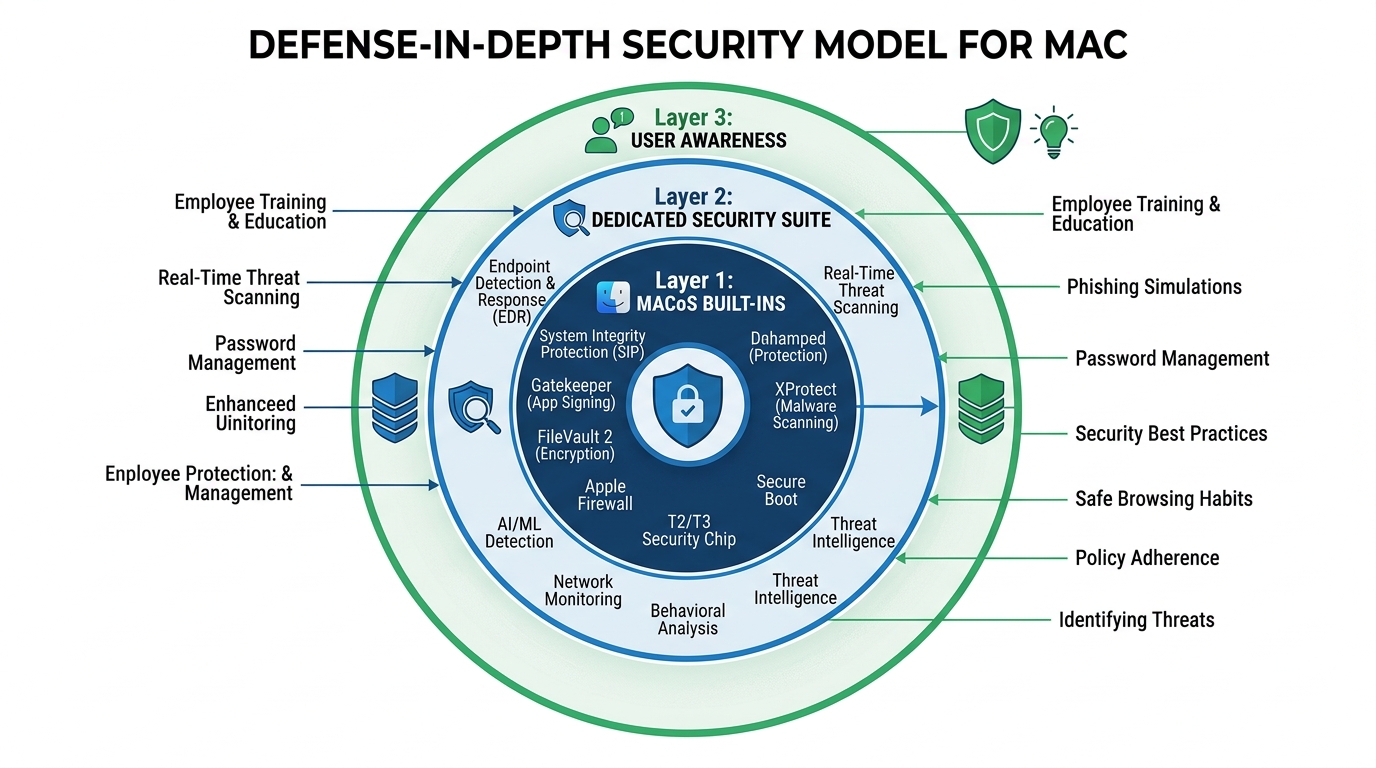
The most resilient security posture for any system — Mac or otherwise — is not built on a single tool or a single behavior, but on multiple overlapping layers of defense. Security professionals refer to this as defense in depth: the principle that if one layer fails or is circumvented, subsequent layers continue to provide protection. For Mac users in the current threat environment, this layered approach is not optional — it is the minimum standard of prudent digital security.
The Three Essential Layers of Modern Mac Security
Layer 1: macOS Built-In Protections. Apple has invested significantly in native macOS security features, and these should always be fully enabled and kept current. Gatekeeper prevents the execution of unsigned or unverified applications by default. XProtect is Apple’s built-in malware signature scanner, updated silently in the background. System Integrity Protection (SIP) prevents even administrator-level processes from modifying critical system files, providing a strong defense against rootkit-style attacks. Keeping macOS itself updated is non-negotiable — the majority of macOS security updates patch actively exploited vulnerabilities, and delaying updates leaves known attack vectors open.
Layer 2: A Dedicated Security Suite. macOS’s built-in tools, while genuinely useful, have documented limitations. XProtect’s signature database is updated less frequently than commercial security products and focuses primarily on the most prevalent threats. It provides no web protection, no behavioral analysis of novel threats, no firewall management, and no privacy or optimization tools. A dedicated security suite fills these gaps comprehensively, providing real-time behavioral monitoring, web filtering, network traffic analysis, and protection against the newer, more sophisticated attack methodologies — including fileless malware that operates entirely in memory and leaves no file system artifacts for signature-based scanners to detect.
Layer 3: User Awareness and Informed Behavior. Technology can only do so much. The most sophisticated security suite in the world cannot fully protect a user who voluntarily enters their credentials into a convincing phishing page, downloads and manually approves the execution of a malicious application, or disables security warnings because they find them inconvenient. User awareness is the most critical and most frequently overlooked layer of the defense-in-depth model. Cultivating a healthy skepticism toward unsolicited communications, maintaining a discipline of downloading software only from official sources, and understanding the social engineering tactics commonly used by attackers are skills that dramatically reduce risk across all threat categories.
Our Clear Recommendation
Yes — every Mac user should be running a dedicated security suite. The evidence is unambiguous: mac malware is increasing in volume and sophistication, the mac virus myth is actively exploited by attackers who target the complacency it creates, and macOS’s built-in protections, while valuable, are insufficient as a standalone defense against the full spectrum of contemporary threats. The question is not whether protection is needed, but which solution best meets your specific needs.
For the vast majority of home users and small business professionals, 360 Total Security represents an outstanding starting point. It delivers strong multi-engine antivirus protection, real-time threat monitoring, comprehensive web protection, and a full suite of system optimization tools — all within a single, free package that requires no subscription commitment. It addresses the core security needs of a modern Mac user without imposing financial barriers or system performance penalties.
The objective is not to operate in a state of digital anxiety, but to operate with well-founded confidence. A properly defended Mac — one running current macOS with all security features enabled, protected by a capable dedicated security suite, and operated by an informed and appropriately skeptical user — is a highly resilient system. The threats are real, but so is the protection available. Download 360 Total Security today and take the first concrete step toward a genuinely secure Mac experience.
Frequently Asked Questions
Q1: Do Macs really need antivirus software, or is macOS secure enough on its own?
macOS includes several valuable built-in security features — Gatekeeper, XProtect, and System Integrity Protection — but these tools alone are insufficient against the full range of modern threats. They do not provide web phishing protection, behavioral analysis of novel malware, or network traffic monitoring. A dedicated security suite fills these critical gaps. Given the documented increase in macOS-targeted malware, running a reputable security solution alongside macOS’s native tools is strongly recommended for all users.
Q2: What is the most common type of malware affecting Mac users today?
Adware and Potentially Unwanted Programs (PUPs) are by far the most frequently encountered threats on macOS, typically delivered by bundling with software downloaded from unofficial sources. Beyond these, info-stealers — malware designed to harvest passwords, financial data, and browser credentials — represent the most financially damaging category and are increasing rapidly in prevalence and sophistication.
Q3: Can a Mac infected with malware spread threats to Windows computers on the same network?
Yes. A compromised Mac can act as a carrier and distribution point for malware that targets other devices on the same network, including Windows PCs, NAS drives, and other networked systems. The Mac itself may not be significantly harmed by Windows-targeted malware it carries, but it can actively facilitate the infection of other devices. This makes Mac security a network-wide concern, not merely a personal one.
Q4: Is free antivirus software safe and effective for Mac?
Free antivirus software from established, reputable vendors is both safe and effective for the majority of home users. Established providers like 360 Total Security maintain strong reputations that depend on delivering genuine protection — a poor or deceptive product would rapidly destroy the brand trust their business model depends upon. Always download free security software directly from the official vendor website to avoid counterfeit or malicious installers.
Q5: How does 360 Total Security protect my Mac beyond basic virus scanning?
360 Total Security provides a multi-layered protection framework that extends well beyond signature-based virus scanning. It includes real-time behavioral threat monitoring, web protection that blocks phishing and malicious websites across all major browsers, firewall management to control application network access, and a comprehensive suite of system optimization tools including junk file cleanup, startup program management, and large file identification. All of these features are available within the free version, making it a genuinely comprehensive security and performance solution for Mac users.
About the Author: This article was researched and written by a Senior Technical Writer and Cybersecurity Content Specialist with over a decade of experience translating complex security concepts into actionable guidance for general and professional audiences. Specializing in endpoint security, threat intelligence, and digital privacy best practices, the author has contributed to security awareness initiatives and technical documentation for leading cybersecurity organizations. All recommendations are based on independent research, publicly available security data, and established industry best practices.
Learn more about 360 Total Security