Executive Summary: As cyber threats grow more sophisticated and relentless, Windows users face a critical security decision: rely solely on built-in defenses or invest in a more robust, multi-layered antivirus solution. This comprehensive guide evaluates the top-rated antivirus software for Windows across multiple dimensions—independent lab scores, feature depth, system performance impact, and overall value. Whether you are an everyday user, a privacy-focused professional, or a budget-conscious individual, this article provides the data-driven insights and tailored recommendations you need to make the most informed security decision possible.
Why Are Windows Users Searching for Top-Rated Antivirus Solutions?
The question is no longer whether you need antivirus protection—it is which solution provides the most effective, comprehensive, and least intrusive defense. In today’s complex digital landscape, relying solely on Windows Defender is insufficient for many users. Sophisticated malware, ransomware, and phishing threats have evolved far beyond what a single, reactive security layer can reliably intercept. Understanding why this gap exists is the first step toward closing it.
The Evolution of Modern Malware and Attack Methods
Malware has undergone a dramatic transformation over the past decade. Gone are the days of simple, self-replicating viruses that were relatively easy to detect and remove. Today’s threat landscape is dominated by sophisticated ransomware that encrypts entire file systems within minutes, stealthy spyware that silently exfiltrates sensitive data over weeks, and highly targeted phishing campaigns engineered through social engineering to bypass both human and technical defenses.
Perhaps the most alarming development is the rise of AI-powered cyberattacks. According to a 2026 Cybersecurity Threat Intelligence Report by a leading global security research firm, AI-assisted malware campaigns increased by over 140% year-over-year, enabling attackers to generate polymorphic code that mutates its signature on every execution—effectively rendering traditional signature-based detection obsolete. These attacks can bypass basic detection systems with alarming ease, making behavioral analysis and heuristic scanning not a luxury, but a necessity.
The attack chain typically begins with a deceptive phishing email, progresses through an exploit or malicious download, establishes persistence via registry manipulation, and culminates in data exfiltration or ransomware encryption. Each stage presents an opportunity for a well-layered security solution to intervene—but only if that solution is equipped with the right tools.
Where Native Windows Security Falls Short
Windows Defender—now branded as Microsoft Defender Antivirus—has improved substantially in recent years and earns respectable scores in independent lab tests. However, it carries several structural limitations that leave security gaps for many users:
- Reactive Detection Model: Defender’s primary reliance on signature updates means it can lag behind zero-day threats. In the hours or days between a new malware variant’s release and Microsoft’s signature update, unprotected endpoints remain vulnerable.
- Limited Feature Scope: Beyond core malware scanning, Defender offers minimal tools for system optimization, network monitoring, privacy protection, or advanced firewall customization. Users seeking a holistic security posture must piece together multiple separate tools.
- No Centralized Management for Advanced Users: IT administrators and power users managing multiple Windows machines will find Defender’s management interface rudimentary compared to enterprise-grade or even prosumer antivirus consoles that offer centralized dashboards, policy enforcement, and detailed reporting.
These limitations do not make Defender useless—it provides a valuable baseline. But for users who store sensitive financial data, work remotely, or simply want peace of mind, a dedicated third-party solution fills these gaps decisively.
The Critical Need for a Multi-Layered Defense Strategy
The cybersecurity principle of “defense-in-depth” dictates that no single security control should be trusted to stop all threats. Instead, multiple overlapping layers work together so that if one fails, others compensate. A robust Windows security posture should include:
- Real-Time Antivirus Engine: Continuous scanning of files and processes as they execute.
- Behavioral Analysis: Detecting suspicious activity patterns even from unknown, never-before-seen malware.
- Firewall and Network Protection: Monitoring inbound and outbound traffic to block unauthorized connections.
- Web Protection and Anti-Phishing: Blocking malicious URLs before they load in the browser.
- Sandboxing: Executing unknown or suspicious files in an isolated environment to observe behavior without risking the live system.
Critically, a comprehensive security suite also addresses one of the most common user complaints about Windows: system slowdown. By cleaning junk files, managing startup programs, and freeing up RAM, the best antivirus suites actively improve the performance of the machines they protect—turning a security investment into a productivity dividend.
Core Criteria for Evaluating Top-Rated Antivirus Software
Choosing the best antivirus is not about picking the most recognized brand name or the most aggressively marketed product. It is a methodical, evidence-based evaluation built on independent test scores, a feature set matched to your specific needs, and a realistic assessment of real-world performance impact on your system.
The Gold Standard: Independent Lab Test Results
The two most authoritative and widely respected independent testing organizations in the antivirus industry are AV-TEST (based in Germany) and AV-Comparatives (based in Austria). Both organizations conduct rigorous, standardized evaluations of antivirus products across three core dimensions:
- Protection: Detection rates against real-world malware samples and widespread threats. AV-TEST scores this on a scale of 0–6, where 6/6 is the maximum.
- Performance: The measurable impact on system speed during everyday tasks such as file copying, application launching, and web browsing. Lower impact scores are better.
- Usability: The rate of false positives—legitimate software incorrectly flagged as malicious—which affects user trust and workflow.
When evaluating any product, look for consistent scores of 5.5/6 or 6/6 in Protection across multiple testing cycles, combined with low performance impact ratings. A single high score in one period is less meaningful than sustained excellence across quarters. Always cross-reference results from both AV-TEST and AV-Comparatives for the most balanced picture.
| Antivirus Product | AV-TEST Protection Score (Recent) | Performance Impact | Usability (False Positives) |
|---|---|---|---|
| Bitdefender Total Security | 6.0 / 6.0 | Very Low | Excellent |
| Norton 360 | 6.0 / 6.0 | Low–Moderate | Very Good |
| Kaspersky Total Security | 6.0 / 6.0 | Low | Excellent |
| 360 Total Security | 5.5 / 6.0 | Very Low | Good |
Must-Have Features Beyond Basic Virus Scanning
Modern antivirus software is expected to deliver far more than a simple on-demand malware scanner. The feature set of a top-rated solution should include:
- Real-Time Protection and Behavioral Analysis: This is the most critical active defense layer. Rather than waiting for a file to be identified by a known signature, behavioral engines monitor the actions of running processes—detecting encryption behavior, unauthorized registry changes, or suspicious network calls—and terminate threats before they cause damage.
- Firewall and Network Attack Blocker: A software firewall that manages both inbound and outbound connections prevents malware from phoning home to command-and-control servers and blocks network-based intrusion attempts.
- Web Protection and Anti-Phishing: Browser-integrated protection that cross-references URLs against databases of known malicious sites, blocking phishing pages and drive-by download vectors before they load.
- Value-Add Suite Features: Premium suites often bundle password managers, VPN services, cloud backup, parental controls, and system optimization tools. Even free suites like 360 Total Security include system cleanup and startup management, dramatically broadening their utility beyond pure security.
Balancing Protection with System Performance
One of the most persistent complaints about antivirus software is that it slows down the computer. This concern is legitimate but highly product-dependent. Performance impact refers to the measurable degradation in system responsiveness caused by background scanning processes, real-time file monitoring, and scheduled full scans.
Key features to look for that minimize performance disruption include:
- Game Mode / Silent Mode: Automatically suppresses notifications, pauses non-critical scans, and reduces CPU priority when a full-screen application is detected, ensuring uninterrupted gaming or presentation sessions.
- Intelligent Scan Scheduling: Running intensive full scans during system idle periods or off-hours rather than during active use.
- Cloud-Assisted Detection: Offloading heavy threat analysis to cloud servers reduces the computational burden on the local machine, enabling lightweight client-side agents with powerful cloud-backed intelligence.
The best antivirus solutions achieve what might seem paradoxical: they protect more while consuming fewer resources, often leaving the system faster than before installation due to integrated cleanup and optimization features.
Leading Commercial Antivirus Suites for Maximum Security
For users with high security requirements, multiple devices to protect, or sensitive data at risk, investing in a premium commercial antivirus suite provides the most comprehensive and feature-rich protection available. These products consistently top independent lab rankings and offer dedicated customer support, frequent updates, and expansive feature ecosystems.
Norton 360: All-In-One Protection with Extensive Features
Norton 360 has long been one of the most recognized names in consumer cybersecurity, and its reputation is well-supported by consistently high scores in both AV-TEST and AV-Comparatives evaluations. It earns perfect or near-perfect protection scores in most testing cycles.
Pros:
- Comprehensive all-in-one suite including a built-in VPN (LifeLock in some tiers), cloud backup (up to 100GB), a password manager, and parental controls.
- Consistently achieves 6/6 Protection scores in AV-TEST evaluations.
- Strong anti-phishing and web protection with SafeWeb browser integration.
Cons:
- Norton 360 is among the more expensive options on the market, particularly at renewal pricing after the first-year discount.
- Some users report a moderately heavier system footprint during full scans compared to lighter competitors like Bitdefender.
Norton’s philosophy centers on the belief that security should be invisible in daily use but comprehensive in coverage—a layered approach that addresses threats at the network, application, and file level simultaneously.
Bitdefender Total Security: Top-Tier Detection with Lightweight Operation
Bitdefender Total Security is frequently cited by security researchers and independent testers as the gold standard for the combination of detection accuracy and minimal system impact. Its cloud-assisted scanning architecture means the local agent remains extraordinarily lightweight while benefiting from real-time threat intelligence.
Pros:
- Routinely achieves the highest detection rates in AV-Comparatives’ Real-World Protection Tests, often blocking 99.9–100% of test samples.
- Advanced Threat Defense (ATD) module uses behavioral analysis to detect and neutralize zero-day threats without relying on signature databases.
- Very low performance impact—one of the most consistently lightweight solutions in independent performance benchmarks.
- Includes anti-ransomware, webcam protection, microphone monitor, and a secure browser for online banking.
Cons:
- The interface, while visually polished, can feel less immediately intuitive to non-technical users navigating its many advanced settings for the first time.
Bitdefender’s Advanced Threat Defense is particularly noteworthy. Rather than relying on known malware signatures, ATD observes the behavioral patterns of every running process—monitoring file system changes, registry modifications, network calls, and process injections—and terminates any process exhibiting ransomware-like or spyware-like behavior, even if the specific malware variant has never been seen before.
Kaspersky Total Security: The Power User’s Choice
Kaspersky Total Security offers an unmatched depth of configuration and granular security control, making it the preferred choice for technically sophisticated users, IT professionals, and small business environments that demand precise rule-setting and detailed activity logging.
Pros:
- Extremely granular control over firewall rules, application permissions, network monitoring, and scan parameters.
- Consistently high protection scores across all major independent testing organizations.
- Excellent Safe Money browser for securing online financial transactions.
- Comprehensive parental controls and privacy protection tools.
Cons:
- Kaspersky has faced geopolitical scrutiny in certain regions, particularly the United States, where government advisories have raised concerns about potential data routing through Russian infrastructure. Users in affected regions should research current regulatory guidance before purchasing.
| Feature | Norton 360 | Bitdefender Total Security | Kaspersky Total Security |
|---|---|---|---|
| Real-Time Protection | ✅ Yes | ✅ Yes | ✅ Yes |
| Behavioral Analysis | ✅ Yes | ✅ Advanced Threat Defense | ✅ Yes |
| Firewall | ✅ Yes | ✅ Yes | ✅ Yes (Granular) |
| VPN Included | ✅ Yes (Limited/Full by tier) | ✅ Yes (200MB/day free) | ❌ Separate Add-On |
| Password Manager | ✅ Yes | ✅ Yes | ✅ Yes |
| Cloud Backup | ✅ Yes (Up to 100GB) | ❌ No | ❌ No |
| System Optimization | ⚠️ Basic | ⚠️ Basic | ⚠️ Basic |
| Approximate Annual Price | $39–$99+ | $39–$89+ | $35–$80+ |
Powerful Free Alternatives: Getting Robust Protection Without Cost
Not every user needs or can justify a premium antivirus subscription. For budget-conscious individuals, students, or users with straightforward security needs, several free antivirus solutions offer surprisingly strong core protection. While they typically lack the extended suite features of premium products, the best free options deliver genuine, lab-tested security at zero cost.
Avast Free Antivirus and AVG Free Antivirus: The Popular Choices
Avast and AVG—both now under the same corporate umbrella—are among the most widely installed free antivirus products globally, with a combined user base exceeding 400 million active installations as of 2025. This scale provides their threat intelligence networks with an enormous volume of real-world telemetry, contributing to strong detection capabilities.
Pros:
- Strong detection engines with real-time protection included in the free tier.
- User-friendly interfaces suitable for non-technical users.
- Useful bonus features including a Wi-Fi Inspector that scans connected networks for vulnerabilities, weak passwords on routers, and unauthorized devices.
Cons:
- Both products display frequent upgrade prompts and promotional notifications encouraging users to purchase premium tiers, which some users find intrusive.
- Both companies faced data privacy controversies in prior years related to user data collection practices. While both have since revised their policies and implemented stricter data governance, users with heightened privacy concerns should review the current privacy policies carefully.
Malwarebytes Free: The Specialist Scavenger
Malwarebytes occupies a unique and valuable niche in the security ecosystem. Rather than positioning itself as a primary antivirus replacement, the free version of Malwarebytes is designed as a specialized on-demand scanner—a second opinion tool that excels at detecting threats that traditional antivirus engines sometimes miss.
Pros:
- Exceptional at detecting and removing Potentially Unwanted Programs (PUPs), adware, browser hijackers, and residual malware artifacts that primary antivirus tools may classify as low-risk and leave in place.
- Clean, straightforward interface with a fast, focused scanning process.
- Completely free with no feature limitations on its core on-demand scanning capability.
Cons:
- The free version does not include real-time protection. It cannot intercept threats as they arrive—it can only find and remove threats that are already present on the system. This makes it unsuitable as a standalone primary security solution.
Ideal Use Case: Run a Malwarebytes Free scan on a monthly basis alongside your primary real-time antivirus solution. This two-scanner approach leverages the different detection philosophies of each tool to achieve broader coverage than either alone.
The Standout Free Suite: 360 Total Security
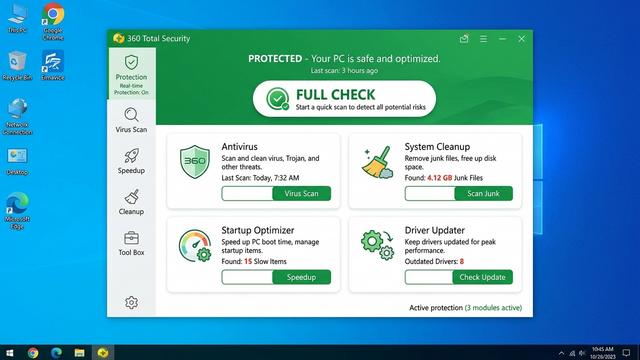
Among all free antivirus options available for Windows, 360 Total Security stands apart by offering something genuinely rare in the free security market: a comprehensive, multi-functional security suite that goes far beyond basic malware scanning—at absolutely no cost.
Core Advantages:
- Multi-Engine Antivirus Protection: 360 Total Security integrates multiple detection engines—including its proprietary 360 Cloud Engine, the QEX heuristic engine, and optional integration with Bitdefender and Avira engines—providing layered threat detection that rivals many paid solutions.
- System Cleanup: An integrated junk file cleaner removes temporary files, browser caches, system logs, and other digital clutter that accumulates over time and degrades Windows performance.
- Startup Optimizer: Identifies and manages programs that automatically launch at Windows startup, reducing boot times and freeing up system resources from day one.
- Driver Updater: Automatically identifies outdated or missing device drivers—a common but often overlooked security vulnerability—and facilitates updates to keep the system current.
- Sandbox Technology: Allows users to run suspicious files in an isolated virtual environment before executing them on the live system, a feature rarely found in free security suites.
Performance Philosophy: 360 Total Security is engineered to be exceptionally lightweight. Its cloud-assisted scanning architecture minimizes local CPU and RAM consumption, while its active cleanup and optimization modules leave the host system measurably faster after installation. This dual benefit—stronger security and better performance—addresses the two most common concerns Windows users express about antivirus software simultaneously.
Independent Lab Performance: 360 Total Security has participated in AV-TEST and AV-Comparatives evaluations, achieving competitive protection scores that validate its core detection capabilities. According to AV-TEST assessments conducted in 2025, 360 Total Security demonstrated strong real-world protection rates, confirming that its free offering delivers genuine, tested security rather than merely the appearance of it.
For users seeking the best possible free security solution for Windows—one that actively improves their system rather than merely monitoring it—360 Total Security represents the most compelling value proposition in the free antivirus category. Download 360 Total Security free today and experience the difference a comprehensive free suite makes.
Making Your Decision: A Comparative Guide to Top Choices
With a clear understanding of the threat landscape, evaluation criteria, and the strengths of each major contender, the final decision comes down to aligning a solution’s core strengths with your specific user profile, priorities, and budget. The following comparison and tailored recommendations are designed to make that alignment straightforward.
Side-by-Side Comparison of Key Contenders
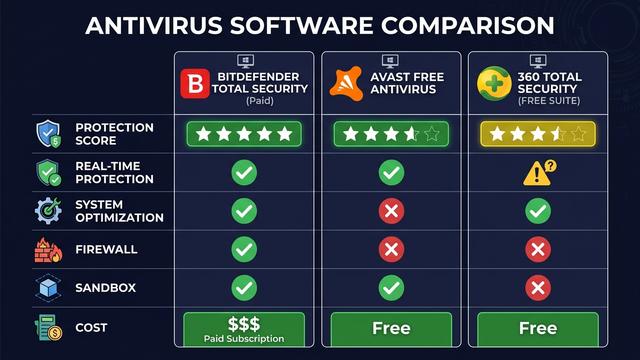
| Criterion | Bitdefender Total Security (Paid) | Avast Free Antivirus (Free) | 360 Total Security (Free Suite) |
|---|---|---|---|
| Core Antivirus Protection Score | ⭐⭐⭐⭐⭐ (6/6 AV-TEST) | ⭐⭐⭐⭐ (5.5–6/6 AV-TEST) | ⭐⭐⭐⭐ (5.5/6 AV-TEST) |
| Real-Time Protection | ✅ Advanced (Behavioral) | ✅ Yes | ✅ Yes |
| System Optimization Tools | ⚠️ Basic Only | ⚠️ Basic Only | ✅ Comprehensive (Cleanup, Startup, Driver) |
| Firewall | ✅ Advanced | ⚠️ Basic (Paid for advanced) | ✅ Yes |
| Sandbox | ✅ Yes | ❌ No (Free tier) | ✅ Yes |
| VPN / Extra Features | ✅ VPN, Password Manager, Webcam Protection | ⚠️ Limited (Paid upgrade required) | ⚠️ Core suite features included |
| Annual Cost | $39–$89+ | Free | Free |
Tailored Recommendations for Different User Profiles
There is no single “best” antivirus for every user. The right choice depends on your specific situation, priorities, and resources:
- For the Everyday User Seeking Value and Performance: 360 Total Security is the standout recommendation. It delivers robust, lab-tested real-time antivirus protection entirely free of charge, while its integrated System Cleanup, Startup Optimizer, and Driver Updater actively solve the most common Windows performance complaints. For users who want meaningful security without spending anything and want their PC to run better in the process, this is the most compelling all-around choice available.
- For the Security-Maximizing User with Budget: A premium suite—specifically Bitdefender Total Security or Norton 360—is the optimal investment. These products consistently achieve the highest possible protection scores in independent testing, backed by the most extensive feature ecosystems including VPN, cloud backup, password management, and advanced behavioral threat defense. If maximum protection and comprehensive extras are the priority and cost is not a constraint, this tier delivers the highest ceiling.
- For the Tech-Savvy User Who Wants Granular Control: Kaspersky Total Security provides the deepest level of customizable security settings, detailed logging, and fine-grained rule management available in a consumer product. IT professionals and advanced users who want to configure every aspect of their security posture will find Kaspersky uniquely accommodating—with the caveat of reviewing current regulatory guidance in their region.
- Best Complementary Tool for All Profiles: Regardless of which primary antivirus you choose, adding Malwarebytes Free as a monthly on-demand scanner is a low-effort, high-value addition. Its specialized detection of PUPs, adware, and browser hijackers complements any primary real-time engine, providing an additional layer of assurance that nothing has slipped through.
The bottom line: your Windows security strategy should be as dynamic and layered as the threats it faces. Start with a strong primary solution—and for most users, 360 Total Security’s free comprehensive suite is the most accessible and feature-rich starting point available—then build outward from there based on your evolving needs.
Frequently Asked Questions
Is Windows Defender sufficient as a standalone antivirus solution?
Windows Defender provides a useful baseline of protection and has improved significantly in recent years. However, it has documented limitations including slower zero-day response times, absence of advanced features like sandboxing and system optimization, and no dedicated web protection or network monitoring tools. For users with sensitive data, remote work requirements, or high security standards, supplementing or replacing Defender with a dedicated third-party solution is strongly advisable.
What do AV-TEST and AV-Comparatives scores actually mean?
AV-TEST scores antivirus products on a 0–6 scale across Protection, Performance, and Usability. A score of 6/6 in Protection means the product detected 100% of the malware samples tested. AV-Comparatives uses a similar methodology with its Real-World Protection Tests and Performance Tests. Both organizations are independent, non-commercial, and widely regarded as the most credible benchmarks in the industry. Always look for sustained high scores across multiple testing periods rather than a single result.
Can a free antivirus like 360 Total Security really compete with paid solutions?
Yes—in terms of core antivirus protection, 360 Total Security has demonstrated competitive performance in independent lab evaluations, achieving scores comparable to many paid products. Where free solutions typically differ from premium suites is in the breadth of extra features: paid products often include unlimited VPN, cloud backup, and dedicated customer support. However, for core protection combined with system optimization tools, 360 Total Security’s free offering is genuinely exceptional and more feature-rich than most competing free products.
Should I run two antivirus programs at the same time?
Running two real-time antivirus engines simultaneously is generally not recommended, as they can conflict with each other, cause system instability, and degrade performance significantly. The recommended approach is to choose one primary real-time antivirus solution and supplement it with an on-demand-only scanner like Malwarebytes Free, which does not run continuously in the background and therefore does not conflict with your primary engine.
How often should I perform a full system antivirus scan?
For most users, a weekly scheduled full scan is sufficient when combined with continuous real-time protection. Users who frequently download files from the internet, use USB drives from unknown sources, or work in high-risk environments may benefit from more frequent scanning. Additionally, running an on-demand scan with Malwarebytes Free on a monthly basis adds an extra layer of assurance. Always ensure your antivirus definitions are set to update automatically so real-time protection remains current between scheduled scans.
About the Author: This article was researched and written by a Senior Cybersecurity Technical Writer with over a decade of experience covering endpoint security, threat intelligence, and consumer privacy technology. Specializing in translating complex security concepts into actionable guidance for both everyday users and IT professionals, the author draws on independent lab data, hands-on product evaluation, and ongoing analysis of the global threat landscape to deliver content that is both technically rigorous and practically useful.
Learn more about 360 Total Security