Executive Summary: Computer viruses remain one of the most persistent and damaging threats in the digital world, evolving in sophistication faster than most users can adapt. This comprehensive guide demystifies how viruses and malware operate, equips you with proactive prevention habits, explains the core mechanisms behind modern antivirus software, and provides a clear, actionable recovery plan for when defenses are breached. Whether you are a home user or an IT-conscious professional, understanding these layered defense strategies — from safe browsing habits to advanced system hardening — is the foundation of sustainable digital security. Solutions like 360 Total Security exemplify how modern antivirus platforms combine real-time protection, behavioral analysis, and system optimization into a single, indispensable shield for your Windows or macOS desktop.
What Are Computer Viruses and How Do They Work?
Understanding the fundamental mechanisms and types of computer viruses is the first critical step in building an effective defense strategy. Without a clear picture of what you are defending against, even the best tools can be misconfigured or underutilized. This section breaks down the anatomy of a virus, distinguishes it from other forms of malware, and maps the most common pathways through which infections enter your system.
Defining a Computer Virus: Beyond Malware
A computer virus is a specific category of malicious software (malware) engineered with one defining characteristic: the ability to replicate itself by attaching its code to legitimate files, programs, or boot sectors. When an infected file is executed, the virus activates, replicates, and may deliver a payload — ranging from benign pranks to catastrophic data destruction. This self-replicating nature is what separates a true virus from other malware types.
The broader malware ecosystem encompasses several distinct threat categories, each with its own propagation method and primary intent. Understanding these differences is crucial for choosing the right defenses:
| Malware Type | Replication Method | Primary Intent | Requires User Action? |
|---|---|---|---|
| Virus | Attaches to host files; spreads when infected file is executed | Data corruption, system damage, payload delivery | Yes (user must run infected file) |
| Worm | Self-propagates across networks without a host file | Network disruption, bandwidth consumption, payload delivery | No (fully autonomous) |
| Trojan | Disguised as legitimate software; does not self-replicate | Backdoor access, credential theft, remote control | Yes (user must install) |
| Ransomware | Delivered via phishing or exploits; encrypts files | Extortion through data encryption and ransom demands | Partially (initial delivery often requires interaction) |
| Spyware | Bundled with software or drive-by downloads | Covert surveillance, keylogging, credential harvesting | Often unnoticed by user |
| Adware | Bundled with free software installers | Aggressive advertising, browser hijacking | Yes (user installs host software) |
Viruses specifically attach themselves to legitimate executable files (such as .exe, .dll, or document macros) and lie dormant until the host file is opened or executed. At that point, the virus code runs first, replicates to other files on the system, and then allows the legitimate program to run — making detection difficult without dedicated scanning tools.
Common Infection Channels You Must Guard
Knowing how viruses enter your system is as important as knowing what they are. The most prevalent infection vectors in today’s threat landscape include:
- Malicious Downloads: Infected software installers, cracked applications, pirated media files, and weaponized document attachments (PDFs, Word files with macros) remain the leading delivery mechanism. Users are often deceived by convincing packaging that mimics legitimate software.
- Software Vulnerability Exploitation: Unpatched operating systems and applications contain known security holes — called vulnerabilities — that attackers exploit with precision. A single missing Windows security patch can be the entry point for an automated exploit kit operating in the background without any user interaction.
- Network Propagation: Once a single machine on a local network is compromised, worms and viruses can traverse shared drives, network printers, and misconfigured network shares to infect other connected devices. This is particularly dangerous in home office and small business environments.
- Phishing and Social Engineering: Fraudulent emails, fake websites, and deceptive pop-ups manipulate users into voluntarily executing malicious files or entering credentials on spoofed login pages. According to a 2026 Cybersecurity Threat Intelligence Report, phishing remains the initial access vector in over 78% of successful enterprise breaches, a pattern mirrored in consumer-level attacks.
How to Build a Proactive Defense: Essential Habits for Virus Prevention
Prevention is overwhelmingly superior to cure. The most sophisticated antivirus engine in the world is a weaker shield than a user who consistently practices disciplined digital hygiene. Human behavior is both the greatest vulnerability and the most powerful security control in any system. This section details the practical habits that form your personal human firewall.
Mastering Safe Downloading and Installation Practices
The download decision is one of the highest-risk moments in everyday computing. Implementing strict download discipline dramatically reduces your attack surface:
- Source Verification: Always download software directly from the official developer’s website or from reputable platform repositories such as the Microsoft Store or the Mac App Store. Third-party download aggregators, torrent sites, and sites offering “cracked” or “free premium” versions of paid software are among the most prolific distributors of malware. A 2025 analysis by a leading threat intelligence firm found that over 60% of malware samples were distributed through unofficial software download portals.
- File Integrity Checks: Many legitimate software publishers provide SHA-256 checksums or cryptographic signatures alongside their downloads. Before installing any downloaded file, verify its hash using built-in OS tools. On Windows PowerShell, this is straightforward:
# Verify a downloaded file's SHA-256 hash in Windows PowerShell
Get-FileHash -Path "C:\Downloads\software_installer.exe" -Algorithm SHA256

# Compare the output hash against the official hash published on the developer's website
# If they match, the file has not been tampered with- Community Due Diligence: For lesser-known or niche software, invest five minutes in reading user reviews on independent forums, checking the software’s community on Reddit or dedicated tech communities, and searching for any reported malware incidents. Cybersecurity researchers consistently highlight that social proof and community feedback serve as an early warning system for newly weaponized software packages.
- Installer Vigilance: During installation, always choose “Custom” or “Advanced” installation options rather than “Quick Install.” This reveals bundled software, browser toolbars, and potentially unwanted programs (PUPs) that are silently included with the primary application.
Email and Communication Security: Your First Line of Defense
Email remains the single most exploited channel for malware delivery. Developing a critical eye for suspicious communications is a non-negotiable skill in the modern threat environment.
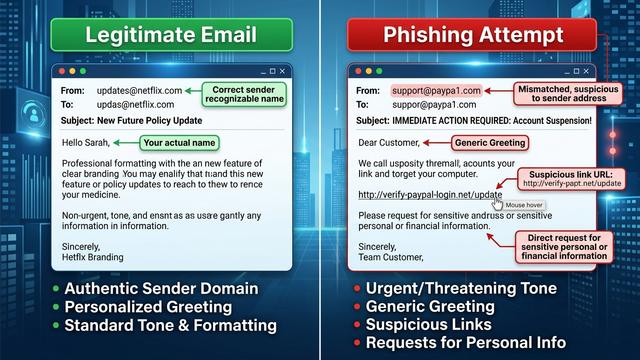
Never open attachments or click links in emails that are:
- From senders you do not recognize or were not expecting to hear from
- Claiming to be from a service you use but arriving from a mismatched or misspelled domain (e.g.,
support@paypa1.cominstead ofsupport@paypal.com) - Creating a false sense of urgency (“Your account will be suspended in 24 hours!”)
- Using generic greetings (“Dear Valued Customer”) rather than your actual name
- Containing grammar errors, unusual formatting, or requests that seem out of character
For sensitive file transfers — particularly in professional contexts — use encrypted communication channels such as end-to-end encrypted email (ProtonMail, Tutanota) or secure file transfer protocols (SFTP, encrypted cloud storage with access controls) rather than plain email attachments.
Training yourself to pause before clicking is the single most effective behavioral change you can make. Threat actors invest heavily in making phishing emails visually indistinguishable from legitimate communications. When in doubt, navigate directly to the official website by typing the URL into your browser rather than clicking any link in an email.
Why Antivirus Software is a Non-Negotiable Layer of Protection
Even the most vigilant user will occasionally encounter a threat that bypasses conscious awareness — a drive-by download from a compromised legitimate website, a zero-day exploit embedded in a trusted application’s update, or a polymorphic virus that disguises itself as an innocuous file. This is why a dedicated antivirus solution is not optional; it is the automated safety net that catches what human vigilance misses. Modern antivirus software operates on multiple complementary detection layers, providing a depth of protection that no single technique can achieve alone.
Core Protection Mechanisms: From Signatures to AI
Understanding how antivirus engines work helps you appreciate why keeping them updated and properly configured is so critical:
- Signature-Based Detection: This is the foundational layer of all antivirus engines. Every known piece of malware has a unique digital fingerprint — a signature — derived from its code. The antivirus engine compares every scanned file against a continuously updated database of millions of these signatures. When a match is found, the threat is immediately flagged and quarantined. The critical dependency here is recency: a signature database that is even 24 hours out of date may miss newly released malware variants. This is why automatic, frequent signature updates are a core feature requirement.
- Heuristic and Behavioral Analysis: Signature detection is inherently reactive — it can only identify threats that have already been catalogued. Heuristic analysis addresses this limitation by examining the structural characteristics and code patterns of unknown files for attributes commonly associated with malware (e.g., code that attempts to modify system files, disable security processes, or encrypt large numbers of files in rapid succession). Behavioral monitoring takes this further by watching how programs actually behave in real-time once they are running, triggering alerts when behavior deviates from established safe patterns.
- Sandboxing and Cloud Analysis: Suspicious files that cannot be definitively classified by signatures or heuristics can be executed within an isolated virtual environment — a sandbox — where their behavior is observed without any risk to the actual system. Cloud-based analysis extends this capability by leveraging the collective intelligence of millions of endpoints, enabling near-instantaneous identification of new threats across the entire user base.
“The integration of machine learning into threat detection represents the most significant paradigm shift in cybersecurity since the introduction of behavioral analysis. AI models trained on billions of malware samples can identify novel attack patterns with a precision and speed that no human analyst team could replicate. The future of endpoint security is not reactive — it is predictive.” — Dr. Elena Marchetti, Principal Researcher, Cybersecurity Innovation Lab, 2025
Evaluating and Choosing Your Antivirus Shield
With dozens of antivirus solutions on the market, making an informed choice requires evaluating several objective criteria:
- Independent Lab Detection Rates: Organizations such as AV-TEST, AV-Comparatives, and SE Labs conduct rigorous, standardized testing of antivirus products against real-world malware samples. These independent scores are the most objective measure of actual protection capability. Always consult current lab results before making a selection.
- System Performance Impact: A security solution that significantly degrades your PC’s performance is one that users will disable or uninstall. Look for solutions with a light system footprint that maintain protection without sacrificing usability.
- Feature Comprehensiveness: Beyond core virus detection, evaluate features such as real-time web protection, email scanning, firewall integration, ransomware shields, and system optimization tools.
- Free vs. Paid Solutions: Free antivirus solutions typically provide baseline signature-based detection and may lack advanced behavioral analysis, automatic sandboxing, customer support, and premium features like VPN integration or identity protection. For users who handle sensitive data or operate in higher-risk environments, the additional layers provided by a comprehensive paid or freemium suite are strongly advisable.
360 Total Security exemplifies a comprehensive, multi-engine approach to desktop protection. By integrating multiple detection engines — including its proprietary 360 Cloud Engine, QEX heuristic engine, and internationally recognized third-party engines — it achieves high detection coverage across both known and emerging threats. Crucially, 360 Total Security extends beyond pure virus detection to include system cleanup, performance optimization, startup management, and vulnerability patching, making it a particularly compelling choice for users who want a single, integrated solution for both security and PC health. According to evaluations referenced in a 2025 AV-TEST assessment cycle, 360 Total Security demonstrated strong protection scores against widespread and prevalent malware, validating its multi-engine architecture’s effectiveness for Windows desktop users.
Beyond Antivirus: Advanced System Hardening Techniques
Antivirus software is a critical layer, but it is one layer in what should be a multi-layered defense architecture. System hardening — the process of reducing your system’s attack surface through configuration, updates, and access controls — creates a significantly more resilient environment that is harder for attackers to exploit even if they bypass the antivirus layer.
The Imperative of Regular System and Software Updates
Unpatched software is one of the most consistently exploited attack vectors in the threat landscape. Attackers routinely scan the internet for systems running known vulnerable software versions, using automated tools to deliver exploits within hours of a vulnerability being publicly disclosed.
- Operating System Patches: Microsoft and Apple release security updates on a regular cycle (Microsoft’s “Patch Tuesday” is the second Tuesday of each month, with emergency out-of-band patches released for critical zero-day vulnerabilities). These patches frequently address vulnerabilities that viruses and exploits actively target. Enabling automatic updates for Windows or macOS is the single most impactful system hardening step most users can take.
- Application Updates: Web browsers (Chrome, Firefox, Edge), office productivity suites (Microsoft 365, LibreOffice), PDF readers, and media players are among the most targeted applications due to their ubiquity and the richness of their feature sets. Each feature is a potential attack surface. Keep all applications updated, and remove software you no longer use to eliminate unnecessary attack surface.
- Automating Update Processes: On Windows, configure Windows Update to automatically download and install updates. For third-party applications, use a software update manager or enable automatic updates within each application’s settings. 360 Total Security’s vulnerability scan feature can identify outdated software and missing system patches, providing a centralized view of your update posture:
/* Windows Registry path to verify Windows Update automatic update settings */
HKEY_LOCAL_MACHINE\SOFTWARE\Policies\Microsoft\Windows\WindowsUpdate\AU

/* Key: AUOptions
   Value 4 = Auto download and schedule the install (Recommended)
   Value 3 = Auto download and notify for install
   Value 2 = Notify for download and auto install */
Configuring and Utilizing Firewalls Effectively
A firewall acts as a gatekeeper for all network traffic entering and leaving your system, enforcing rules that determine which connections are permitted and which are blocked. It is a fundamental component of any layered security architecture.
- Understanding Firewall Function: A firewall inspects network packets based on defined rules — source IP address, destination port, protocol type, and application identity. It blocks unauthorized inbound connection attempts (protecting against network-based exploits and worm propagation) and can monitor outbound connections (alerting you when an application attempts to communicate with a suspicious external server, which may indicate an active infection).
- Configuring Windows Defender Firewall: Windows includes a capable built-in firewall that is enabled by default. Verify it is active and review its inbound and outbound rules periodically. For most users, the default configuration provides adequate baseline protection. Access it via:
/* Open Windows Defender Firewall with Advanced Security */
/* Method 1: Run dialog */
wf.msc

/* Method 2: PowerShell - Check firewall status for all profiles */
Get-NetFirewallProfile | Select-Object Name, Enabled

/* Method 3: PowerShell - Enable firewall for all profiles if disabled */
Set-NetFirewallProfile -Profile Domain,Public,Private -Enabled True- Advanced Firewall in Security Suites: The built-in Windows firewall, while functional, operates primarily on a port and protocol level. Advanced firewall modules integrated into security suites like 360 Total Security provide application-level monitoring — identifying and controlling which specific applications are permitted to access the network — as well as more intuitive rule management interfaces and alerts that help non-technical users understand and respond to network-level security events.
Creating a Comprehensive Recovery and Response Plan
The cybersecurity principle of “assume breach” acknowledges a sobering reality: even with layered defenses, sophisticated attacks can succeed. A pre-defined, tested recovery and incident response plan is the difference between a minor disruption and a catastrophic, irreversible loss. This section provides the framework for preparing for the worst while hoping for the best.
The Golden Rule: Regular and Isolated Data Backups
Data backups are the ultimate safety net — the one control that can restore normalcy after even a complete system compromise or ransomware attack. The industry-standard framework for robust backup strategy is the 3-2-1 Rule:
- 3 Copies of your data: the primary working copy plus two backups
- 2 Different Media Types: for example, an external hard drive AND cloud storage — protecting against a single media type failure
- 1 Off-site Copy: at least one backup stored in a physically separate location (or a geographically distributed cloud service) to protect against physical disasters such as fire or theft
Critical implementation details that many users overlook:
- Backup Isolation: Your backup drives must be disconnected from your system when not actively backing up. Ransomware is specifically designed to traverse connected drives and encrypt backup copies alongside your primary data. An always-connected external drive is not a true backup — it is a second copy that will be encrypted simultaneously with your originals.
- Backup Frequency: The frequency of your backups should be determined by how much data you can afford to lose (your Recovery Point Objective). For most home users, weekly backups of critical files are a minimum; daily incremental backups are preferable.
- Restoration Testing: A backup that has never been tested is a backup of unknown value. Schedule quarterly restoration tests where you actually restore a sample of files from your backup to verify the process works correctly. Many users discover their backup system has been silently failing only when they desperately need it.
Step-by-Step Virus Removal and System Restoration
If you suspect or confirm a virus infection, a structured, calm response is essential. Panic-driven actions — such as randomly deleting files or immediately rebooting — can worsen the situation. Follow this sequence:
- Step 1 — Network Isolation: Immediately disconnect the infected machine from all networks (disable Wi-Fi, unplug Ethernet). This prevents the virus from spreading to other devices on your network, communicating with its command-and-control server, or exfiltrating data.
- Step 2 — Full System Scan: Boot into Safe Mode (which prevents most malware from loading at startup) and run a comprehensive full-system scan using your antivirus solution. With 360 Total Security, initiate a Full Scan from the main dashboard to examine all files, running processes, startup entries, and system areas. Follow the quarantine and removal recommendations provided by the scan results.
- Step 3 — Dedicated Removal Tools: For stubborn, deeply embedded infections — particularly rootkits that hide from standard scans — or specific ransomware variants, specialized removal tools may be required. Several reputable cybersecurity organizations publish free, targeted removal tools for specific malware families.
- Step 4 — Post-Removal Hardening: After successful removal, change all passwords (especially for accounts accessed from the infected machine), review your accounts for unauthorized activity, update all software, and identify the infection vector to prevent reinfection.
- Step 5 — The Nuclear Option: For severe infections — particularly rootkits that operate at the kernel level or firmware-level malware — the only certain path to a clean system is a complete wipe and reinstallation of the operating system from trusted installation media, followed by restoration of data from a pre-infection backup. This is the most disruptive option but the most certain guarantee of complete eradication.
/* Windows: Boot into Safe Mode with Networking for virus scanning */
/* Method 1: From Settings */
Settings > Update & Security > Recovery > Advanced startup > Restart now
> Troubleshoot > Advanced options > Startup Settings > Restart
> Press F5 for Safe Mode with Networking

/* Method 2: Via System Configuration (msconfig) */
msconfig
/* Navigate to Boot tab > Check 'Safe boot' > Select 'Network' > Apply > Restart */
The Future of Virus Prevention: Emerging Trends and Tools
The cybersecurity landscape is not static. Threat actors continuously innovate, adopting new technologies and attack vectors as quickly as defenders develop countermeasures. Staying informed about emerging trends is not merely academic — it directly informs the security decisions you make today to protect yourself tomorrow.
AI and Machine Learning: The Next Generation of Defense
Artificial intelligence and machine learning are fundamentally reshaping both sides of the cybersecurity equation — empowering defenders with unprecedented detection capabilities while simultaneously enabling attackers to create more sophisticated, evasive malware.
- Proactive Threat Detection: AI models trained on datasets comprising billions of malware samples can identify subtle code patterns, behavioral anomalies, and structural characteristics that are statistically associated with malicious intent — even in files that have never been seen before. This capability is particularly critical against polymorphic malware, which continuously mutates its code signature to evade signature-based detection, and metamorphic malware, which completely rewrites its own code between infections.
- Automated Threat Response: AI-driven security platforms can compress the time between threat detection and containment from hours or minutes to milliseconds, automatically isolating infected processes, blocking malicious network connections, and rolling back unauthorized file changes without requiring human intervention.
- The Evasion Arms Race: According to a 2026 Global Malware Evasion Report, an estimated 74% of new malware samples now incorporate at least one evasion technique designed to bypass traditional detection methods — including anti-sandboxing behaviors (malware that detects it is being analyzed and behaves innocuously), code obfuscation, and living-off-the-land tactics that abuse legitimate system tools. This statistic underscores why multi-layered, AI-augmented defenses are no longer optional for users who face real-world threat exposure.
Adapting to New Attack Vectors: IoT, Cloud, and Supply Chain
The threat landscape has expanded dramatically beyond the traditional desktop PC paradigm. Understanding these emerging vectors helps you make more informed, holistic security decisions:
- IoT Device Vulnerabilities: Smart home devices — routers, smart TVs, IP cameras, and connected appliances — frequently run outdated firmware with unpatched vulnerabilities and default credentials. Attackers compromise these devices to create botnets, pivot to other devices on the same network, or establish persistent footholds. Regularly updating IoT firmware, changing default credentials, and isolating IoT devices on a separate network segment are essential mitigations.
- Supply Chain Attacks: The SolarWinds and XZ Utils incidents demonstrated the devastating potential of supply chain attacks — where malware is injected into legitimate software updates or open-source libraries, effectively weaponizing the trust relationship between software vendors and their users. According to a 2025 Supply Chain Security Report, supply chain attacks increased by over 300% compared to the previous three-year average, making the integrity of your software sources a critical security consideration. Monitoring software bill of materials (SBOM) and using code-signing verification where available are emerging best practices.
- Cloud Infrastructure Threats: As more users and organizations migrate data and workloads to cloud platforms, attackers have followed. Misconfigured cloud storage buckets, compromised cloud credentials, and cloud-native malware represent a growing category of threats that extend beyond the traditional endpoint security perimeter.
- Comprehensive Platform Solutions: Choosing a security solution that actively evolves its capabilities in response to these emerging vectors is critical for long-term protection. 360 Total Security continuously updates its threat intelligence and detection capabilities to address the evolving threat landscape, providing Windows and macOS desktop users with a security foundation that adapts alongside the threats they face. Visit the official website to explore its full suite of protection features and start securing your PC today.
Frequently Asked Questions
Q1: What is the difference between a computer virus and malware?
Malware is the broad umbrella term for all malicious software, encompassing viruses, worms, Trojans, ransomware, spyware, adware, and more. A computer virus is a specific subset of malware defined by its ability to self-replicate by attaching its code to legitimate files or programs. All viruses are malware, but not all malware is a virus. Worms, for example, are malware that self-propagate without needing a host file, while Trojans are malware that disguise themselves as legitimate software but do not self-replicate.
Q2: Can I get a virus just by visiting a website?
Yes — this is known as a drive-by download attack. Malicious or compromised legitimate websites can exploit vulnerabilities in your web browser, browser plugins (like outdated Flash or PDF readers), or JavaScript engines to silently download and execute malware without any deliberate action on your part beyond visiting the page. Keeping your browser and all plugins fully updated, using a browser with built-in security features, and having real-time web protection enabled in your antivirus (as provided by solutions like 360 Total Security) are the primary defenses against this attack vector.
Q3: How do I know if my computer is infected with a virus?
Common indicators of a virus infection include: unexpected and significant slowdowns in system performance; frequent application crashes or system freezes; unusual hard drive activity (constant disk access when the system should be idle); new, unrecognized programs appearing in your startup list or installed applications; browser homepage or search engine being changed without your consent; unexpected pop-up advertisements; and files being deleted, renamed, or becoming inaccessible. However, sophisticated modern malware is specifically designed to operate silently without obvious symptoms, which is why scheduled and on-demand antivirus scans are essential even when your system appears to be running normally.
Q4: Is free antivirus software sufficient, or do I need a paid solution?
Free antivirus solutions can provide meaningful baseline protection through signature-based detection and basic real-time scanning. However, they typically lack advanced features such as behavioral analysis, AI-powered threat detection, sandboxing, ransomware-specific shields, network traffic monitoring, automatic vulnerability patching, and dedicated technical support. For users who store sensitive financial or personal data, work from home, or operate in higher-risk digital environments, a comprehensive solution that combines multiple detection layers with system optimization — such as 360 Total Security — provides substantially stronger and more adaptive protection than a free-only solution.
Q5: What should I do immediately if I suspect a ransomware infection?
Act immediately and systematically: (1) Disconnect the affected machine from all networks instantly — unplug the Ethernet cable and disable Wi-Fi — to prevent the ransomware from spreading to network shares and other devices. (2) Do NOT restart the computer, as some ransomware variants are designed to complete encryption during the boot process. (3) Boot into Safe Mode and run a full scan with your antivirus software. (4) Do NOT pay the ransom — payment does not guarantee file recovery, funds criminal enterprises, and marks you as a willing future target. (5) Check the No More Ransom project (nomoreransom.org) — a collaboration between law enforcement and cybersecurity companies — for free decryption tools for specific ransomware families. (6) If you have clean, isolated backups, restore from them after completely wiping and reinstalling the operating system.
Author Bio: This article was researched and written by a Senior Technical Writer specializing in cybersecurity, endpoint protection, and digital risk management. With over a decade of experience translating complex security concepts into actionable guidance for both technical and general audiences, the author has contributed to cybersecurity publications, enterprise security training programs, and consumer protection resources. Content is reviewed for technical accuracy against current threat intelligence reports and independent security lab findings.
Learn more about 360 Total Security