Executive Summary: Choosing the right free antivirus software in today’s threat landscape requires more than picking the most recognizable name. This comprehensive guide evaluates what truly makes a free antivirus effective, compares free versus paid security suites, spotlights top contenders including 360 Total Security, and delivers actionable best practices to help you build a resilient security posture — all without spending a dollar. Whether you’re a casual home user or a privacy-conscious professional, understanding these distinctions will help you make an informed, confident decision.
What Makes a Truly Effective Free Antivirus Today?
The era of basic, on-demand virus scanners is over. Today’s threat environment demands that free antivirus solutions deliver real-time protection, minimal system footprint, and a suite of modern security essentials. An effective free antivirus must balance robust threat detection with seamless everyday performance — protecting users without becoming a burden on their system resources.
The Core of Defense: Real-Time Protection vs. Basic Scanning
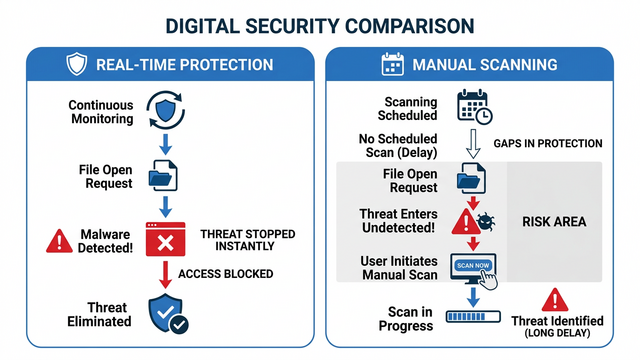
Not all antivirus protection is created equal. The fundamental distinction lies between real-time (on-access) protection and manual (on-demand) scanning. Understanding this difference is critical to evaluating any free antivirus solution.
- Real-Time Protection operates continuously in the background, intercepting threats the moment a malicious file is accessed, downloaded, or executed. It acts as an always-on sentinel, preventing infections before they can take root.
- Manual Scanning only checks for threats when you explicitly initiate a scan. While useful for periodic audits, it offers zero protection against threats that slip in between scans.
The stakes of relying solely on manual scans are alarmingly high. According to a 2025 Cybersecurity Threat Intelligence Report, modern ransomware strains can encrypt thousands of files within under 60 seconds of initial execution. In such a scenario, a manual scanner that you run weekly provides virtually no meaningful defense. Real-time protection is not a luxury feature — it is the foundational requirement of any antivirus worth considering.
Balancing Security with System Performance
One of the most persistent concerns among users considering antivirus software is the fear of performance degradation. The question “will this slow down my PC?” is entirely valid, and the answer depends heavily on the quality of the software’s engineering.
Modern, well-optimized free antivirus programs address this concern through several intelligent design choices:
- Cloud-Based Scanning: Offloading heavy analysis tasks to remote servers rather than processing everything locally, dramatically reducing CPU and RAM consumption.
- Game Mode / Silent Mode: Automatically detecting when a user is in a full-screen application or resource-intensive task and suppressing non-critical notifications and background scans. This ensures zero interruption during gaming, video editing, or presentations.
- Intelligent Scheduling: Running full system scans during periods of low activity, such as when the computer is idle or plugged in overnight.
When evaluating free antivirus software, look for independent benchmark tests that measure CPU usage, memory consumption, and boot time impact both with and without the antivirus active. The best solutions impose a performance overhead that is virtually imperceptible in daily use.
Essential Modern Features Beyond Virus Scanning
A capable free antivirus in today’s environment must extend its protection beyond simple virus signature matching. The following features have transitioned from premium add-ons to essential security components:
- Firewall Integration: A software firewall monitors both inbound and outbound network traffic, blocking unauthorized connection attempts and preventing malicious programs from phoning home to command-and-control servers.
- Browser Protection and Anti-Phishing: Browser extensions or integrated modules that flag malicious URLs, block phishing pages, and warn against dangerous downloads in real time. Given that a significant proportion of malware infections originate from web browsing, this layer of protection is indispensable.
- Automatic Virus Database Updates: Threat landscapes evolve daily, with thousands of new malware variants emerging every hour. An antivirus that doesn’t update its definitions automatically is perpetually behind the curve. Ensure your chosen solution updates silently and frequently without requiring manual intervention.
How Do Free Antiviruses Compare to Paid Security Suites?
The free versus paid antivirus debate is nuanced. For many users, a high-quality free antivirus provides sufficient protection. For others, the advanced capabilities bundled in paid suites represent a worthwhile investment. Understanding the actual differences — rather than marketing claims — empowers you to make the right choice for your specific risk profile.
The Protection Gap: Core vs. Comprehensive Security
Free antivirus solutions typically cover the essential security pillars: real-time malware scanning, basic firewall functionality, and web protection. Paid security suites build upon this foundation with layers of advanced capability that address more sophisticated threat vectors.
| Feature | Free Antivirus | Paid Security Suite |
|---|---|---|
| Real-Time Malware Protection | ✅ Included | ✅ Included (Enhanced) |
| Basic Firewall | ✅ Often Included | ✅ Advanced / Bidirectional |
| Browser / Anti-Phishing Protection | ⚠️ Basic / Limited | ✅ Comprehensive |
| VPN (Secure Browsing) | ❌ Rarely Included | ✅ Often Bundled |
| Password Manager | ❌ Not Included | ✅ Often Bundled |
| Parental Controls | ❌ Not Included | ✅ Included |
| Behavioral Analysis / Sandboxing | ⚠️ Limited | ✅ Advanced |
| System Optimization Tools | ⚠️ Varies by Product | ✅ Comprehensive |
| Dedicated Technical Support | ❌ Community Forums Only | ✅ Priority Support |
Advanced threat prevention techniques such as behavioral analysis (monitoring program behavior for suspicious patterns rather than relying solely on known signatures) and sandboxing (executing suspicious files in an isolated virtual environment before allowing them to run on the real system) are predominantly found in paid tiers. These technologies are particularly effective against zero-day exploits and novel malware variants that haven’t yet been catalogued in virus databases.
The Support and Convenience Factor
Beyond raw security capabilities, the support ecosystem and convenience features represent a meaningful differentiator between free and paid solutions.
- Technical Support: Free antivirus users typically rely on community forums, knowledge base articles, and self-service troubleshooting. Paid subscribers often receive priority email, chat, or phone support — a critical advantage when dealing with an active infection or urgent security incident.
- Automated PC Maintenance: Many paid suites bundle holistic PC care tools including disk cleaners, driver updaters, registry optimizers, and startup managers. These tools address the performance degradation that accumulates over time on Windows systems.
Notably, 360 Total Security uniquely bridges this gap in the free tier. Unlike most free antivirus products that offer bare-bones protection, 360 Total Security bundles powerful system optimization tools — including a Cleanup module, Speed Up utility, and performance analyzer — directly into its free offering. This positions it as a rare all-in-one solution that doesn’t require an upgrade to access meaningful PC maintenance capabilities.
Identifying Who Needs a Paid Suite
The decision to invest in a paid security suite should be driven by your specific risk profile and usage patterns:
- High-Risk Users Who Should Consider Paid: Frequent online shoppers who store payment information, families with young children who need parental controls, professionals handling sensitive client data, frequent travelers using public Wi-Fi networks, and small business owners managing critical operational data.
- Users for Whom Free Is Sufficient: Standard home users with good browsing habits, users who primarily access trusted websites, individuals who maintain regular system backups, and those who are vigilant about software downloads and email attachments.
For the majority of everyday home users, a robust free antivirus with strong real-time protection, regular updates, and good detection rates provides a level of security that is genuinely adequate for their threat exposure.
Top Free Antivirus Contenders: A Detailed Look at 360 Total Security
Among the crowded field of free antivirus solutions, 360 Total Security distinguishes itself through a combination of multi-engine threat detection, cloud-backed intelligence, and an unusually comprehensive set of PC optimization tools — all available at no cost. Here is a detailed examination of what makes it a compelling choice.
Dual-Engine Threat Detection and Cloud Intelligence
360 Total Security’s security architecture is built on a multi-layered detection framework that sets it apart from single-engine competitors:
- 360 Cloud Engine: Leverages a massive, continuously updated cloud-based threat database, enabling near-instant detection of newly emerging malware variants without requiring large local definition downloads.
- Bitdefender Antivirus Engine: Integrates the award-winning Bitdefender engine, consistently rated among the highest performers in independent laboratory tests for detection rates and false positive management.
- QVMII AI Engine: An artificial intelligence-powered engine that uses machine learning to identify previously unknown threats through behavioral pattern analysis.
The cloud-first approach delivers a dual benefit: it reduces the local processing burden on your CPU and RAM while simultaneously ensuring that threat intelligence is always current. Independent security evaluations have consistently recognized 360 Total Security’s detection capabilities, with reviewers at platforms like PCMag and TechRadar noting its strong malware detection rates relative to its zero-cost price point.
Beyond Antivirus: Integrated System Optimization Toolkit
Perhaps the most distinctive aspect of 360 Total Security’s free offering is its integrated suite of PC optimization tools — functionality that most competitors reserve exclusively for paid tiers:
- Cleanup: Scans for and removes junk files, temporary data, browser cache, and redundant system files that accumulate over time and consume valuable disk space.
- Speed Up: Analyzes and manages startup programs, background processes, and services that unnecessarily consume system resources, resulting in faster boot times and improved responsiveness.
- Disk Analysis: Provides a visual breakdown of storage usage, helping users identify large files and folders consuming disproportionate space.
- Network Protection: Monitors network connections for suspicious activity and unauthorized access attempts.
- Driver Updater: Identifies outdated device drivers and facilitates updates, which can resolve compatibility issues and close security vulnerabilities in hardware-level software.
User Experience and Considerations
A balanced assessment of 360 Total Security requires acknowledging both its strengths and its limitations:
- Pros:
- Exceptionally comprehensive free feature set that rivals many paid solutions
- Strong multi-engine detection rates validated by independent testing
- Genuinely useful optimization tools that improve everyday PC performance
- Relatively lightweight footprint due to cloud-based processing architecture
- Regular updates ensuring current threat database coverage
- Cons:
- The interface may occasionally surface promotional elements or upgrade prompts for the paid Premium tier
- Certain advanced features, such as enhanced ransomware protection and premium technical support, are gated behind the paid version
- Users in some regions may notice slightly different feature availability
Ideal User Profile: 360 Total Security is particularly well-suited for users who want a single, unified application that handles both their security and PC maintenance needs without cost. It eliminates the need to install separate cleanup utilities, startup managers, and antivirus programs — consolidating essential PC care into one cohesive, free platform.
Ready to experience comprehensive free protection? Download 360 Total Security from the official website and start protecting and optimizing your PC today.
Other Notable Free Antivirus Options and Their Specialties
While 360 Total Security represents a strong all-in-one choice, the free antivirus ecosystem includes several other reputable options, each with distinct strengths that cater to specific user preferences and needs.
The Established Giants: Avast and AVG Free Antivirus
Avast Free Antivirus and AVG AntiVirus Free are two of the most widely recognized names in the free security space, each boasting hundreds of millions of active users globally.
- Core Strengths: Both offer solid real-time malware protection, behavior shields that monitor program activity for suspicious patterns, and network scanning features that identify vulnerabilities in your Wi-Fi connection. Their large user bases contribute to rapid threat intelligence updates through community-sourced data.
- Feature-Rich Free Tiers: Beyond basic scanning, both include web shields for blocking malicious URLs, email protection modules, and performance scanning utilities in their free versions.
- Shared Technology: It’s worth noting that Avast acquired AVG in 2016, meaning both products now share the same underlying detection engine and threat intelligence infrastructure. Users choosing between them are largely selecting based on interface preference rather than fundamentally different protection capabilities.
- Consideration: Both have faced scrutiny in the past regarding data collection practices in their free tiers. Users with strong privacy concerns should review their respective privacy policies before installation.
The Built-in Option: Microsoft Windows Defender
For Windows 10 and Windows 11 users, a fully functional antivirus solution is already installed and active by default: Microsoft Defender Antivirus (formerly Windows Defender).
- Key Advantages:
- Seamless integration with the Windows operating system — zero installation required
- Extremely low system impact due to deep OS-level optimization
- Automatic updates delivered through Windows Update, ensuring consistent currency
- No upsell prompts, promotional content, or third-party bundleware
- Limitations:
- Historically perceived as less aggressive in detection than specialized third-party solutions, though this gap has narrowed considerably in recent years
- Lacks the additional PC optimization, cleanup, and performance tools offered by dedicated third-party solutions
- Best results require pairing with strong user security habits
According to AV-TEST Institute’s 2025 evaluation of Windows Defender (Microsoft Defender Antivirus), the built-in solution achieved a 99.7% detection rate against widespread and prevalent malware, demonstrating that it has matured into a genuinely capable baseline protection solution. For users who prioritize simplicity and zero friction, Windows Defender is a legitimate choice — particularly when combined with a complementary on-demand scanner.
Specialized Tools: Malwarebytes Free (The On-Demand Scanner)
Malwarebytes Free occupies a unique and valuable niche in the free security ecosystem: it is not a traditional antivirus replacement, but rather a highly effective specialized remediation tool.
- Core Strength: Malwarebytes Free excels at detecting and removing persistent, deeply embedded malware — including adware, spyware, potentially unwanted programs (PUPs), and rootkits — that conventional antivirus solutions sometimes miss. Its detection algorithms are specifically tuned for these categories of threats.
- Critical Limitation: The free version of Malwarebytes does not provide real-time, continuous background protection. It functions exclusively as an on-demand scanner that you run manually when you suspect an issue or as part of a scheduled maintenance routine.
- Recommended Use Case: Malwarebytes Free is ideally deployed as a secondary, complementary tool alongside a primary real-time antivirus. For example, running a monthly deep scan with Malwarebytes alongside 360 Total Security or Windows Defender creates a layered defense that combines continuous real-time protection with periodic deep remediation scanning — a combination that addresses a broader spectrum of threat scenarios than either tool alone.
Implementing and Maximizing Your Free Antivirus Protection
Installing a free antivirus is the essential first step — but it is only the beginning. The difference between users who get infected and those who don’t often comes down not to which antivirus they chose, but how they configured it, maintained it, and paired it with sound security habits. This section provides a practical roadmap for building a truly resilient security posture.
Optimal Installation and Configuration Steps
The installation process itself presents security risks that many users overlook. Follow these steps to ensure a clean, properly configured setup:
Step 1: Download Only from Official Sources
Always download antivirus software directly from the vendor’s official website. Third-party download sites frequently bundle legitimate software with adware, toolbars, or even malware. For 360 Total Security, the only trusted source is the official 360 Total Security website.
Step 2: Verify the Download Integrity
Where available, verify the SHA-256 hash of the downloaded installer against the value published on the official website to confirm the file hasn’t been tampered with.
Step 3: Post-Installation Configuration Checklist
POST-INSTALLATION SECURITY CONFIGURATION CHECKLIST
====================================================
[ ] Real-Time Protection: ENABLED
[ ] Automatic Virus Database Updates: ENABLED (Frequency: Daily or Continuous)
[ ] Scheduled Quick Scan: ENABLED (Recommended: Daily, low-activity period)
[ ] Scheduled Full System Scan: ENABLED (Recommended: Weekly)
[ ] Web/Browser Protection Module: ENABLED
[ ] Firewall: ENABLED and configured
[ ] Game/Silent Mode: CONFIGURED for primary applications
[ ] Notifications: Configured to alert on threats, suppress routine updates
====================================================
Step 4: Remove Conflicting Software
Running multiple real-time antivirus programs simultaneously causes conflicts, degrades performance, and can actually reduce your protection. Ensure any previously installed antivirus is fully uninstalled before activating a new solution’s real-time protection. Windows Defender automatically disables itself when a third-party antivirus with real-time protection is installed.
Building a Security Mindset: Beyond the Software
No antivirus software, regardless of how sophisticated, can compensate for risky user behavior. The most secure users combine technical tools with a proactive security mindset:
- Keep Your Operating System Updated: The majority of successful malware attacks exploit known vulnerabilities in operating systems and applications for which patches already exist. Enabling automatic Windows Updates closes these attack vectors promptly. According to a 2026 Verizon Data Breach Investigations Report projection, unpatched vulnerabilities remain one of the top three initial access vectors for attackers.
- Practice Safe Browsing: Be critically skeptical of unsolicited email attachments and links, even from known contacts whose accounts may be compromised. Download software only from official sources or reputable app stores. Use strong, unique passwords for each account, ideally managed through a dedicated password manager.
- Enable Multi-Factor Authentication (MFA): For all accounts that support it, MFA provides a critical secondary barrier that prevents account compromise even if your password is stolen.
- Be Wary of Social Engineering: Phishing attacks have become increasingly sophisticated, mimicking legitimate services with high fidelity. Verify unexpected requests — particularly those involving financial transactions, credential resets, or urgent action — through an independent channel before acting.
Maintaining Your Digital Hygiene
Consistent maintenance practices are what separate a security-conscious user from one who is perpetually vulnerable. Establish these habits as routine:
- Periodic Full System Scans: Even with real-time protection active, schedule monthly full system scans. Real-time protection is optimized for speed and may occasionally miss threats that a thorough, deep scan will catch. Full scans also detect dormant threats that entered the system before your antivirus was installed.
- Leverage Optimization Tools for Security: Regularly using the cleanup and optimization features in tools like 360 Total Security provides a security benefit beyond mere performance improvement. Removing junk files, clearing temporary directories, and cleaning browser caches eliminates potential hiding spots for malware and reduces the attack surface of your system. A lean, well-maintained system is inherently harder to exploit than a cluttered one.
- Maintain Regular Backups: Follow the 3-2-1 backup rule: maintain three copies of important data, on two different media types, with one copy stored off-site or in the cloud. This is your ultimate insurance against ransomware — if your files are encrypted, you can restore from backup without paying a ransom.
- Know When to Escalate: If your antivirus detects threats repeatedly, if your system behaves erratically despite scans showing clean results, or if you suspect a sophisticated infection, don’t hesitate to seek professional assistance. Post in reputable security forums such as BleepingComputer, or consult a professional cybersecurity service. Persistent threats may require specialized removal tools or expert intervention.
Frequently Asked Questions
Is a free antivirus really enough to protect my PC?
For most standard home users with good browsing habits, a high-quality free antivirus with robust real-time protection is genuinely sufficient. Solutions like 360 Total Security provide multi-engine detection, cloud-backed intelligence, and web protection that address the vast majority of threats encountered in everyday computing. However, users with elevated risk profiles — such as those handling sensitive financial data, families with children, or frequent users of public Wi-Fi — should consider whether the additional features of a paid suite are warranted for their specific situation.
Can I run two antivirus programs at the same time for better protection?
No — running two real-time antivirus programs simultaneously is strongly discouraged. The two programs will conflict with each other, each attempting to intercept the same file operations, resulting in severe performance degradation, system instability, and paradoxically reduced protection. The one valid exception is using a dedicated on-demand only scanner like Malwarebytes Free alongside a primary real-time antivirus, since Malwarebytes Free does not run a background protection process.
How often should I update my antivirus and run scans?
Your antivirus virus database should update automatically and continuously — ideally multiple times per day. This should be configured to happen without requiring manual action. For scans, a daily quick scan and a weekly full system scan represent a solid baseline. Many users configure their antivirus to run full scans overnight or during other periods of low system activity to avoid any performance impact during active use.
What is the difference between a virus, malware, and ransomware?
Malware is the broad umbrella term for any malicious software, including viruses, ransomware, spyware, adware, trojans, and worms. A virus is a specific type of malware that replicates by attaching itself to legitimate files. Ransomware is a particularly destructive category of malware that encrypts the victim’s files and demands a payment (ransom) in exchange for the decryption key. Modern antivirus software is designed to detect and block all categories of malware, not just traditional viruses.
Does 360 Total Security work on both Windows and macOS?
Yes. 360 Total Security provides desktop antivirus protection for both Windows and macOS platforms. It is a dedicated desktop/PC security solution. For the most current information on supported operating system versions and to download the appropriate installer for your platform, visit the official 360 Total Security website.
About the Author: This article was written by a Senior Technical Writer specializing in cybersecurity, endpoint protection, and consumer technology. With over a decade of experience evaluating security software, analyzing threat intelligence reports, and translating complex technical concepts into actionable guidance for general audiences, the author has contributed to leading technology publications and security research platforms. Their work focuses on empowering everyday users to make informed decisions about their digital security without requiring a background in information technology.
Learn more about 360 Total Security