Executive Summary: In an increasingly connected digital world, understanding cybersecurity is not just a technical necessity — it is a fundamental ethical responsibility. This comprehensive guide explores how individuals and organizations can protect themselves online through responsible security practices, proactive threat awareness, and trusted antivirus solutions. Whether you are a home user or a business professional, the principles outlined here will help you build a resilient, ethical, and secure digital life.
Why Ethical Cybersecurity Matters More Than Ever
Core Idea: Responsible use of technology is the cornerstone of a safe digital ecosystem. Cybersecurity is not just about defending against attacks — it is about fostering a culture of trust, accountability, and respect for others online.
According to a 2026 Global Cybersecurity Report, cybercrime damages are projected to cost the world over $10.5 trillion annually, making it one of the most significant economic and social challenges of our time. Behind every data breach, ransomware attack, or phishing scam is a real human victim — a person whose privacy, finances, or identity has been compromised.
Ethical cybersecurity means choosing to be part of the solution. It means using your knowledge and tools to protect, not harm. It means understanding that the same technical skills that could be misused can instead be channeled into building safer systems, educating others, and defending communities from genuine threats.
The line between curiosity and harm in the digital world can be thin. Responsible practitioners always ask: Does this action protect people, or does it put them at risk? That question is the foundation of everything covered in this guide.
Understanding the Cybersecurity Threat Landscape
Core Idea: You cannot defend against threats you do not understand. A clear picture of modern cyber threats empowers users to make smarter, safer decisions every day.
Modern cyber threats are diverse, sophisticated, and constantly evolving. Here is a breakdown of the most common threat categories every user should be aware of:
Common Cyber Threat Types
| Threat Type | Description | Common Target | Risk Level |
|---|---|---|---|
| Phishing | Deceptive emails or websites designed to steal credentials | Individuals, Businesses | High |
| Ransomware | Malware that encrypts files and demands payment | Businesses, Hospitals, Governments | Critical |
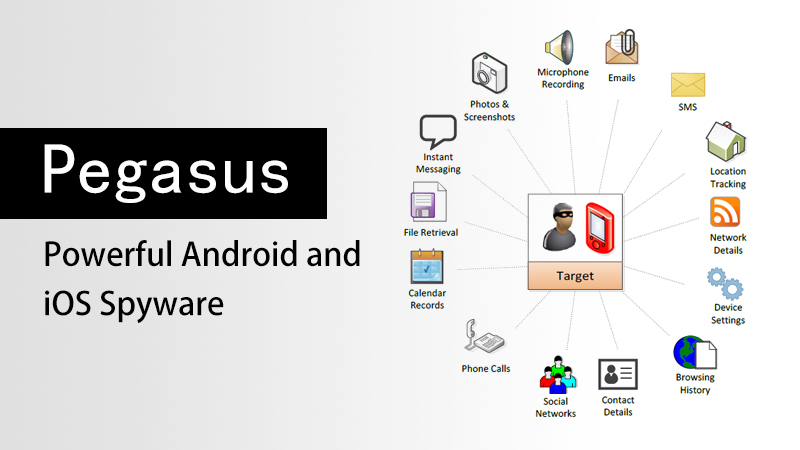
| Spyware | Software that secretly monitors user activity | Individuals, Executives | High |
| Trojans | Malicious programs disguised as legitimate software | Home Users, SMBs | High |
| Social Engineering | Psychological manipulation to gain unauthorized access | All Users | Very High |
| Zero-Day Exploits | Attacks targeting unknown software vulnerabilities | Enterprises, Critical Infrastructure | Critical |
Understanding these threats is the first step toward neutralizing them. Awareness transforms potential victims into informed defenders.
Core Principles of Responsible Cybersecurity
Core Idea: Ethical cybersecurity is built on a set of actionable principles that guide both individual behavior and organizational policy. These principles are universal, practical, and immediately applicable.
1. Practice the Principle of Least Privilege
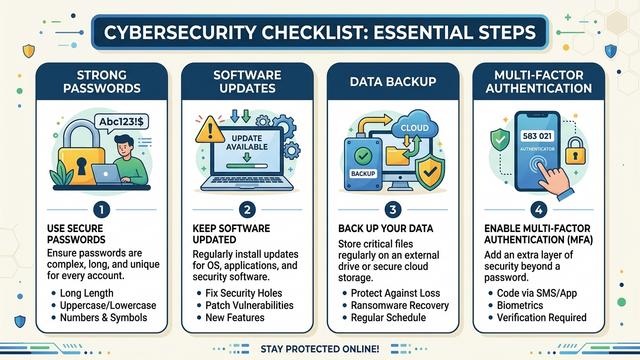
Only grant access to systems, files, and data that is strictly necessary for a given task. This applies to user accounts, software permissions, and network access. Limiting privileges reduces the potential damage of any single compromised account or application.
# Example: Creating a restricted user account on Windows (Command Prompt - Admin)
net user RestrictedUser StrongPassword123! /add
net localgroup Users RestrictedUser /add
# Do NOT add to Administrators group unless absolutely required
2. Keep All Software and Operating Systems Updated
According to a 2025 Vulnerability Intelligence Report, over 60% of successful cyberattacks exploited known vulnerabilities for which patches were already available. Regular updates are one of the simplest and most effective defenses available.
- Enable automatic updates for your operating system (Windows Update, macOS Software Update).
- Regularly update all installed applications, especially browsers and office software.
- Audit and remove software you no longer use — unused applications are silent attack surfaces.
3. Use Strong, Unique Passwords and Multi-Factor Authentication
Weak or reused passwords remain one of the leading causes of account compromise. A strong password policy combined with multi-factor authentication (MFA) dramatically reduces unauthorized access risk.
- Use passwords of at least 16 characters combining letters, numbers, and symbols.
- Never reuse passwords across different services.
- Use a reputable password manager to store credentials securely.
- Enable MFA on all accounts that support it, prioritizing email, banking, and work systems.
4. Back Up Your Data Regularly
Data backups are your last line of defense against ransomware and accidental data loss. Follow the 3-2-1 Backup Rule: keep 3 copies of your data, on 2 different storage types, with 1 copy stored offsite or in the cloud.
# Example: Windows built-in backup via Command Prompt
wbadmin start backup -backupTarget:E: -include:C: -allCritical -quiet
# Replace E: with your external drive letter
5. Be Skeptical — Verify Before You Trust
Social engineering attacks succeed because they exploit human trust. Cultivate a healthy skepticism online:
- Verify the sender of any email requesting sensitive information or urgent action.
- Hover over links before clicking to inspect the actual destination URL.
- When in doubt, contact the organization directly using a known, trusted phone number or website.
- Never download software from unofficial or unverified sources.

How Antivirus Software Fits Into Your Defense Strategy
Core Idea: A reliable antivirus solution is a critical layer in any personal or professional cybersecurity stack. It provides real-time protection, threat detection, and system optimization that manual vigilance alone cannot replicate.
Even the most security-conscious users benefit enormously from a robust antivirus solution running in the background. Modern antivirus software does far more than scan for viruses — it monitors behavior, blocks malicious websites, quarantines suspicious files, and optimizes system performance.
What to Look for in a Desktop Antivirus Solution
- Real-Time Protection: Continuous monitoring of files, processes, and network activity.
- Behavioral Analysis: Detection of unknown threats based on suspicious behavior patterns, not just known signatures.
- Low System Impact: Effective protection without slowing down your PC.
- Automatic Updates: Virus definition databases updated frequently to catch the latest threats.
- Comprehensive Scanning: Full system, quick, and custom scan options.
- Trusted Reputation: Verified by independent testing organizations and backed by a strong track record.
360 Total Security: Trusted Desktop Protection for Windows and macOS
For users seeking a powerful, reliable, and user-friendly desktop security solution, 360 Total Security offers comprehensive protection for both Windows and macOS computers. Trusted by hundreds of millions of users worldwide, 360 Total Security combines multiple antivirus engines with advanced AI-powered threat detection to keep your PC safe from the full spectrum of modern cyber threats.
Key features include:
- Multi-Engine Protection: Combines multiple leading antivirus engines for maximum detection coverage.
- Real-Time Threat Blocking: Instantly neutralizes malware, ransomware, spyware, and trojans before they can cause damage.
- System Optimization Tools: Built-in performance boosters help keep your PC running smoothly alongside security features.
- Privacy Protection: Safeguards sensitive personal data from unauthorized access and data-stealing malware.
- Free Core Version Available: Essential protection accessible to everyone, with premium features available for advanced users.
If you are serious about protecting your Windows or macOS desktop from today’s evolving threats, download 360 Total Security today and take the first step toward a more secure digital life.
Building a Culture of Cybersecurity Responsibility
Core Idea: Individual security habits ripple outward. When each person takes responsibility for their digital safety, the entire connected ecosystem becomes stronger and more resilient for everyone.
Cybersecurity is not a one-time setup — it is an ongoing practice and a shared responsibility. According to a 2025 Human Factor in Cybersecurity Study, human error remains the leading contributing factor in over 74% of all data breaches. This statistic is not a reason for despair — it is a powerful call to action. It means that education, awareness, and responsible habits can directly prevent the majority of cyber incidents.
Steps to Build Long-Term Cybersecurity Habits
- Schedule Regular Security Audits: Monthly reviews of your passwords, software, and account permissions keep your defenses current.
- Stay Informed: Follow reputable cybersecurity news sources to stay aware of emerging threats and new protective measures.
- Educate Those Around You: Share what you know with family, friends, and colleagues. Security awareness is contagious in the best possible way.
- Report Suspicious Activity: If you encounter phishing attempts, malware, or suspicious online behavior, report it to the appropriate authorities or platform administrators.
- Engage With the Security Community Ethically: If you have technical skills, consider channeling them into ethical security research, bug bounty programs, or community education — not harmful activities.
Ethical Use of Technical Knowledge
Technical knowledge in cybersecurity is a powerful tool. Like all powerful tools, its impact depends entirely on how it is used. The global cybersecurity community depends on ethical practitioners — researchers who responsibly disclose vulnerabilities, educators who train the next generation of defenders, and everyday users who choose safe and lawful behavior online.
If you are interested in deepening your cybersecurity knowledge, there are many legitimate and rewarding paths available:
- Pursue recognized certifications such as CompTIA Security+, Certified Ethical Hacker (CEH), or CISSP.
- Participate in authorized Capture The Flag (CTF) competitions to develop skills in a safe, legal environment.
- Contribute to open-source security projects and responsible vulnerability disclosure programs.
- Explore careers in cybersecurity — a field with millions of unfilled positions globally and a genuine positive impact on society.
Frequently Asked Questions (FAQ)
Q1: What is the single most important thing I can do to improve my cybersecurity right now?
Install a reputable antivirus solution on your desktop PC and enable automatic software updates. These two steps alone address the vast majority of common attack vectors. For Windows and macOS users, 360 Total Security provides an excellent starting point with a free core protection tier.
Q2: Is it legal to test security vulnerabilities on systems I own?
Yes — testing security on systems you own or have explicit written permission to test is legal and encouraged. However, accessing, probing, or testing any system without clear authorization is illegal in most jurisdictions under laws such as the Computer Fraud and Abuse Act (CFAA) in the United States and similar legislation worldwide. Always obtain explicit permission before conducting any form of security testing.
Q3: How can I tell if my computer has been infected with malware?
Common signs of malware infection include: unexpected slowdowns or crashes, unusual network activity, unfamiliar programs running in the background, browser redirects to unknown websites, and unexplained changes to system settings. If you notice any of these symptoms, run a full system scan with your antivirus software immediately. 360 Total Security’s comprehensive scan engine can detect and remove a wide range of threats from Windows and macOS systems.
Q4: What should I do if I accidentally click a phishing link?
Act quickly: disconnect from the internet immediately, run a full antivirus scan, change any passwords that may have been exposed (starting with your email account), enable multi-factor authentication on affected accounts, and monitor your financial accounts for suspicious activity. Report the phishing attempt to the organization being impersonated and to your local cybersecurity authority.
Q5: Are free antivirus programs effective, or do I need a paid solution?
Quality free antivirus programs can provide meaningful baseline protection. 360 Total Security’s free version, for example, offers real-time protection, multi-engine scanning, and system optimization tools at no cost. For users with higher security needs — such as businesses or individuals handling sensitive data — premium tiers with advanced features like enhanced ransomware protection and priority support are worth considering. The key is to use a reputable, well-maintained solution rather than relying on no protection at all.
Author Bio: This article was written by a Senior Cybersecurity Content Specialist with over a decade of experience in digital threat analysis, security education, and responsible technology advocacy. Specializing in translating complex cybersecurity concepts into actionable guidance for everyday users and IT professionals alike, the author is committed to promoting ethical, informed, and effective approaches to personal and organizational digital security.
Learn more about 360 Total Security