Executive Summary: Online privacy is no longer a luxury reserved for the technically sophisticated — it is a fundamental necessity for every internet user. From invisible data trackers and sophisticated phishing campaigns to spyware that silently drains your most sensitive credentials, the modern digital threat landscape is more aggressive and automated than ever before. This comprehensive guide breaks down the most critical online privacy threats you face today, establishes the foundational habits that form a resilient personal security posture, evaluates the essential tools — including antivirus suites, VPNs, and browser extensions — and finally equips power users with advanced, expert-level strategies for near-total digital control. Whether you are starting from scratch or hardening an existing setup, this guide provides actionable, layered protection for your personal data and digital identity.
What Are the Most Common Online Privacy Threats Today?
Understanding the landscape of modern digital threats is the first critical step toward effective protection. The uncomfortable truth is that most users dramatically underestimate both the sophistication and the sheer variety of attacks and surveillance mechanisms targeting their personal data every single day. Threats no longer come only from criminal hackers — they also originate from the very platforms and services users trust with their daily lives.
The Pervasive World of Data Tracking and Profiling
Every time you open a browser, you leave behind a trail of data points that are systematically harvested, aggregated, and monetized. Websites deploy HTTP cookies to remember your sessions and preferences, but advertising networks exploit third-party cookies to follow you across thousands of unrelated sites. More insidiously, browser fingerprinting — a technique thoroughly documented by the Electronic Frontier Foundation in its Panopticlick research — builds a unique identifier from your browser version, installed fonts, screen resolution, timezone, and dozens of other parameters without storing a single file on your device. This fingerprint is often more persistent and harder to block than traditional cookies.
Beyond fingerprinting, social media pixels embedded invisibly in retail sites, news portals, and blogs report your browsing behavior back to platforms like Meta and TikTok, even if you never click an ad. The result is a detailed behavioral profile that can infer your income, health concerns, political views, and relationship status.
Sitting at the top of this ecosystem are data brokers — companies whose entire business model revolves around aggregating personal information from public records, loyalty programs, app permissions, and purchased datasets, then selling it to advertisers, insurers, employers, and even law enforcement. According to a 2025 industry analysis, the global data broker market is valued at over $300 billion annually, operating largely without meaningful user consent or awareness. Your name, address history, phone numbers, purchasing habits, and even estimated net worth are packaged and sold thousands of times without your knowledge.
Malware Designed for Espionage and Data Theft
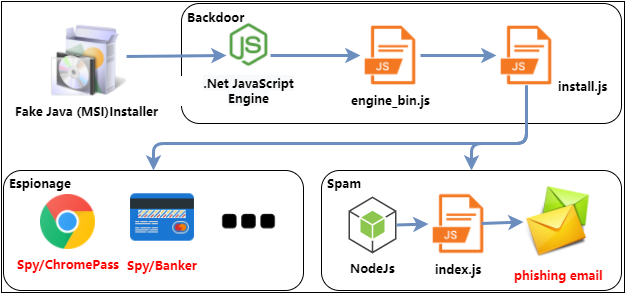
While passive tracking is pervasive, active malware represents a far more immediate and damaging threat to online privacy. Keyloggers are programs that silently record every keystroke you make — capturing passwords, credit card numbers, private messages, and search queries — and transmit that data to a remote attacker. Spyware operates at a broader level, taking periodic screenshots, accessing your webcam and microphone, and exfiltrating files. Remote Access Trojans (RATs) give attackers full, real-time control of an infected machine, allowing them to browse your file system, activate peripherals, and pivot to other devices on your network.
A particularly alarming category that has grown significantly since 2024 is stalkerware — commercially available applications marketed under euphemisms like “parental monitoring” or “employee tracking” software. These tools can be covertly installed on a victim’s Windows PC or laptop to log calls, capture screenshots, track location data, and read private messages. According to a 2025 report by cybersecurity researchers, stalkerware detections on desktop platforms increased by over 40% compared to the previous year, with intimate partner abuse being the most commonly cited misuse scenario. The defining characteristic of stalkerware is that it is designed to be invisible to the victim while remaining fully accessible to the perpetrator.
Social Engineering: Phishing and Its Evolving Tactics
No technical defense can fully compensate for a user who has been psychologically manipulated into voluntarily surrendering their credentials. Phishing remains the single most effective initial attack vector because it exploits human psychology rather than software vulnerabilities. A convincingly spoofed login page for a bank, email provider, or cloud service can capture username and password combinations in seconds, with the victim none the wiser until unauthorized transactions appear.
The evolution from broad, spray-and-pray phishing campaigns to highly targeted spear-phishing represents a significant escalation in sophistication. Attackers research their targets using social media profiles, LinkedIn data, and leaked databases to craft emails that reference real colleagues, recent projects, or personal details — dramatically increasing the likelihood of success. Meanwhile, smishing (SMS phishing) exploits the higher trust users place in text messages, often impersonating delivery services, banks, or government agencies with urgent calls to action.
| Phishing Type | Delivery Method | Common Targets | Key Red Flags |
|---|---|---|---|
| Standard Phishing | Mass email campaigns | General public, account holders | Generic greeting, mismatched sender domain, urgent language |
| Spear-Phishing | Targeted email with personal details | Executives, employees, high-value individuals | References real names/projects but requests unusual action |
| Smishing | SMS / text message | Mobile users, banking customers | Unsolicited links, fake delivery or bank alerts, short URLs |
| Vishing | Voice call / VoIP | Elderly users, corporate employees | Caller claims authority, requests immediate action or credentials |
| Clone Phishing | Duplicated legitimate email with malicious link | Previous email recipients | Identical to a real past email but with replaced attachments or links |
How Can You Build a Strong Foundation for Digital Privacy?
Proactive, layered security habits form an essential defense that goes beyond any single tool. No software solution, however sophisticated, can fully protect a user who practices poor digital hygiene. Building a resilient personal security posture means establishing a set of non-negotiable behaviors that collectively reduce your attack surface across every dimension — account security, software integrity, and behavioral awareness.
Mastering Password Hygiene and Account Security
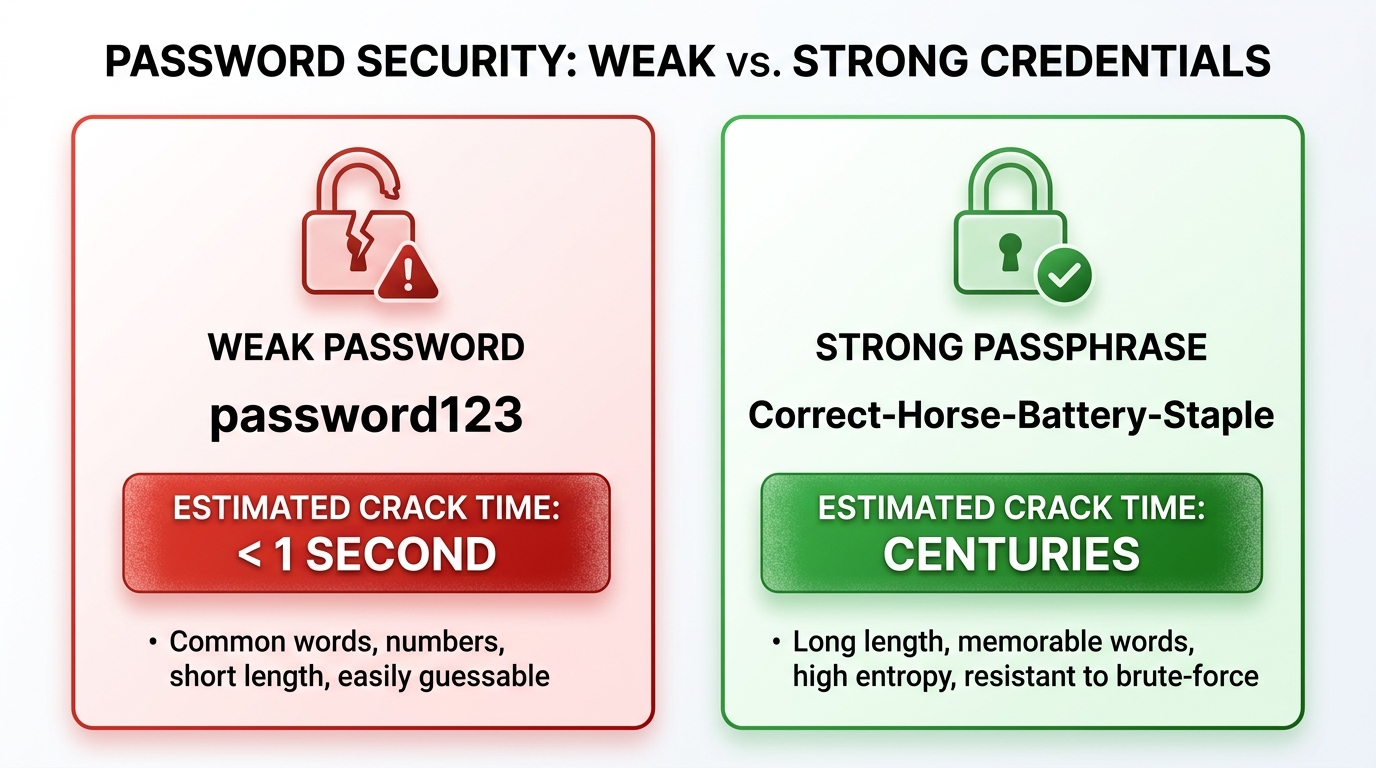
The most common and devastating entry point for account compromise is credential reuse. When a data breach exposes your email and password combination from one service, attackers use automated tools to test those same credentials against hundreds of other platforms in a technique called credential stuffing. The defense is absolute: every account must have a unique, randomly generated password that bears no resemblance to any other.
A reputable password manager — such as Bitwarden, 1Password, or KeePass — eliminates the cognitive burden of remembering dozens of complex passwords. These tools generate cryptographically random passwords of 20 or more characters, store them in an encrypted vault, and auto-fill them securely. The master password protecting the vault should be a long, memorable passphrase — a sequence of four or more unrelated words — which is both resistant to brute-force attacks and practical to remember.
Equally critical is the deployment of Two-Factor Authentication (2FA) on every account that supports it. Not all 2FA implementations are equal in security. SMS-based 2FA, while better than nothing, is vulnerable to SIM-swapping attacks where criminals convince a carrier to transfer your phone number to their device. App-based TOTP authenticators (such as Authy or Google Authenticator) generate time-sensitive codes locally on your device, eliminating the SIM-swap vulnerability. For the highest-value accounts — email, financial services, primary cloud storage — a hardware security key (such as a YubiKey) provides the strongest available protection, as it requires physical possession of the device to authenticate.
The Non-Negotiable Habit of Regular Software Updates
Software vulnerabilities are the technical equivalent of unlocked doors — and attackers maintain continuously updated lists of which doors are open on which systems. Every operating system, browser, plugin, and application contains code written by humans and therefore contains bugs. When security researchers or attackers discover a bug that can be exploited to gain unauthorized access, the race begins between the vendor releasing a patch and attackers weaponizing the vulnerability at scale.
Enabling automatic updates for your operating system, browser, and all installed applications is not optional — it is the single most impactful action most users can take. According to a 2025 Verizon Data Breach Investigations Report analysis, a significant majority of successful exploitation incidents leveraged known vulnerabilities for which patches had already been available for weeks or months. The victims were not attacked with novel zero-day exploits; they were attacked through vulnerabilities they had simply failed to patch.
“The data is unambiguous: the overwhelming majority of successful intrusions exploit vulnerabilities with available patches. Patch management is not glamorous, but it is the single highest-return security investment any organization or individual can make.” — Senior Threat Intelligence Researcher, 2025 Cybersecurity Industry Summit
The risk of outdated software extends beyond the operating system. Browser plugins — particularly older PDF readers, media players, and legacy Java or Flash components — have historically been among the most exploited attack surfaces. Conduct a quarterly audit of your installed software and uninstall anything you no longer actively use. A smaller attack surface is an inherently more secure one.
Adopting Privacy-Conscious Browsing and Social Media Practices
Behavioral discipline is the layer of security that no software can fully replicate. The information you voluntarily share on social media platforms — your employer, hometown, family members’ names, vacation plans, and daily routines — is a goldmine for social engineers constructing targeted phishing attacks. Practicing deliberate information minimization on public profiles dramatically reduces the quality of intelligence available to attackers.
Public Wi-Fi networks present a different category of risk. Unencrypted or poorly secured networks at airports, cafes, and hotels allow other users on the same network to intercept unencrypted traffic. While the widespread adoption of HTTPS has significantly reduced the risk of content interception, metadata — which sites you visit, when, and how frequently — can still be observed. Using a VPN on public networks encrypts this metadata and prevents passive surveillance.
Layering smart behavioral habits with a capable security suite creates a powerful combined defense. 360 Total Security complements these habits by providing real-time warnings when users attempt to visit known malicious or phishing websites, and by monitoring network connections for suspicious activity. This safety net catches the moments when vigilance lapses — because no human can maintain perfect awareness across every click and every link.
What Are the Essential Tools and Software for Privacy Protection?
A curated toolkit of specialized software is necessary to automate and enforce privacy protections at a scale and consistency that human vigilance alone cannot achieve. Trackers, malware distributors, and data harvesters all rely on automated systems — the effective counter-strategy requires deploying equally automated defenses that operate continuously in the background.
Virtual Private Networks (VPNs): More Than Just Bypassing Geo-Blocks
A Virtual Private Network creates an encrypted tunnel between your device and a VPN server, routing all your internet traffic through that server before it reaches its destination. This accomplishes two privacy-critical functions: it encrypts your traffic so that your Internet Service Provider (ISP), network administrator, or anyone monitoring the local network cannot read its contents, and it masks your real IP address, replacing it with the VPN server’s IP in the logs of the websites you visit.
However, VPNs are frequently misunderstood as anonymity tools, and this misconception leads to dangerous overconfidence. A VPN does not prevent websites from tracking you via cookies or fingerprinting. It does not protect against malware already installed on your device. And critically, it shifts your trust from your ISP to your VPN provider — meaning a dishonest VPN provider can log and sell your data just as an ISP could. Free VPN services are particularly problematic; numerous investigations have found free VPN applications collecting and selling user browsing data, defeating the entire purpose of using a privacy tool.
| Feature | Why It Matters | What to Look For |
|---|---|---|
| No-Logs Policy | Ensures provider cannot hand over your browsing history | Independently audited by a third-party firm |
| Jurisdiction | Determines which legal frameworks apply to data requests | Outside 5/9/14 Eyes intelligence-sharing alliances |
| Encryption Protocol | Determines strength and speed of the encrypted tunnel | WireGuard or OpenVPN with AES-256 encryption |
| Kill Switch | Cuts internet if VPN drops, preventing IP exposure | Available and enabled by default |
| Speed Impact | Affects usability for streaming, video calls, and downloads | Less than 20% speed reduction on nearby servers |
| DNS Leak Protection | Prevents DNS queries from bypassing the VPN tunnel | Verified via independent DNS leak test tools |
Comprehensive Security Suites: The First Line of PC Defense
While VPNs protect data in transit and browser extensions block trackers, a robust antivirus and security suite is the essential defense against the malware threats that represent the most severe privacy violations. Spyware, keyloggers, RATs, and stalkerware are designed to operate invisibly — and without active scanning and behavioral monitoring, they can persist on a system for months, silently exfiltrating sensitive data.
360 Total Security addresses this challenge through a distinctive multi-engine detection architecture. Rather than relying on a single detection engine, it combines its own AI-powered cloud engine with integrated engines from industry-leading vendors including Bitdefender and Avira. This layered approach dramatically increases detection rates for sophisticated, polymorphic threats that are specifically designed to evade single-engine scanners. When one engine fails to recognize a novel malware variant, the others provide redundant coverage — a critical advantage against the rapidly mutating threat landscape of 2025 and 2026.
Beyond core malware detection, 360 Total Security offers several features with direct privacy implications for Windows PC users:
- Sandbox Mode: Allows users to execute suspicious files, installers, or email attachments in a fully isolated virtual environment. Any malicious behavior — file system changes, registry modifications, network connections — occurs within the sandbox and cannot affect the real system or access private files stored on the host machine.
- Proactive Defense System: Monitors the system in real-time for unauthorized changes to critical areas including startup entries, browser settings, and system files — behaviors characteristic of spyware installation and persistence mechanisms.
- Secure Browser Mode: Provides an isolated browsing environment for sensitive transactions such as online banking and shopping, protecting against keyloggers and screen-capture malware that target financial credentials.
Browser Extensions and Encrypted Communication
Complementing your security suite with privacy-focused browser extensions creates an additional layer of defense specifically targeting the tracking ecosystem. uBlock Origin is the gold standard for ad and tracker blocking, using curated filter lists to prevent tracking scripts from loading in the first place — rather than merely blocking their cookies after the fact. Privacy Badger, developed by the Electronic Frontier Foundation, takes a behavioral approach, learning to block trackers based on their cross-site tracking behavior rather than relying solely on static lists.
For communications, the encryption of data in transit is paramount. Signal provides end-to-end encrypted messaging and voice calls with an open-source, independently audited protocol that has become the industry benchmark for secure communication. ProtonMail offers end-to-end encrypted email hosted in Switzerland, outside the jurisdiction of most government data request frameworks. For users who require Telegram, only Secret Chats — not standard cloud chats — provide end-to-end encryption.
The following example illustrates what a typical tracker report from a privacy extension looks like when visiting a major news website — demonstrating the scale of tracking that occurs on sites users consider routine:
DuckDuckGo Privacy Essentials — Tracker Report
Site: [example-news-site.com]
Grade: D

Trackers Blocked (23):
  - Google Analytics (analytics)
  - DoubleClick.net (advertising)
  - Facebook Pixel (social/advertising)
  - Outbrain (content recommendation/tracking)
  - Taboola (content recommendation/tracking)
  - Scorecard Research (audience measurement)
  - Moat Analytics (advertising measurement)
  - Permutive (audience data platform)
  - Amazon Associates (affiliate tracking)
  - [14 additional trackers from ad networks]

Major Tracker Networks Present: Google, Meta, Amazon
Encryption: HTTPS (Forced)
Cookies Set: 47
Fingerprinting Attempts: Detected (Canvas API)
Advanced Strategies for the Privacy-Conscious Power User
For those who have mastered the foundational layer and seek maximum control over their digital footprint, advanced techniques involving network-level intervention, operating system isolation, and systematic data minimization can create a near-fortified digital environment. These strategies require greater technical investment but yield proportionally greater privacy returns — and represent the approaches used by security researchers, journalists, and privacy advocates who face elevated threat models.
Taking Control at the Network Level with DNS and Firewalls
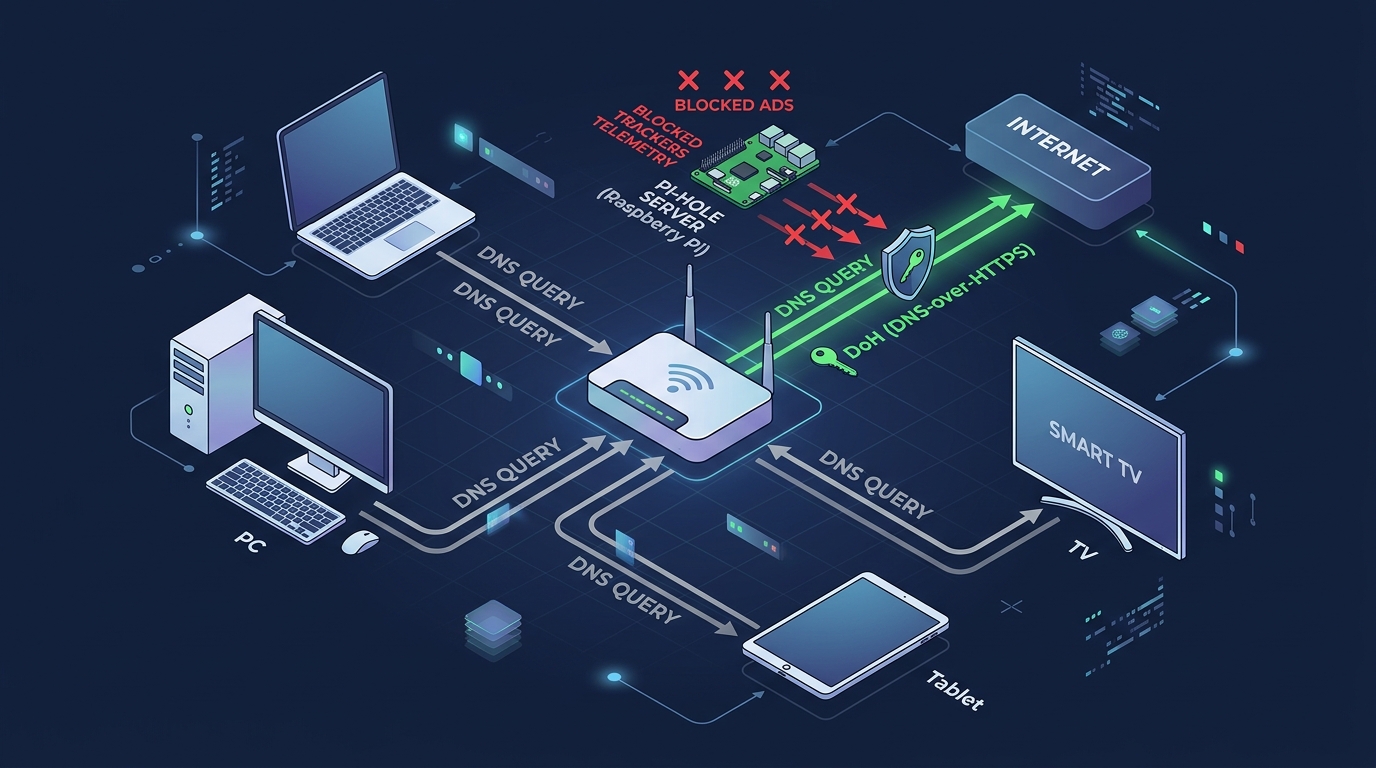
Every time your device connects to a website, it first sends a DNS query — essentially asking “what is the IP address of this domain?” By default, these queries are sent to your ISP’s DNS servers in plain text, allowing your ISP to log every domain you visit regardless of whether you use HTTPS. Switching to DNS-over-HTTPS (DoH) encrypts these queries, preventing ISP-level surveillance. Privacy-focused DNS providers such as Cloudflare 1.1.1.1 (with a strong no-logs policy) or NextDNS (which offers customizable blocking rules) can be configured at the browser level or system-wide.
For network-wide protection that covers every device on your home network — including smart TVs, gaming consoles, and IoT devices that cannot run browser extensions — a Pi-hole is a powerful solution. Pi-hole is an open-source DNS sinkhole that runs on a Raspberry Pi or any local server, intercepting DNS queries from all devices on the network and blocking requests to known advertising and tracking domains before they are ever resolved. The result is network-wide ad and tracker blocking that requires no configuration on individual devices.
Complementing DNS-level filtering, your router’s built-in firewall should be configured to block unsolicited inbound connections and, where possible, restrict outbound connections from devices that have no legitimate reason to communicate with external servers. Advanced users can implement dedicated firewall hardware or software solutions such as pfSense or OPNsense for granular traffic control.
Isolation and Compartmentalization Techniques
The principle of compartmentalization — keeping different activities and identities strictly separated — is one of the most powerful privacy strategies available. At its simplest, this means using different browsers or browser profiles for different categories of activity: one profile exclusively for social media (accepting that these platforms will track you within their ecosystem), a separate profile for work, and a third for sensitive activities like banking or health research. This prevents cross-contamination of tracking data between contexts.
At a more advanced level, virtual machines (VMs) provide complete operating system isolation. Running a separate VM for high-risk activities — testing unknown software, visiting potentially compromised sites, or conducting research that should not be linked to your primary identity — ensures that any malware or tracking within the VM cannot access data on the host system. The VM can be snapshotted to a clean state and restored instantly if compromised.
For the highest-risk scenarios, Tails OS is a privacy-focused Linux distribution designed to run entirely from a USB drive without leaving any trace on the host machine. It routes all traffic through the Tor network, uses amnesic storage that erases all data on shutdown, and includes hardened privacy tools by default. It is the operating system of choice for journalists communicating with sources in hostile environments.
For users who want VM-level isolation without the complexity of full virtualization, 360 Total Security‘s integrated Sandbox feature provides an accessible middle ground. Users can right-click any executable or installer and choose to run it within the Sandbox — a contained environment where the program can execute normally but cannot write to the real file system, access private documents, modify registry entries, or establish persistent network connections outside the sandbox boundary. This is particularly valuable for evaluating software from unverified sources or opening email attachments of uncertain provenance.
The Philosophy of Data Minimization and Digital Decluttering
The most underutilized privacy strategy is also one of the most effective: systematically reducing the amount of personal data that exists about you in the first place. Data minimization is both a philosophy and a practice — the recognition that data which does not exist cannot be breached, sold, or subpoenaed.
Begin with a digital account audit. Use a service like HaveIBeenPwned to identify email addresses that have appeared in data breaches, and then use your password manager’s stored logins as an inventory of accounts to review. For every account you no longer actively use, initiate the deletion process rather than simply abandoning it. Dormant accounts with stored personal information and payment details are attractive targets precisely because their owners are unlikely to notice a breach.
For new sign-ups that are low-trust or low-importance, use alias email addresses generated by services like SimpleLogin or Apple’s Hide My Email. These forward to your real inbox but can be disabled instantly if they begin receiving spam — and they prevent the service from linking your sign-up to your primary identity. Similarly, services like Google Voice or MySudo can provide alias phone numbers for SMS verification requirements.
Finally, engaging in data broker opt-out is a time-intensive but measurable privacy investment. Major data brokers — including Spokeo, Whitepages, Intelius, BeenVerified, and dozens of others — are legally required in many jurisdictions to honor opt-out requests. According to a 2026 privacy research study, users who submitted opt-out requests to the top 50 data brokers and followed up consistently over a 90-day period reported a measurable reduction in targeted advertising, unsolicited calls, and spam email — with the most significant improvements appearing after 30 to 50 individual opt-out submissions had been processed. Tools like DeleteMe or Privacy Bee can automate portions of this process for users who prefer a managed approach.
Frequently Asked Questions
Is using a VPN enough to protect my online privacy?
No. A VPN is a valuable component of a privacy toolkit, but it addresses only one specific threat: the interception of your traffic in transit and the exposure of your IP address to the websites you visit. It does not protect against malware already on your device, browser fingerprinting, cookie-based tracking, phishing attacks, or data broker profiling. Comprehensive privacy requires a layered approach combining a VPN, a robust security suite, browser extensions, strong passwords with 2FA, and disciplined browsing habits.
How do I know if spyware or a keylogger is already installed on my PC?
Spyware and keyloggers are specifically designed to be invisible to casual observation, which makes detection difficult without dedicated tools. Warning signs include unexplained slowdowns, unusual network activity, battery drain (on laptops), and unfamiliar processes in Task Manager. The most reliable detection method is running a comprehensive scan with a reputable security suite such as 360 Total Security, which uses multi-engine detection to identify privacy-invasive malware that single-engine scanners may miss. Regular scheduled scans are strongly recommended even in the absence of symptoms.
What is the single most important privacy habit I can adopt today?
If forced to choose one action, enable Two-Factor Authentication on your primary email account immediately. Your email account is the master key to your digital identity — it is used to reset passwords for virtually every other account you own. If an attacker gains access to your email, they can lock you out of your entire digital life within minutes. App-based 2FA (using an authenticator app rather than SMS) provides strong protection against the most common account takeover methods and takes less than five minutes to set up.
Are free antivirus programs sufficient for privacy protection?
Free antivirus programs typically provide basic malware scanning but lack the advanced features most critical for privacy protection — such as real-time behavioral monitoring, sandbox execution environments, secure browsing modes, and proactive defense against spyware installation. Additionally, some free security products have faced scrutiny over their own data collection practices. A comprehensive security suite like 360 Total Security provides a substantially more complete defense layer, including multi-engine detection and sandbox isolation, that free-tier products cannot match.
How do data brokers get my personal information, and can I stop them?
Data brokers aggregate information from a wide range of sources: public records (voter registrations, property records, court filings), social media profiles, loyalty and rewards programs, app permissions, purchase history from retailers, and data purchased from other brokers. Stopping the collection entirely is not practically feasible, but you can significantly reduce your exposure through a combination of approaches: tightening social media privacy settings, opting out of data sharing in app and service settings, submitting opt-out requests directly to major data brokers, and using alias emails and phone numbers for non-essential sign-ups. The process requires sustained effort over several months to produce measurable results, but the reduction in targeted advertising and unsolicited contact is well-documented.
About the Author: This article was authored by a Senior Cybersecurity Technical Writer with over a decade of experience covering digital privacy, endpoint security, and threat intelligence for enterprise and consumer audiences. Specializing in translating complex security concepts into actionable guidance, the author has contributed to cybersecurity publications, academic conference proceedings, and security awareness training programs across North America and Europe. Areas of expertise include malware analysis, privacy engineering, and the human factors of security behavior.
Ready to take the first step toward comprehensive PC privacy protection? Visit 360 Total Security to explore a multi-engine security suite built for the modern threat landscape — featuring real-time malware detection, sandbox isolation, and proactive defense for Windows and macOS desktops.
Learn more about 360 Total Security