Executive Summary: For decades, Mac users have operated under the comfortable assumption that their devices exist in a virus-free bubble. This guide dismantles that myth with precision. Modern macOS faces a sophisticated and growing threat landscape — from adware and cryptojackers to targeted phishing campaigns and ransomware. While Apple’s built-in defenses like Gatekeeper, XProtect, and System Integrity Protection (SIP) form a solid foundation, they carry meaningful limitations that leave real gaps in protection. This comprehensive resource walks through exactly how macOS security works, who is genuinely at risk, and how to build a layered defense strategy that combines smart digital habits with the right security software — giving both casual users and professionals the clarity they need to stay protected.
Why Do People Think Macs Are Immune to Viruses?
The belief that Macs cannot get viruses is one of the most persistent myths in consumer technology. It did not emerge from nowhere — it has roots in real historical dynamics. But in today’s interconnected threat landscape, clinging to this idea is not just inaccurate; it is actively dangerous. Understanding where this perception came from, and why it no longer holds, is the essential first step toward genuine security awareness.
The Origin of the Invincibility Myth
In the early 2000s, Windows dominated the personal computing market with a share exceeding 90%. For malware authors — who are, at their core, economically motivated actors — this made Windows an overwhelmingly more profitable target. Writing malicious code for a platform used by 9 out of 10 computers simply made more sense than investing the same effort into targeting the remaining fraction running macOS. This market share effect created a statistical reality: Mac users encountered far fewer threats, not because their systems were impenetrable, but because attackers had little incentive to focus on them.
Apple recognized this perception and leaned into it aggressively. Their iconic “Get a Mac” advertising campaign, which ran from 2006 to 2009, featured a recurring segment where the PC character was plagued by viruses while the Mac character remained carefree. These campaigns were enormously effective at cementing the idea that Mac ownership was synonymous with security. The cultural imprint of those advertisements persists to this day in the assumptions of millions of users.
There was also a technical dimension to this narrative. macOS is built on a Unix-based foundation, which introduced a permission architecture and file system structure that was genuinely different from the Windows environment of that era. Early malware developers who were deeply familiar with Windows vulnerabilities faced a steeper learning curve when attempting to exploit macOS. This created a real, if temporary, technical barrier — one that was frequently mischaracterized as an absolute wall rather than a speed bump.
How Modern Threats Have Shattered the Illusion
The threat landscape of 2025 bears almost no resemblance to the one that gave birth to the Mac invincibility myth. Three fundamental shifts have changed everything.
First, a large category of modern threats does not care what operating system you run. Phishing emails, malicious web scripts, ransomware delivered through social engineering, and credential-stealing attacks target human behavior, not operating system architecture. A convincing fake login page for your bank works equally well whether you are viewing it on Windows, macOS, or Linux. The operating system is irrelevant when the vulnerability is the user.
Second, the demographic profile of Mac users has made them increasingly attractive targets. Macs are disproportionately used by creative professionals, software developers, executives, and academics — people who tend to have higher incomes, more valuable intellectual property, and access to sensitive organizational data. According to a 2025 cybersecurity threat intelligence report, the average financial value of data stored on a targeted Mac device is substantially higher than on a typical Windows consumer machine, making the return on investment for Mac-focused attacks far more compelling for sophisticated threat actors.
Third, and most definitively, documented evidence of sophisticated macOS-specific malware has destroyed any remaining credibility of the immunity argument. Silver Sparrow — discovered in early 2021 — infected nearly 30,000 Mac devices across 153 countries and was notably compiled to run natively on Apple’s then-new M1 silicon, demonstrating that threat actors were investing in cutting-edge Mac-specific development. XCSSET targeted macOS developers by injecting malicious code into Xcode projects, turning trusted development tools into malware distribution vectors. Shlayer, one of the most prolific Mac threats ever documented, consistently ranked as the top macOS threat for multiple consecutive years according to Kaspersky’s threat reports, spreading through fake Adobe Flash update prompts and compromised websites. A 2025 threat landscape analysis building on earlier Malwarebytes data confirms a continued year-over-year increase in Mac-specific detections, with adware and trojans leading the category.
What Are the Real Security Risks for Modern Mac Users?
Understanding the real risk profile for Mac users requires moving beyond the narrow concept of “viruses” — a term that technically refers to self-replicating code and represents only a small slice of the modern threat ecosystem. Mac users face a diverse matrix of threats that range from performance-degrading nuisances to serious privacy violations and data loss events.
Beyond Viruses: Adware, PUPs, and Cryptominers
The most statistically common macOS threats are not dramatic ransomware attacks — they are adware and Potentially Unwanted Programs (PUPs). These are typically bundled with legitimate-looking software downloads: a free video converter, a PDF editor, a browser extension that promises useful features. The installation process is designed to be confusing, with pre-checked boxes and misleading “Accept” buttons that authorize the installation of secondary software alongside the intended application. Once installed, adware injects advertisements into web browsing sessions, redirects search queries, and collects browsing data for sale to third-party advertisers.
Cryptojacking represents a more technically sophisticated threat. Malicious scripts — either embedded in websites or delivered through installed software — hijack the Mac’s CPU and GPU resources to mine cryptocurrency for the attacker’s benefit. The user typically notices nothing more than a sluggish system, elevated fan noise, and reduced battery life. Opening Activity Monitor might reveal a process consuming an unusual percentage of CPU resources with an unfamiliar or deliberately innocuous-sounding name. The damage is not immediate data loss, but sustained cryptojacking accelerates hardware degradation and creates a significant productivity tax.
These threats are engineered specifically to avoid triggering alarm. They do not encrypt your files or display ransom notes. They operate quietly, profiting from your resources and data while staying below the threshold of obvious detection — which is precisely what makes them so pervasive and so underestimated.
The Human Factor: Phishing and Social Engineering
No operating system — regardless of how sophisticated its architecture — can fully protect a user who is deceived into voluntarily surrendering their credentials or granting permissions to malicious software. Phishing attacks targeting Mac users arrive through email, SMS, calendar invites, and even iMessage, impersonating Apple Support, financial institutions, cloud service providers, and popular software vendors.
A particularly effective attack vector on macOS involves malicious .pkg installer files. These files mimic legitimate software installers and, when opened, prompt the user for their administrator password — a request that feels entirely normal during software installation. Once the password is granted, the malicious payload has the elevated privileges it needs to install persistent components, modify system settings, or exfiltrate data. The social engineering is the attack; the technical execution is merely the follow-through.
The following table illustrates how macOS and Windows threat profiles compare, revealing the significant overlap in user-targeted attack categories:
| Threat Category | macOS Prevalence | Windows Prevalence | Primary Attack Vector |
|---|---|---|---|
| Adware / PUPs | Very High | Very High | Bundled software downloads |
| Phishing / Credential Theft | Very High | Very High | Email, fake websites, SMS |
| Trojans | High | Very High | Fake installers, pirated software |
| Ransomware | Low–Medium | Very High | Email attachments, exploit kits |
| Cryptojackers | Medium | Medium | Malicious scripts, browser exploits |
| Rootkits / Bootkits | Low | Medium | Advanced persistent threats (APTs) |
| Spyware / Stalkerware | Medium | High | Malicious apps, physical access |
Privacy Intrusions and System Slowdown
A category of threats that receives insufficient attention is the slow erosion of system performance and user privacy caused by unwanted software operating in the background. Browser hijackers modify Safari or Chrome settings — replacing the default search engine, injecting a new homepage, or adding persistent extensions — without clear user consent. Data-collecting applications monitor browsing habits, application usage, and even keystrokes, packaging this information for sale to data brokers.
The cumulative performance impact of multiple adware processes, browser extensions, and background agents running simultaneously is not trivial. Users may notice their Mac taking longer to boot, applications launching slowly, fans running constantly, and battery life degrading faster than expected. While these symptoms are often dismissed as normal aging of the hardware, they are frequently attributable to unwanted software consuming resources. This represents a security issue in the broadest sense: a compromised user experience, reduced productivity, and an environment where the user has lost meaningful control over their own device.
How Does macOS Built-in Security Actually Work?
Apple has invested significantly in building a multi-layered security architecture into macOS, and it would be inaccurate to dismiss these defenses as ineffective. They are genuinely powerful — and understanding exactly how they work, and where they stop working, is essential context for making informed decisions about additional protection.
The First Line of Defense: Gatekeeper and Notarization
Gatekeeper is the security feature most Mac users have encountered, usually in the form of a dialog box warning that an application “cannot be opened because it is from an unidentified developer.” By default, macOS allows applications downloaded from the App Store and from identified developers who have registered with Apple’s Developer ID program. Applications from outside these categories are blocked at the point of launch, requiring the user to explicitly override the restriction through System Settings.
Notarization extends this concept further. Before a developer can distribute software outside the Mac App Store, they must submit it to Apple for automated scanning. Apple’s systems check the software against a database of known malware and verify that it does not contain malicious components. If the software passes, it receives a notarization ticket that Gatekeeper validates when a user attempts to install it. This creates a meaningful checkpoint in the software supply chain.
However, the critical limitation of both systems is their timing: they operate primarily at the point of installation, not during runtime. Once a piece of software has been installed and granted permissions, Gatekeeper and Notarization step back. They cannot detect malicious behavior that emerges after installation — for example, a legitimate application that is later updated to include malicious functionality, or a notarized application that downloads and executes a secondary malicious payload after it has already passed Apple’s checks.
XProtect: Apple’s Silent Antivirus Engine
XProtect operates silently in the background, functioning as a signature-based malware scanner. When you download a file — regardless of the browser or application used — macOS checks it against XProtect’s database of known malware signatures. If a match is found, the file is quarantined and the user is alerted. XProtect updates are delivered automatically through macOS software updates, meaning users do not need to take any manual action to keep its definitions current.
The system is genuinely useful and catches a meaningful volume of known threats without any user intervention or performance overhead. Its significant limitation, however, is the nature of signature-based detection itself. XProtect can only identify threats it already knows about. New malware variants, zero-day exploits, and threats that have been specifically engineered to evade Apple’s detection systems can pass through XProtect undetected until Apple updates the signature database — a process that, according to independent security research published in 2025, can lag behind commercial antivirus solutions by days or even weeks for newly emerging threats. Independent testing by organizations such as AV-TEST has consistently shown that commercial antivirus engines maintain broader and more frequently updated threat databases than XProtect alone, particularly for the latest zero-day variants.
System Integrity Protection (SIP) and Sandboxing
System Integrity Protection, introduced in macOS El Capitan and significantly strengthened in subsequent releases, is one of Apple’s most powerful security innovations. SIP places core system directories — including /System, /usr, /bin, and /sbin — under a protection layer that prevents modification even by processes running with root (administrator) privileges. This means that even if malware successfully escalates its privileges to root level, it cannot modify critical system files, replace system binaries, or inject code into protected processes.
# To check SIP status in Terminal:
csrutil status
# Expected output on a protected system:
# System Integrity Protection status: enabled.
App Sandboxing, required for all Mac App Store applications, restricts what resources and data an application can access. A sandboxed application cannot freely read files outside its designated container, cannot access the camera or microphone without explicit user permission, and cannot communicate with other applications in unauthorized ways. If a sandboxed application is compromised, the damage it can inflict is significantly constrained by these boundaries.
Yet these protections have a well-defined scope that leaves meaningful gaps. SIP protects system-level files, not user data. Ransomware that targets documents, photos, and other files stored in the user’s Home folder operates entirely outside SIP’s jurisdiction — it does not need to touch a single protected system file to encrypt everything that matters to the user. Similarly, sandboxing and SIP provide zero protection against phishing attacks, where the threat bypasses the operating system entirely by manipulating the user directly.
Who Actually Needs Additional Antivirus Protection on a Mac?
The honest answer is that the need for third-party security software is not uniform across all Mac users. It is shaped by behavior, profession, and the specific value of the data on the device. Rather than offering a blanket prescription, a risk-based assessment provides more useful guidance.
The High-Risk User Profile
Certain usage patterns dramatically elevate the risk profile of a Mac user, pushing them firmly into the category where additional protection is not optional but prudent.
- Frequent downloaders: Users who regularly download software, plugins, fonts, media files, or utilities from sources outside the Mac App Store — including third-party developer websites, file-sharing platforms, and torrent sites — encounter a significantly higher volume of potentially malicious files. Each download is a potential attack vector that Apple’s built-in systems may not catch in real time.
- Professionals with sensitive data: Attorneys, accountants, healthcare workers, software developers, journalists, and executives who store sensitive client information, financial records, proprietary code, or confidential communications on their Macs face consequences from a security breach that extend far beyond personal inconvenience. The professional and legal liability of a data breach creates a compelling case for layered protection.
- Broad web users: Users who visit a wide variety of websites — including entertainment platforms, adult content sites, torrent indexes, and niche hobby forums — encounter a statistically higher density of malicious advertisements, drive-by download attempts, and browser-based exploit attempts. These are among the most common vectors for adware and PUP installation.
- Shared device environments: Macs used by multiple family members, in educational settings, or in small business environments where multiple users with varying levels of security awareness share a single machine represent a compounded risk profile.
The Added Value Beyond Malware Detection
Even for users whose risk profile is moderate, third-party security solutions offer capabilities that macOS’s built-in tools simply do not provide, and these capabilities address real, documented threat vectors.
Real-time web protection is perhaps the most significant gap in Apple’s native security stack. XProtect does not monitor your web browsing in real time or block access to malicious URLs before they load. A commercial security solution with browser integration can intercept a connection to a known phishing domain, a malware distribution server, or a site hosting malicious scripts before the page loads — a fundamentally different and more proactive form of protection that works across Safari, Chrome, Firefox, and other browsers.
Heuristic and behavioral analysis addresses the limitation of signature-based detection. Rather than only matching files against a database of known threats, behavioral analysis monitors how applications act in real time. A process that suddenly begins encrypting large numbers of files, attempting to access the system keychain, or establishing unusual network connections can be flagged and stopped even if it has never been seen before — a critical capability against zero-day threats and novel malware variants.
System optimization and performance monitoring tools address the performance degradation aspect of security. Junk file cleaners, startup item managers, and resource monitors help users identify and remove the background processes and accumulated clutter that adware and PUPs leave behind. A comprehensive solution like 360 Total Security combines robust antivirus protection with these essential PC optimization tools, offering a holistic approach to system health and security that addresses both the threat detection and the performance impact dimensions of the problem simultaneously.
Choosing and Using a Mac Security Solution Effectively
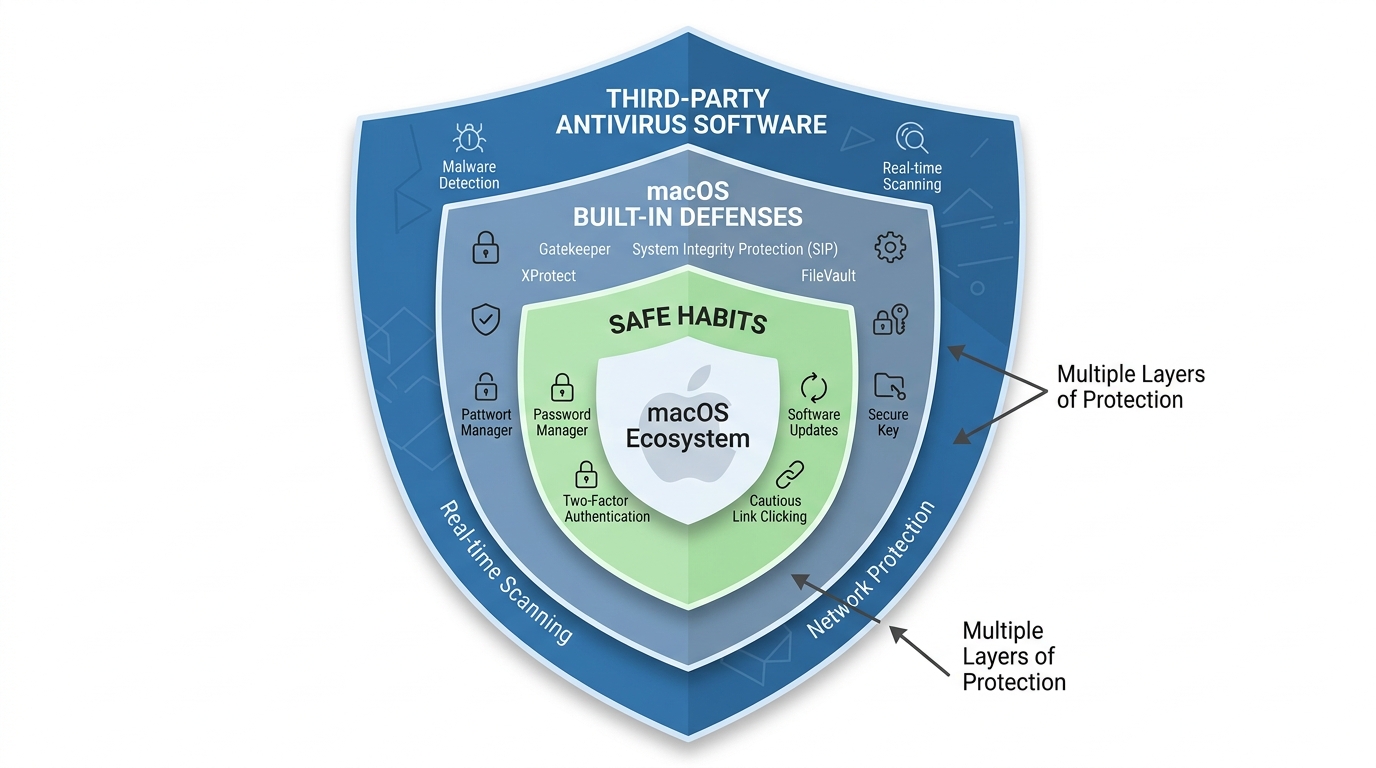
Selecting the right security software is only half of the equation. The most sophisticated antivirus engine in the world cannot compensate for consistently risky user behavior. A complete defense strategy combines capable software with disciplined digital habits — creating multiple overlapping layers of protection where the failure of any single layer does not result in a catastrophic outcome.
Key Features to Look For in Mac Security Software
When evaluating security solutions for macOS, prioritize the following capabilities:
- Real-time scanning with minimal performance impact: The software should monitor file system activity and network connections continuously without consuming enough CPU or RAM to noticeably degrade system responsiveness. Look for solutions that publish independent performance benchmark results from testing organizations like AV-TEST or AV-Comparatives.
- Phishing and malicious URL blocking: Browser integration that intercepts dangerous URLs across all major browsers — not just Safari — is essential given that phishing is among the highest-volume threats facing Mac users.
- Privacy protection features: Alerts when applications attempt to access the webcam or microphone, monitoring of which applications have been granted sensitive permissions, and notifications about suspicious background data transmissions address the privacy intrusion threat category.
- Clean, non-intrusive interface: Security software that bombards users with false positives, aggressive upsell prompts, and alarming notifications for benign activities trains users to ignore alerts — which defeats the purpose entirely. Look for software with a clear, calm interface that surfaces genuine threats without crying wolf.
Software like 360 Total Security is notable for providing these essential protections in a free package, making robust security accessible to users who want comprehensive defense without committing to a subscription fee. Its combination of multiple antivirus engines, real-time protection, and system optimization tools makes it a strong consideration for Mac users building their security stack.
Best Practices for a Layered Defense Strategy
Software protection is most effective when it operates as one layer within a broader security posture. The following practices, applied consistently, dramatically reduce the attack surface available to any threat actor:
- Maintain rigorous update discipline: The majority of successful malware attacks exploit known vulnerabilities for which patches already exist. Keeping macOS, all applications, and especially browsers and their extensions updated to the latest versions closes these doors before attackers can walk through them. Enable automatic updates wherever possible.
- Use a password manager and enable two-factor authentication (2FA): Credential theft is one of the highest-impact attack outcomes. A password manager ensures that every account uses a unique, complex password, so that a breach of one service cannot cascade into account takeovers elsewhere. Two-factor authentication ensures that even a stolen password is insufficient to access a protected account.
- Maintain regular, versioned backups: Time Machine, configured to back up to an external drive that is disconnected when not in use, or a reputable cloud backup service, represents the ultimate defense against ransomware. If your files are encrypted by an attacker, a clean backup makes the attack an inconvenience rather than a catastrophe. Test your backups periodically to verify they can actually be restored.
- Practice consistent skepticism: Treat unsolicited links — in emails, messages, calendar invites, and social media — as suspect by default. Download software exclusively from the Mac App Store or from official developer websites that you navigate to directly, never through a link in an email or advertisement. When an installer requests your administrator password, pause and verify the source before proceeding.
Building these habits is not about paranoia — it is about closing the gap between macOS’s built-in protections and the full breadth of the modern threat landscape. Paired with a capable security solution like 360 Total Security, this layered approach gives Mac users a genuinely robust defense that accounts for both technical vulnerabilities and the human factors that no operating system can fully protect against. Visit the official website to explore how 360 Total Security can complement your Mac’s built-in defenses with real-time protection, multi-engine scanning, and system optimization — all in one accessible package.
Frequently Asked Questions
Q1: Can Macs really get viruses, or is that just a myth used to sell antivirus software?
Macs can absolutely get viruses, though the threat profile differs from Windows. The more common threats for Mac users are adware, trojans, cryptojackers, and phishing attacks rather than traditional self-replicating viruses. Documented malware families like Shlayer, Silver Sparrow, and XCSSET confirm that macOS is actively targeted. The myth of complete Mac immunity stems from historical market share dynamics and Apple’s own marketing, not from any technical reality that holds in 2025.
Q2: Is Apple’s built-in security (XProtect, Gatekeeper, SIP) enough on its own?
For low-risk users with careful digital habits, Apple’s built-in defenses provide meaningful protection. However, they have documented limitations: XProtect’s signature database updates less frequently than commercial solutions, Gatekeeper only checks software at installation (not runtime), and neither SIP nor Sandboxing protects user data from ransomware or defends against phishing. Users who download frequently, handle sensitive data, or visit a broad range of websites benefit significantly from supplementing Apple’s tools with a third-party solution.
Q3: What is the most common type of malware that affects Mac users?
Adware and Potentially Unwanted Programs (PUPs) are consistently the most prevalent category of macOS threats, typically delivered through bundled software installers. Trojans disguised as legitimate software — particularly fake Adobe Flash updates and pirated application installers — are the second most common category. Phishing attacks, while not technically malware, represent the highest-volume threat in terms of user impact and financial loss.
Q4: Does installing antivirus software slow down my Mac?
The performance impact of modern security software varies significantly between products. Well-engineered solutions are designed to run efficiently in the background with minimal CPU and RAM consumption during idle periods, performing intensive scans only when the system is not under heavy load. Independent benchmark testing by organizations like AV-TEST measures the performance impact of specific products. When evaluating options, look for solutions with published performance test results and user reviews that specifically address system speed impact.
Q5: What is the single most important thing I can do to protect my Mac right now?
If forced to choose one action, enable automatic macOS updates and ensure your system is running the latest version. The majority of successful attacks exploit known vulnerabilities for which patches already exist. Keeping the operating system and all applications current closes the most commonly exploited attack vectors. Beyond that, maintaining a regular backup with Time Machine ensures that even in a worst-case scenario, your data can be recovered — making it the most consequential single habit for long-term security resilience.
About the Author: This article was written by a Senior Technical Writer and Cybersecurity Content Specialist with over a decade of experience covering endpoint security, operating system architecture, and consumer threat intelligence. Their work synthesizes findings from independent security research organizations, vendor threat reports, and hands-on product analysis to deliver actionable guidance for both technical and general audiences. They hold expertise in macOS security ecosystems, Windows endpoint protection, and the evolving landscape of cross-platform cyber threats.
Learn more about 360 Total Security