Executive Summary: The long-standing belief that Macs are immune to viruses is one of the most dangerous myths in modern computing. While macOS was historically more secure than Windows, today’s threat landscape tells a very different story. Mac users now face adware, spyware, ransomware, and zero-day exploits specifically engineered for Apple’s operating system. This comprehensive guide examines the real risks macOS users face, evaluates the built-in defenses Apple provides, and explains when and why supplementary tools like 360 Total Security can provide the additional protection layer that modern Mac users genuinely need.
Does the “Mac Immune to Viruses” Myth Still Hold True?
For decades, Apple’s marketing and a genuine technical reality reinforced the idea that owning a Mac meant owning a virus-free computer. That perception shaped purchasing decisions, user behavior, and even IT policies across organizations worldwide. Today, however, that assumption is not just outdated — it is actively dangerous. Understanding why the myth existed and why it no longer applies is the first step toward genuinely protecting your Mac.
Historical Reasons Behind the “Invulnerability” Perception
The origins of Mac’s security reputation are rooted in legitimate technical and market realities that were very much true during the early decades of personal computing.
- UNIX-Based Architecture: macOS is built on a UNIX foundation, which historically provided a more robust security model than early versions of Windows. UNIX systems enforce strict user permission hierarchies, meaning that even if a malicious process executes, it typically cannot access system-level files without explicit administrator authorization. This architectural advantage was real and meaningful in the era of early internet threats.
- A Less Profitable Target: Malware development is, fundamentally, an economic activity. When Windows commanded over 90% of the desktop market, cybercriminals had an overwhelming financial incentive to target that platform. Writing malware for macOS, which held a small fraction of the market, offered a poor return on investment. This market dynamic, not any inherent Mac invulnerability, was the primary reason Mac malware was rare.
- Apple’s Controlled Ecosystem: Features like Gatekeeper, which blocks software from unidentified developers, and the curated Mac App Store created genuine friction for malware distribution. Apple’s tight integration of hardware and software allowed for security controls that the more open Windows ecosystem struggled to implement. These features reinforced the perception of safety and contributed to it in a meaningful, though not absolute, way.
Why Modern Reality Differs from the Old Myth
The conditions that made Macs a low-priority target have fundamentally changed, and the cybersecurity community has documented this shift extensively.
- Growing Market Share, Growing Target: According to 2025 global desktop market share data, Apple’s macOS now accounts for a significantly larger portion of the market than it did a decade ago, with some reports placing it above 15% in key consumer segments. As that share grows, so does the financial incentive for cybercriminals to invest in macOS-specific malware development. The economics that once protected Mac users are now working against them.
- More Stealthy and Sophisticated Malware: Modern macOS malware is engineered to evade casual user detection. Unlike the obvious, destructive viruses of the early internet era, today’s threats often operate silently in the background — harvesting credentials, injecting advertisements, or encrypting files over extended periods before revealing themselves. Adware, spyware, and trojans targeting macOS have become increasingly sophisticated, mimicking legitimate system processes to avoid detection.
- The Rise of Cross-Platform Threats: Many of the most effective attacks today do not require operating system-specific code at all. Phishing emails, malicious PDF documents, compromised browser extensions, and social engineering attacks work equally well against a Mac user as they do against a Windows user. The human element of security does not change based on which logo is on your laptop lid.
What Types of Malware and Threats Actually Target macOS?
Acknowledging that Macs can be infected is only the beginning. Understanding the specific threat categories that target macOS users allows for more targeted, effective defenses. The spectrum ranges from low-level nuisances to genuinely destructive attacks capable of causing significant financial and personal harm.
Common and Pervasive Threats: Adware and Spyware
These represent the most frequently encountered category of macOS threats and are often underestimated because they do not cause the dramatic, visible damage associated with ransomware or system-destroying viruses.
- Adware Bundled with Legitimate-Looking Software: This is the most common infection vector for Mac users. Fake Adobe Flash updaters, bundled software installers, and deceptive browser extensions have been responsible for millions of Mac infections. Once installed, adware injects unwanted advertisements into web browsing sessions, redirects search queries, and can slow system performance significantly. The deception lies in how convincingly these installers mimic legitimate software.
- Spyware Disguised as Utility Tools: A particularly insidious category involves applications that present themselves as helpful system optimizers, cleaners, or performance boosters. Once installed, these applications operate as spyware, harvesting browser history, saved passwords, autofill data, and even keystrokes. The victim often continues using the application believing it is helping their Mac while their personal data is being exfiltrated.
- Browser Hijackers: Closely related to adware, browser hijackers modify Safari, Chrome, or Firefox settings without user consent, changing default search engines, homepages, and new tab pages to generate advertising revenue for the attacker. Removing them often requires more than simply deleting an application, as they embed themselves in browser profiles and system preferences.
More Dangerous Threats: Ransomware and Zero-Day Exploits
While less frequent than adware, these higher-severity threats demonstrate that macOS is not immune to the most serious categories of cybercrime.
- Ransomware Targeting macOS: The existence of KeRanger, the first fully functional ransomware targeting macOS, proved definitively that Mac users are not exempt from this category of attack. KeRanger was distributed through a compromised version of the Transmission BitTorrent client, encrypting user files and demanding a ransom payment. More recent variants have continued to emerge, and according to a 2025 cybersecurity threat report, ransomware attacks targeting macOS environments increased year-over-year, particularly in small business contexts.
- Zero-Day Exploits: These represent the most technically sophisticated threat category. Zero-day exploits target previously unknown vulnerabilities in macOS itself, in Safari, or in widely used third-party applications. Because no patch exists at the time of exploitation, even fully updated systems can be compromised. Notable zero-day vulnerabilities affecting macOS have been documented in recent security disclosures, targeting components ranging from the kernel to WebKit, the browser engine underlying Safari. These exploits are frequently used in targeted attacks against high-value individuals and organizations.
macOS Threat Type Comparison:
| Threat Type | Primary Delivery Method | Typical Behavior | Risk Level |
|---|---|---|---|
| Adware | Bundled software installers, fake updaters | Injects ads, redirects browser, slows system | Medium |
| Spyware | Fake utility apps, phishing downloads | Steals passwords, browser data, keystrokes | High |
| Browser Hijacker | Browser extension bundles, software installers | Modifies browser settings, generates ad revenue | Medium |
| Ransomware | Compromised legitimate apps, phishing emails | Encrypts user files, demands payment | Critical |
| Trojans | Pirated software, deceptive downloads | Creates backdoor, enables remote access | High |
| Zero-Day Exploits | Malicious websites, drive-by downloads | Exploits unpatched vulnerabilities, full system access | Critical |
How Can Mac Users Proactively Protect Their Systems?
Security on a Mac is not a passive condition that Apple maintains on your behalf — it is an active practice that requires informed decisions, consistent habits, and a clear understanding of the tools at your disposal. The good news is that macOS provides a genuinely strong security foundation; the challenge is knowing how to use it effectively and where its limitations lie.
Maximizing macOS’s Built-in Security Features
Apple has invested significantly in native security technologies that, when properly understood and utilized, provide meaningful protection against a wide range of threats.
- Gatekeeper, XProtect, and MRT: Gatekeeper prevents the execution of software from unidentified developers unless explicitly overridden by the user. XProtect is Apple’s built-in malware detection system, which operates silently in the background and is updated regularly with new malware signatures. The Malware Removal Tool (MRT) actively removes known malware from infected systems during macOS updates. Understanding that these tools exist and are active is important, but so is understanding their limitations — they respond to known threats and may lag behind emerging ones.
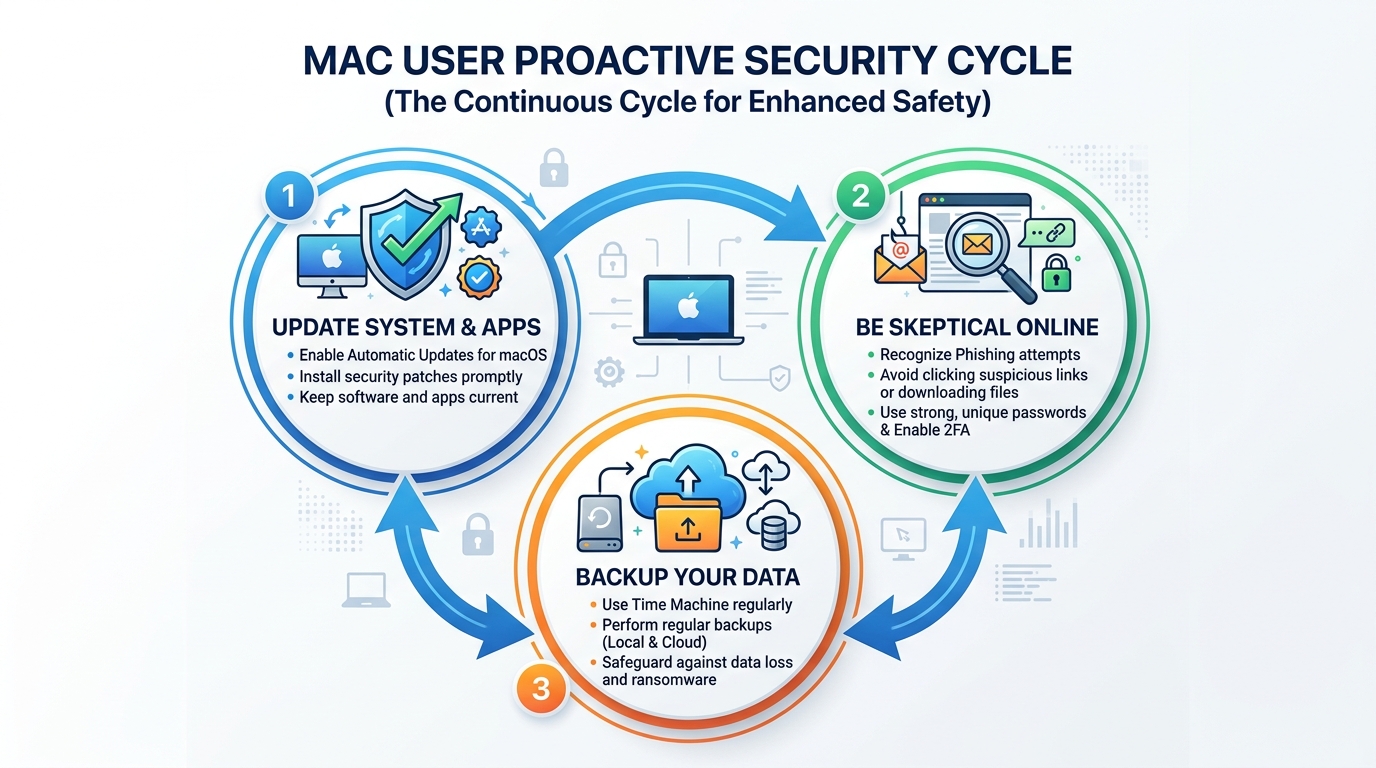
- Strict Software Source Management: The single most effective behavioral change a Mac user can make is to prioritize the Mac App Store for all software downloads. App Store applications are reviewed by Apple before distribution, providing a meaningful — though not absolute — quality and security gate. When downloading software from the web is necessary, verify the developer’s identity, check the official website directly rather than following links, and inspect the installer before running it.
- Prompt System and Application Updates: The majority of successful malware attacks exploit known vulnerabilities for which patches already exist. Enabling automatic macOS updates and regularly updating all installed applications closes these attack windows. This single habit eliminates a substantial percentage of the attack surface available to opportunistic malware.
Essential User Habits for Safe Computing
Technical defenses are only as effective as the human decisions made around them. Social engineering and phishing attacks are specifically designed to bypass technical controls by manipulating users directly.
- Healthy Skepticism as a Security Tool: Unsolicited emails requesting account verification, pop-up alerts claiming your Mac is infected, and software offers that seem unusually generous are the primary delivery mechanisms for social engineering attacks. Developing a habit of pausing before clicking, verifying unexpected communications through official channels, and treating urgency as a red flag rather than a prompt to act are among the most valuable security skills a Mac user can develop.
- Strong Passwords and Two-Factor Authentication: Credential theft is a primary objective of much macOS spyware. Using a password manager to generate and store strong, unique passwords for every account, combined with enabling two-factor authentication on all critical services, dramatically reduces the impact of credential theft even if it occurs. iCloud Keychain provides a built-in starting point for Mac users.
- Regular Data Backups: Time Machine, Apple’s built-in backup solution, provides automatic, versioned backups to an external drive. In the event of a ransomware attack, hardware failure, or accidental deletion, a current backup transforms a potentially catastrophic event into a manageable inconvenience. The backup drive should be disconnected from the Mac when not in active use to prevent ransomware from encrypting backup files as well. Cloud-based backup solutions provide an additional layer of redundancy.
When and Why Should You Consider Antivirus Software for Your Mac?
Apple’s built-in security tools are genuinely valuable, but they were designed to address a specific threat profile and operate within deliberate constraints. Dedicated antivirus software addresses the gaps that remain — providing real-time monitoring, broader threat detection coverage, and additional features that Apple’s native tools do not include. For users whose risk profile or usage patterns exceed what built-in tools can reliably address, third-party security software is not paranoia — it is prudent risk management.
The Critical Gaps that Antivirus Software Fills
Understanding what Apple’s tools do not do is as important as understanding what they do.
- Real-Time Protection: XProtect performs scans at specific trigger points — when software is first launched or when the signature database is updated. Dedicated antivirus software provides continuous, real-time monitoring of file system activity, network connections, and process behavior. This constant vigilance means threats are identified and blocked at the moment of attempted execution rather than discovered after the fact. For users who download files frequently or work with documents from multiple sources, this distinction is significant.
- Specialized and Broader Detection Engines: Apple’s XProtect signature database, while regularly updated, focuses on confirmed, widespread threats. Dedicated security vendors maintain larger threat intelligence networks, analyze emerging malware variants earlier in their lifecycle, and deploy behavioral detection methods that can identify suspicious activity even from previously unseen threats. This gap in coverage is particularly relevant for adware and spyware variants, which proliferate rapidly and often evade signature-based detection for extended periods.
- Enhanced Web Protection: Native macOS tools do not provide active, real-time blocking of malicious websites during browsing sessions. Dedicated security software integrates with browsers to check URLs against continuously updated threat databases, blocking access to phishing sites, malware distribution servers, and fraudulent pages before any content loads. This protection layer addresses one of the most common infection vectors — malicious web content.
Beyond Viruses: The Value of System Optimization Tools
The most compelling security solutions for Mac users today offer value that extends beyond malware detection alone, addressing the overall health and performance of the system.
- Integrated Cleanup and Optimization: Comprehensive security suites like 360 Total Security combine robust malware protection with practical system optimization features. These include junk file removal, startup item management, disk cleanup, and performance monitoring. Over time, macOS systems accumulate cache files, log files, and application remnants that consume storage and can degrade performance. An integrated tool addresses both security and performance in a single, unified workflow.
- Simplicity and Efficiency: Managing multiple specialized tools — one for malware, one for cleanup, one for web protection — creates complexity and increases the likelihood that important maintenance tasks are overlooked. A unified platform that handles all of these functions reduces cognitive overhead, ensures that security and optimization tasks are performed consistently, and provides a single dashboard for monitoring system health. As one IT administrator managing a mixed fleet of Windows and Mac systems noted: “The efficiency gain from using a combined security and optimization tool is substantial. Instead of juggling separate utilities, we have one consistent workflow across all endpoints, and the real-time protection means we’re not constantly reacting to incidents after the fact.”
- Accessible Protection Without Cost Barriers: One of the most significant advantages of solutions like 360 Total Security is that comprehensive protection — including real-time scanning, web protection, and system optimization — is available without a financial barrier. For individual users and small businesses evaluating whether to invest in additional Mac security, a capable free solution removes the cost objection entirely while delivering meaningful security improvements over built-in tools alone.
Making an Informed Choice: Evaluating Your Mac Security Needs
There is no universal answer to whether a Mac user needs additional security software. The right decision depends on an honest assessment of how you use your computer, what data you handle, and what the consequences of a successful attack would be. A thoughtful risk evaluation leads to a proportionate, effective security posture rather than either complacency or unnecessary complexity.
Assessing Your Personal Risk Profile and Usage
Not all Mac users face the same threat level. Calibrating your security measures to your actual risk profile is both more effective and more practical than applying a one-size-fits-all approach.
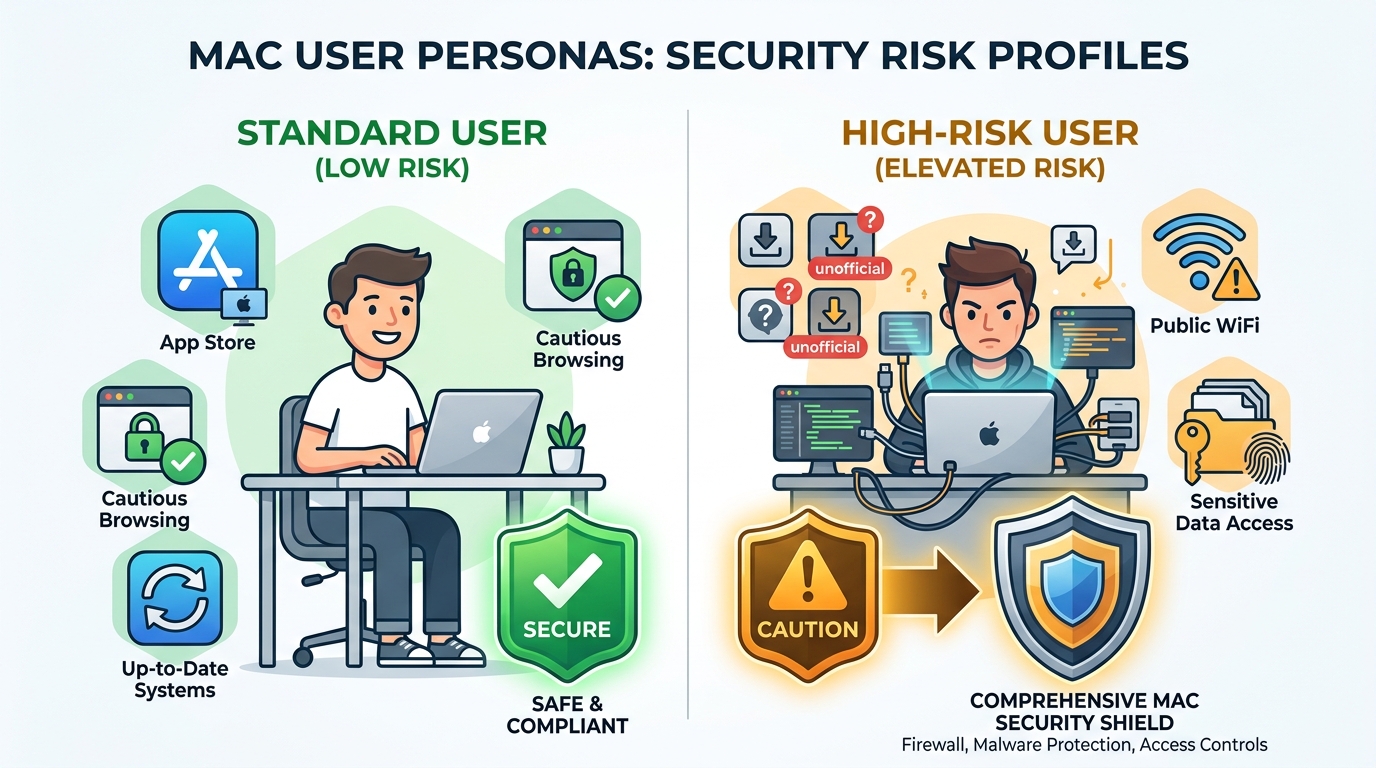
- High-Risk Users — Strong Case for Dedicated Security Software: If you regularly download software from sources outside the Mac App Store, work with documents received from unknown or untrusted parties, handle sensitive financial or personal data, use your Mac for business purposes involving client information, or frequently connect to public Wi-Fi networks, your risk profile is elevated. The potential consequences of a security incident — data breach, ransomware, credential theft — are significant enough to warrant the additional protection layer that dedicated antivirus software provides.
- Standard Users — Built-in Features May Suffice with Diligence: If your Mac usage is primarily limited to App Store applications, you are consistently cautious about unsolicited communications, you maintain current system updates, and you do not regularly handle highly sensitive data, Apple’s built-in security tools combined with strong user habits may provide adequate protection. The key word is diligence — the built-in tools are effective when user behavior does not create unnecessary exposure.
- The Value Proposition of Free, Comprehensive Solutions: For high-risk users evaluating additional security tools, the availability of a free, feature-rich solution like 360 Total Security changes the calculus significantly. When the cost of additional protection is zero, the question shifts from “Can I afford this?” to “Can I afford not to have this?” For users in the high-risk category, the answer is clear.
Key Features to Look For in a Mac Security Solution
If you determine that additional security software is appropriate for your situation, evaluating options against a consistent set of criteria ensures you select a solution that genuinely improves your security posture without introducing new problems.
- Lightweight Design: A security tool that significantly degrades macOS performance, drains battery life, or introduces system instability creates a different kind of problem. Look for solutions with demonstrably low system resource consumption that have been specifically optimized for macOS rather than ported from Windows with minimal adaptation.
- Strong Real-Time Protection with Regular Updates: The core function of any security tool is reliable, real-time malware and adware detection backed by a threat database that is updated frequently. Evaluate how often signature updates are deployed and whether behavioral detection supplements signature-based methods for catching emerging threats.
- Useful Supplementary Features: Web protection that blocks malicious URLs, firewall monitoring, and system cleanup tools add genuine value beyond the core antivirus function. These features address threat vectors and performance issues that built-in macOS tools do not fully cover, making the overall package more valuable than the sum of its parts.
Security Approach Comparison: Built-in macOS Features vs. Built-in Features + 360 Total Security
| Security Dimension | Built-in macOS Features Only | Built-in Features + 360 Total Security |
|---|---|---|
| Known Malware Detection | Yes — via XProtect signatures | Yes — XProtect + expanded threat database |
| Real-Time Scanning | Limited — trigger-based, not continuous | Yes — continuous file and process monitoring |
| Adware and Spyware Detection | Partial — known variants only | Strong — specialized adware detection engine |
| Ransomware Protection | Limited — relies on known signatures | Enhanced — behavioral detection supplements signatures |
| Web Protection (Malicious URLs) | Safari basic filtering only | Active blocking across all browsers |
| System Optimization and Cleanup | Not included | Yes — junk file removal, startup management, performance boost |
| Zero-Day Threat Coverage | Dependent on Apple patch cycle | Improved — behavioral analysis provides partial coverage |
| Cost | Free (included with macOS) | Free — no cost barrier |
The data in this comparison makes the recommendation straightforward for users in elevated risk categories: the combination of Apple’s built-in security tools with a dedicated solution like 360 Total Security provides substantially broader coverage across every meaningful security dimension, at no additional cost. For Mac users who are serious about protecting their data, their privacy, and their system performance, visiting the 360 Total Security official website to download and evaluate the solution is a logical next step.
Frequently Asked Questions
Can a Mac really get a virus?
Yes, absolutely. While macOS has strong built-in security features, Macs are susceptible to a range of malware including adware, spyware, trojans, ransomware, and zero-day exploits. The belief that Macs cannot get viruses is a myth rooted in historical market dynamics that no longer reflect current reality. As Mac market share has grown, so has the incentive for cybercriminals to develop macOS-specific threats.
Is Apple’s built-in security (XProtect, Gatekeeper) enough to protect my Mac?
For users with cautious online habits who primarily use the Mac App Store and keep their system updated, Apple’s built-in tools provide a meaningful baseline of protection. However, these tools have limitations: XProtect is not a continuous real-time scanner, its coverage focuses on known threats, and it does not provide web protection or system optimization. Users who download software from multiple sources, handle sensitive data, or want comprehensive real-time protection should consider supplementing built-in tools with dedicated security software.
What is the most common type of malware affecting Mac users today?
Adware is by far the most frequently encountered threat for Mac users. It is typically distributed through bundled software installers, fake browser extensions, and deceptive updaters for popular software. While adware is less destructive than ransomware, it degrades user experience, can harvest browsing data, and often serves as a gateway for more serious infections. Spyware disguised as system utility applications is the second most common category.
Does antivirus software slow down a Mac?
This concern is legitimate but depends heavily on the specific software chosen. Poorly optimized security tools can impact performance, but well-designed solutions built specifically for macOS have minimal system footprint. 360 Total Security, for example, is engineered for lightweight operation while maintaining comprehensive protection. In fact, the system optimization features included in the suite often result in a net performance improvement by removing junk files and unnecessary startup items that were already degrading performance.
How do I know if my Mac already has malware?
Common indicators of a Mac infection include: unexpected browser behavior such as changed homepage or search engine settings, intrusive advertising appearing outside of normal browser sessions, unexplained slowdowns or high CPU usage, applications you do not remember installing appearing in your Applications folder, and unexpected network activity. If you observe any of these symptoms, running a full system scan with a dedicated security tool is the recommended first step. Downloading 360 Total Security and performing a comprehensive scan can identify and remove threats that may have evaded Apple’s native detection tools.
About the Author: This article was written by a Senior Cybersecurity Technical Writer with over a decade of experience covering endpoint security, threat intelligence, and operating system security architecture. Specializing in making complex security concepts accessible to both technical and general audiences, the author has contributed to cybersecurity publications, enterprise security documentation, and consumer-focused security guides. Their work emphasizes practical, evidence-based security recommendations grounded in current threat research.
Learn more about 360 Total Security