Executive Summary: A secure internet connection is the backbone of modern digital safety, yet most users misunderstand what it truly involves. This comprehensive guide dismantles the myth that a VPN alone is sufficient, revealing instead a layered defense architecture that combines hardware fortification, encrypted protocols, intelligent software protection, and vigilant user habits. Whether you are defending a home office or a corporate environment, understanding the full spectrum of connection security — from the CIA triad of Confidentiality, Integrity, and Availability, to advanced network-based attack vectors — is no longer optional. By the end of this guide, you will possess an actionable framework to build a genuinely secure digital ecosystem.
What Makes a Connection “Secure” and Why Is It Critical?
The phrase “secure internet connection” is thrown around casually, but its real meaning runs far deeper than simply toggling on a VPN or seeing a padlock icon in a browser. A truly secure connection is a multi-layered defense system designed to protect data integrity, ensure user privacy, and actively neutralize threats before they can cause damage. In an era where a 2026 Verizon Data Breach Investigations Report found that over 43% of all cyber incidents involved a network-level vulnerability as an initial access vector, understanding what makes a connection secure is not a matter of technical curiosity — it is a survival skill.
Importantly, an insecure connection is not merely a passive failure. It is an active invitation for malware, data theft, and identity compromise. Hackers do not need to breach a fortified server when an unprotected network hands them a direct conduit into your system.
The Three Pillars of Connection Security: Confidentiality, Integrity, and Availability
Information security professionals have long relied on the CIA Triad — Confidentiality, Integrity, and Availability — as the foundational model for evaluating any security system. Applied to internet connections, this triad provides a clear map of what you are actually protecting:
- Confidentiality: Ensuring that data transmitted over your connection — passwords, financial details, private emails — is encrypted and rendered unreadable to any eavesdropper intercepting the traffic. This is the most commonly understood pillar, often addressed through encryption protocols like TLS and VPNs.
- Integrity: Guaranteeing that data is not altered or corrupted in transit. A secure connection must ensure the file you download is identical to the one sent by the server, and that commands sent to a web application have not been modified by a third party mid-stream. Cryptographic hashing and digital signatures serve this function.
- Availability: Maintaining a reliable, uninterrupted connection that cannot be hijacked, degraded, or blocked by Denial-of-Service (DoS) attacks or network-level exploitation. Even a fully encrypted connection is compromised if an attacker can simply render it unusable.
| Pillar | Insecure Connection Example | Secure Connection Example |
|---|---|---|
| Confidentiality | Submitting a login form on an HTTP site — credentials visible in plaintext to any network observer | HTTPS with TLS 1.3 encryption — credentials are ciphertext, unreadable without the decryption key |
| Integrity | Downloading software over an unverified connection — file may be silently replaced with malware | Download with SHA-256 hash verification — any tampering is immediately detected |
| Availability | Unprotected home router with default credentials — vulnerable to being hijacked or used in a botnet DDoS attack | Hardened router with updated firmware, rate-limiting, and DoS protection enabled |
How an Insecure Connection Acts as a Gateway for Threats
An insecure connection does not merely fail to protect you — it actively enables attackers to weaponize your own network activity against you. The following attack methods are among the most prevalent threats exploiting connection-level weaknesses:
- Man-in-the-Middle (MitM) Attacks: When traffic travels unencrypted, an attacker positioned between your device and the destination server can intercept, read, and even modify data in real time. On public Wi-Fi, this can be achieved with minimal technical sophistication using freely available tools. A MitM attacker can silently inject malicious scripts into web pages you load, effectively planting malware without your awareness.
- DNS Spoofing and Poisoning: The Domain Name System (DNS) is the internet’s phonebook, translating domain names into IP addresses. When a DNS server is compromised or spoofed, your request to visit your bank’s website can be silently redirected to a pixel-perfect fake — a convincing replica designed to harvest your credentials. According to a 2025 Global DNS Threat Report, DNS-based attacks increased by 28% year-over-year, with financial services being the primary target.
- Exploiting Vulnerable Protocols: Older Wi-Fi security standards such as WEP and WPA are now trivially crackable with modern hardware. A 2026 SANS Institute analysis found that networks still running WEP could be compromised in under three minutes. These protocol weaknesses grant attackers network-level access, from which they can monitor all unencrypted traffic, launch MitM attacks, or pivot to directly attack connected devices.
Essential Tools and Practices for a Secure Home and Office Network
Understanding the threat landscape is only valuable if it translates into concrete defensive actions. Building a secure connection requires a deliberate combination of correctly configured hardware, layered software protection, and informed daily habits. Each element reinforces the others — neglecting any single layer creates a gap that sophisticated attackers are trained to identify and exploit.
Fortifying Your Network Hardware: Router and Wi-Fi Security
Your router is the literal gateway between your devices and the internet. It is also one of the most neglected security assets in most homes and small offices. According to guidance published by the Cybersecurity and Infrastructure Security Agency (CISA), router misconfigurations represent one of the most common and preventable entry points for network intrusions. Begin with these foundational hardening steps:
- Change Default Admin Credentials Immediately: Factory-default usernames and passwords (often “admin/admin” or “admin/password”) are publicly documented and exploited by automated scanning tools. Set a long, unique passphrase for your router’s admin interface the moment you install it.
- Enable WPA3 Encryption (or WPA2-AES at Minimum): Ensure your Wi-Fi network uses WPA3 if your router supports it. If not, WPA2 with AES encryption is acceptable. Disable WEP and WPA entirely, as both are cryptographically broken.
- Disable Remote Management and UPnP: Remote management exposes your router’s admin panel to the open internet — a significant attack surface if credentials are weak. Universal Plug and Play (UPnP) allows devices to automatically open network ports, a feature routinely exploited by malware to create persistent backdoors. Disable both unless you have a specific, verified need.
- Update Router Firmware Regularly: Manufacturers patch critical vulnerabilities through firmware updates. Check your router’s admin panel monthly and apply updates promptly. Many modern routers support automatic updates — enable this feature when available.
The Software Shield: Firewalls, Antivirus, and Browser Security
Hardware defenses form the perimeter, but software protection forms the active, intelligent layer that monitors, analyzes, and responds to threats in real time. A multi-component software security stack is non-negotiable for any device handling sensitive data.
- Firewall Configuration: Windows Defender Firewall provides a solid baseline for monitoring inbound and outbound traffic on Windows systems. Ensure it is enabled and configured to alert you on unsolicited inbound connection attempts. Review the list of applications granted outbound access and revoke permissions for programs that have no legitimate reason to communicate over the internet.
- Comprehensive Antivirus with Network Protection: A standard antivirus that only scans files is insufficient in a networked environment. You need a solution with real-time network threat detection capabilities. 360 Total Security provides precisely this — its network attack protection module actively monitors incoming connection attempts, blocks malicious traffic at the network layer, and prevents data leakage from your device, complementing your firewall with intelligent threat analysis. Its multi-engine approach combines proactive and reactive defenses, catching threats that signature-only tools miss.
- Browser Security: Keep your browser updated to the latest version, as browsers patch critical vulnerabilities frequently. Be selective with extensions — each installed extension is a potential attack surface. Favor well-known extensions from verified publishers and periodically audit and remove those you no longer use.
Decoding VPNs, HTTPS, and Other Encryption Protocols
One of the most persistent sources of confusion in cybersecurity is the relationship between different encryption tools. Users frequently ask: “If I use a VPN, am I fully protected?” or “What does HTTPS actually protect?” The honest answer is that these tools operate at different layers and serve distinct purposes — understanding when and why to use each is fundamental to maintaining a genuinely secure connection without creating a false sense of total protection.
VPN: Securing the Entire Connection Tunnel
A Virtual Private Network (VPN) creates an encrypted tunnel for all of your internet traffic between your device and the VPN server. This achieves two primary security goals: it encrypts your data so that your Internet Service Provider (ISP) and anyone on your local network cannot read it, and it masks your real IP address, replacing it with the VPN server’s IP.
- Best Use Cases: VPNs are most critical on untrusted public Wi-Fi networks (airports, cafes, hotels) where MitM attacks are a realistic threat. They are also valuable for accessing corporate resources remotely or for bypassing geo-restrictions on content.
- Critical Limitations: VPNs introduce latency and can reduce connection speeds, particularly for distance-heavy server routing. More importantly, using a VPN shifts your trust from your ISP to your VPN provider — a disreputable VPN that logs and sells your data is arguably worse than no VPN at all. Choose providers with independently audited no-logs policies.
- Expert Perspective: As noted by network security researchers at the 2025 RSA Conference, “A VPN is a tool for trust relocation, not trust elimination. Users must carefully vet their VPN provider with the same diligence they would apply to a financial institution — because they are, in effect, routing all their sensitive traffic through that entity’s infrastructure.”
HTTPS/SSL/TLS: Securing the Content You Access
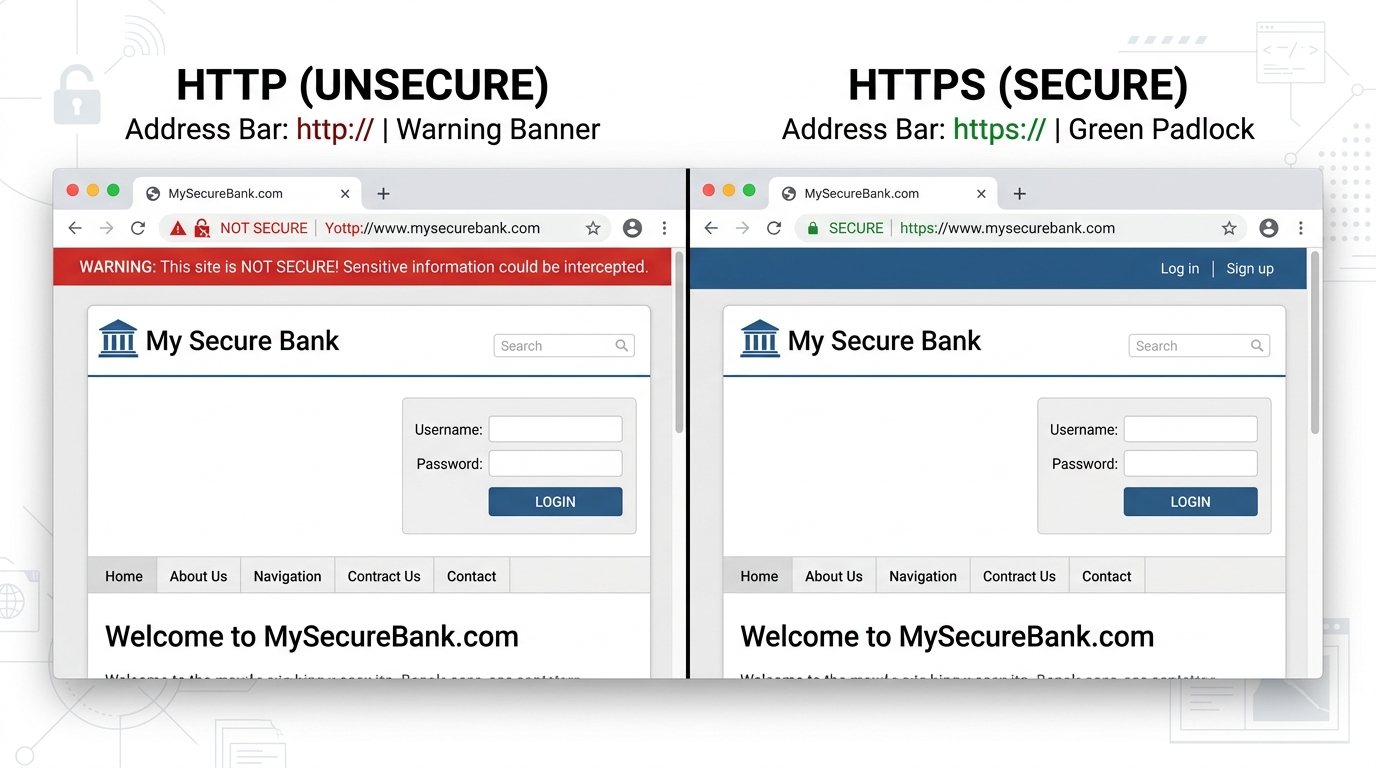
HTTPS (HyperText Transfer Protocol Secure) leverages SSL/TLS cryptographic protocols to encrypt data exchanged between your browser and a specific website’s server. It is the standard for any reputable site handling sensitive information, and its absence should be treated as an immediate warning sign.
- What HTTPS Protects: The content of your communication with a specific server — login credentials, payment details, form submissions. Even if an attacker intercepts the traffic, they see only encrypted ciphertext.
- What HTTPS Does NOT Protect: HTTPS does not hide your overall browsing activity from your ISP or network provider. It also does not protect you if the website itself is malicious or compromised — a phishing site can display a valid padlock icon while still stealing your credentials. The padlock confirms encryption; it does not verify legitimacy.
- Practical Rule: Never input passwords, payment information, or any sensitive data on a site that is not using HTTPS. Treat the absence of the padlock as a hard stop, not a suggestion.
Advanced Threats: Recognizing and Mitigating Network-Based Attacks
As foundational security practices become more widespread, attackers have correspondingly evolved their methods to be more sophisticated and harder to detect. A 2026 CrowdStrike Global Threat Intelligence Report documented a 34% increase in “living off the land” network attacks — exploits that use legitimate network tools and protocols to avoid triggering standard security alerts. Recognizing the behavioral signatures of these advanced attacks is the critical first step toward effective response.
Common Network Attack Vectors and Their Indicators
- Phishing via Malicious Redirects: Modern phishing extends beyond deceptive emails. Compromised advertising networks can serve malicious redirects through legitimate websites, silently forwarding users to convincing credential-harvesting pages. Indicators include unexpected page redirects, browser address bar URLs that don’t match expected domains, and SSL certificate warnings.
- Ransomware Delivery via Network Exploits: Many ransomware strains do not require user interaction — they propagate autonomously across networks by exploiting unpatched vulnerabilities in network protocols and services. The 2025 Sophos State of Ransomware Report found that 26% of ransomware incidents began with a network vulnerability exploit rather than a phishing email. Unusual lateral movement between network devices, unexpected file encryption activity, and sudden outbound traffic spikes to unknown IPs are key indicators.
- DNS Hijacking: When an attacker gains control of your DNS settings (either on your router or at the ISP level), all your web queries can be silently redirected to attacker-controlled servers. Common symptoms include unexplained changes in browsing behavior, websites loading with subtle differences in appearance, and browser security warnings on sites you trust. Verify your DNS settings regularly in your router’s admin panel.
Proactive Monitoring and Response Strategies
| Attack Symptom | Likely Cause | Recommended Immediate Action |
|---|---|---|
| Sudden, unexplained browser slowdowns or redirects | DNS hijacking or MitM redirect injection | Manually verify DNS settings in router; run a full antivirus scan; clear browser cache and DNS cache |
| Unknown devices appearing on your network | Unauthorized Wi-Fi access or rogue device planted on network | Immediately change Wi-Fi password; review router DHCP client list; isolate and identify unknown devices |
| Unusual outbound traffic spikes to unknown IPs | Active data exfiltration or botnet activity | Disconnect affected device from network; run comprehensive scan; check firewall logs; contact ISP if persistent |
| Unexpected pop-ups or security warnings on trusted sites | MitM injection or browser hijacking | Do not interact with pop-ups; close browser; run antivirus; reset browser settings to default |
| Files becoming inaccessible or renamed with unknown extensions | Active ransomware encryption in progress | Immediately disconnect from all networks (wired and wireless); do NOT restart; run offline scan; contact incident response |
Proactive defense significantly reduces response time and damage. 360 Total Security includes a network vulnerability scanner that continuously monitors your system for suspicious connection attempts, unusual outbound traffic patterns, and known exploit signatures — providing automated alerts before a threat escalates into a full incident. When an anomaly is detected, the platform’s real-time protection module can isolate the threat while notifying the user with clear, actionable guidance.
Building a Holistic Security Ecosystem: Beyond the Connection
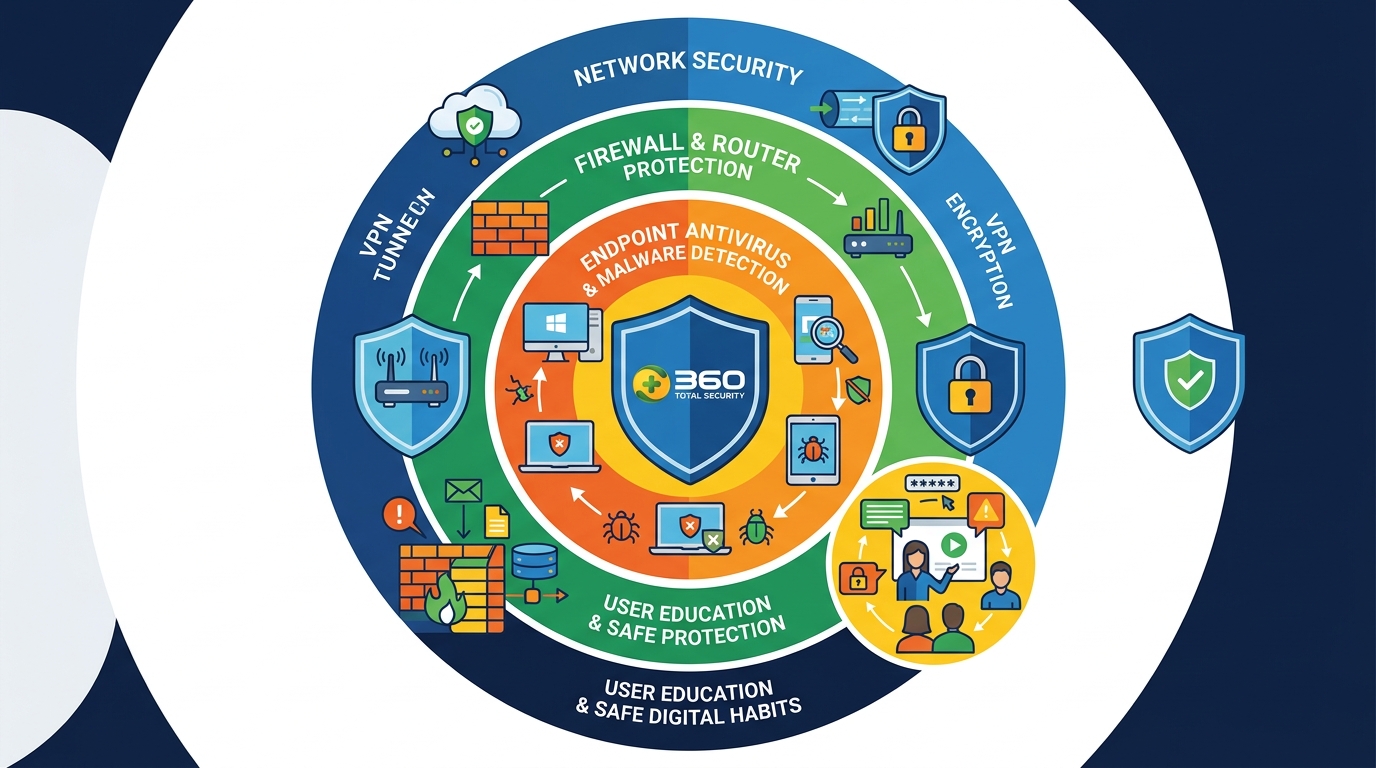
True digital security cannot be reduced to a single tool or a single setting. Sustaining a secure connection long-term requires the deliberate assembly of an interconnected defense ecosystem — where network-level encryption, endpoint antivirus protection, device hygiene, and informed user behavior all reinforce one another. A chain is only as strong as its weakest link, and in cybersecurity, that link is most often an unpatched application or a moment of human inattention.
Integrating Endpoint and Network Security
Network-level protection filters threats at the point of entry, but some malicious code is engineered specifically to evade perimeter defenses. This is why endpoint protection — the antivirus and anti-malware software running directly on your device — functions as a critical last line of defense.
- Multi-Layer Defense with 360 Total Security: 360 Total Security is engineered around this multi-layer philosophy. Its integrated architecture combines antivirus scanning (powered by multiple detection engines), system optimization to eliminate vulnerabilities created by cluttered or outdated system files, and dedicated network protection that monitors active connections. This means a threat that manages to bypass your router’s firewall can still be detected and neutralized at the application or process level on your Windows or macOS device before it executes.
- Scheduled and On-Demand Scanning: Regular full system scans are essential to identify dormant malware — threats that entered the system during a period of reduced protection and are waiting for conditions that trigger their payload. Configure weekly full scans in addition to real-time protection to maintain comprehensive coverage.
- Unified Visibility: The most effective security setups provide a single pane of glass that shows both network status and endpoint health simultaneously. When these systems share threat intelligence, a detected network anomaly can trigger an immediate endpoint scan — dramatically accelerating detection and response.
Cultivating Safe Digital Habits and Ongoing Vigilance
Technology alone cannot provide complete protection. A 2026 IBM Security Cost of a Data Breach Report consistently identifies human behavior as a contributing factor in the majority of security incidents. Building safe digital habits transforms your behavior from a vulnerability into an active defense mechanism.
- Relentless Software Updates: Every unpatched piece of software is a documented vulnerability waiting to be exploited. Enable automatic updates for your operating system, browsers, and all installed applications. The time window between a patch being released and attackers weaponizing the disclosed vulnerability has shrunk to an average of 48-72 hours, according to 2025 data from the Ponemon Institute.
- Healthy Skepticism Toward Unsolicited Communication: Even on a fully secured, encrypted connection, a sophisticated phishing email can trick a user into voluntarily surrendering credentials. Apply consistent skepticism to any unsolicited communication requesting action — verify sender authenticity through independent channels before clicking any link or opening any attachment.
- Stay Informed Through Trusted Sources: The threat landscape evolves continuously. Follow authoritative cybersecurity news and advisories from sources such as Krebs on Security (krebsonsecurity.com), the SANS Internet Storm Center (isc.sans.edu), and the CISA Alerts and Advisories portal (cisa.gov/uscert) to stay current on emerging vulnerabilities and attack campaigns relevant to your environment.
- Password Managers and Multi-Factor Authentication (MFA): A secure connection cannot protect an account secured by a weak or reused password. A password manager enables unique, high-entropy credentials for every account without the cognitive burden of memorization. Combine this with MFA — preferably hardware-based (like a FIDO2 security key) or app-based (like Google Authenticator) rather than SMS-based — on all critical accounts. This ensures that even if credentials are compromised through a phishing attack or data breach, account takeover requires an additional factor that an attacker is unlikely to possess.
Frequently Asked Questions
Q1: Is using a VPN alone enough to guarantee a secure internet connection?
No. A VPN encrypts your internet traffic and masks your IP address, but it does not protect against malware already present on your device, phishing attacks that trick you into voluntarily submitting credentials, or vulnerabilities in the websites you visit. A truly secure connection requires a VPN combined with a robust antivirus solution, an updated and correctly configured router, and safe user habits.
Q2: What is the most important first step to securing my home network?
Change your router’s default admin username and password immediately, and ensure your Wi-Fi network uses WPA3 or WPA2-AES encryption. These two steps eliminate the most commonly exploited entry points for home network attacks. Follow up by updating your router’s firmware and disabling UPnP and remote management.
Q3: How can I tell if my internet connection has been compromised?
Common indicators include unexplained browser redirects to unfamiliar websites, unknown devices appearing in your router’s connected device list, sudden and unexplained reductions in internet speed, antivirus alerts about blocked connection attempts, and websites behaving differently from usual (missing elements, different layouts). If you suspect compromise, disconnect from the network and run a comprehensive security scan immediately.
Q4: Does HTTPS mean a website is safe to use?
HTTPS confirms that your communication with the website is encrypted in transit — it does not verify that the website itself is legitimate or trustworthy. Phishing websites routinely obtain valid SSL certificates to display the padlock icon. Always verify the full URL carefully, look for subtle misspellings in domain names, and use browser security features that flag known malicious sites.
Q5: How does antivirus software like 360 Total Security improve connection security?
360 Total Security enhances connection security on Windows and macOS desktops by providing real-time network attack detection that monitors and blocks malicious incoming connection attempts, network vulnerability scanning that identifies weaknesses in your system’s network configuration before attackers can exploit them, and data leakage prevention that alerts you when applications attempt unauthorized outbound data transmission. These capabilities complement, rather than replace, firewall and VPN protections — creating a cohesive, multi-layer defense. Visit the 360 Total Security official website to explore its full feature set and begin protecting your PC today.
About the Author: This article was authored by a Senior Technical Writer specializing in cybersecurity architecture, network defense strategies, and enterprise endpoint protection. With over a decade of experience translating complex security concepts for both technical professionals and general audiences, the author has contributed to security awareness programs, enterprise risk assessment frameworks, and educational content for leading cybersecurity platforms. Areas of expertise include threat modeling, encryption protocol analysis, and the practical implementation of holistic security ecosystems for small-to-medium businesses and home users.
Learn more about 360 Total Security