Executive Summary: This comprehensive Kaspersky antivirus review delivers an in-depth, unbiased analysis of one of the cybersecurity industry’s most recognized names. We examine Kaspersky’s malware detection capabilities, real-world system performance, user experience, pricing structure, and geopolitical considerations—then position it within the competitive landscape against Norton, McAfee, and the increasingly capable free alternative, 360 Total Security. Whether you are a security-conscious power user or a budget-focused home user, this guide provides the data-driven insights you need to make a confident, informed decision about your PC’s protection.
What Makes a Kaspersky Review Essential Before Installing?
Choosing a cybersecurity solution is not a trivial decision. The software you install gains deep access to your operating system, monitors your files, and in many cases, interacts with your network traffic. Before committing to any product, understanding its full scope—its technical architecture, its product range, its trustworthiness, and its real-world performance—is absolutely critical. A thorough Kaspersky antivirus review must address the foundational question: does this product genuinely protect you, and is it the right fit for your specific security needs?
Kaspersky Lab, founded in 1997 and headquartered in Moscow with global operations, has built a reputation as one of the most technically sophisticated antivirus vendors in the world. Its research teams have been credited with uncovering some of the most complex state-sponsored malware campaigns in history. Yet, its name also carries controversy. Understanding both dimensions is essential for any honest evaluation.
Evaluating Core Protection & Detection Capabilities
Kaspersky employs a multi-layered approach to malware detection that goes well beyond simple signature matching. Its protection stack integrates three primary detection methodologies:
- Signature-Based Detection: Traditional matching of known malware fingerprints against a continuously updated cloud database, ensuring rapid identification of established threats.
- Heuristic Analysis: Examination of file structures and code patterns to identify suspicious characteristics in files that have not yet been catalogued as malware, catching zero-day variants before they are widely recognized.
- Behavioral Analysis (System Watcher): Real-time monitoring of running processes to detect malicious behavior patterns—such as unauthorized file encryption or registry modification—even if the underlying file passes all other checks. This is particularly effective against ransomware.
These layers work in concert, creating a detection net that is significantly harder for sophisticated malware to evade than any single-method approach.
Independent testing organizations provide the most objective measure of antivirus efficacy. According to AV-TEST quarterly evaluations, Kaspersky has consistently achieved near-perfect scores in the Protection category, frequently scoring 6 out of 6 points—detecting 100% of widespread malware and zero-day threats in controlled test environments. AV-Comparatives Real-World Protection Tests have similarly placed Kaspersky among the top performers, with detection rates regularly exceeding 99.5% and false-positive rates that remain among the lowest in the industry. According to a 2026 Cybersecurity Report analyzing two years of comparative lab data, Kaspersky’s detection engine ranked in the top three globally for consecutive testing periods, a testament to the maturity and investment behind its core technology.
Understanding the Product Range: Free vs. Premium
Kaspersky Free Antivirus provides the foundational protection layer at no cost. It includes real-time file scanning, web protection against malicious URLs, and email scanning. However, it deliberately omits several components that define a complete security suite: there is no dedicated software firewall (it relies on Windows Firewall), no Safe Money banking browser, no privacy protection tools, and no password manager. For users with basic needs and technical confidence, it is a capable free option—but it is not a comprehensive solution.
The premium tiers introduce substantially more value. Kaspersky Internet Security adds a two-way firewall, Safe Money (a hardened browser environment for financial transactions), webcam protection, and parental controls. Kaspersky Total Security further layers in a Password Manager, encrypted file vault, and advanced backup tools. The table below illustrates the key differentiators across the product family:
| Feature | Kaspersky Free | Kaspersky Internet Security | Kaspersky Total Security |
|---|---|---|---|
| Real-Time Malware Protection | ✅ Yes | ✅ Yes | ✅ Yes |
| Web & Email Protection | ✅ Yes | ✅ Yes | ✅ Yes |
| Two-Way Firewall | ❌ No | ✅ Yes | ✅ Yes |
| Safe Money (Banking Browser) | ❌ No | ✅ Yes | ✅ Yes |
| Privacy Protection / Webcam Guard | ❌ No | ✅ Yes | ✅ Yes |
| Parental Controls | ❌ No | ✅ Yes | ✅ Yes |
| Password Manager | ❌ No | ❌ No | ✅ Yes |
| Encrypted File Vault | ❌ No | ❌ No | ✅ Yes |
| Backup Tools | ❌ No | ❌ No | ✅ Yes |
| Limited VPN (200MB/day) | ❌ No | ✅ Yes (Limited) | ✅ Yes (Limited) |
| Annual Cost (Approx. 1 Device) | Free | ~$39.99 | ~$49.99 |
How Does Kaspersky Perform in Real-World System Impact & Usability?
A detection rate of 99.9% means very little if the software that achieves it renders your PC sluggish, bombards you with confusing alerts, or presents a user interface so complex that its protective features go unconfigured. Real-world usability is the bridge between technical capability and actual security outcomes. This section examines how Kaspersky performs when installed on a typical user’s machine—not in a lab, but in the daily workflow of browsing, working, and gaming.
System Resource Consumption & Scanning Performance
Kaspersky has made significant strides in reducing its system footprint over recent product generations. In idle state, the background protection processes typically consume between 150–250 MB of RAM and less than 1–2% CPU on modern hardware, which is largely imperceptible during normal use. This places it in the competitive middle ground—lighter than some legacy security suites but not as minimal as purpose-built lightweight solutions.
During active full-system scans, resource consumption naturally spikes. CPU utilization can reach 20–40% on mid-range processors, and disk I/O increases substantially. However, Kaspersky’s intelligent scan scheduler is designed to defer intensive operations during periods of active user engagement, prioritizing user experience over scan immediacy. Independent performance benchmarks from AV-Comparatives’ Performance Test—which measures impact on everyday tasks like file copying, application launching, and web browsing—have consistently awarded Kaspersky an Advanced or Advanced+ rating, indicating a below-average system impact relative to the protection provided.
Scan speeds for a typical system drive (500GB with standard file distribution) average between 25–45 minutes for a full scan and under 2 minutes for a quick scan—competitive figures within its class. Subsequent scans benefit from intelligent caching, which skips previously verified clean files and dramatically reduces scan duration over time.
Navigating the User Interface & Configuration Complexity
Kaspersky’s main dashboard presents a clean, tile-based interface that surfaces the most critical status indicators—protection status, update recency, and scan options—without overwhelming new users. For novice users, the default configuration is genuinely protective out of the box, requiring minimal manual intervention. The color-coded status system (green for secure, amber for attention required, red for critical) communicates system health intuitively.
However, beneath this accessible surface lies a configuration depth that can become a double-edged sword. Advanced settings—covering Application Control rules, network packet filtering, trusted zone exclusions, and exploit prevention parameters—are powerful but can be disorienting for users who venture into them without technical background. The sheer number of configurable parameters, while a strength for security professionals, represents a usability challenge for mainstream consumers.
A frequently cited user complaint involves notification management. Kaspersky’s default alert settings can be verbose, generating notifications for actions that many users consider routine—such as a new application requesting network access or a script executing in a browser. While each individual alert is technically informative, the cumulative effect can lead to alert fatigue, where users begin dismissing warnings without reading them, paradoxically undermining the security awareness the software is designed to promote. Adjusting notification thresholds is possible but requires navigating several settings layers.
Addressing Privacy & Feature Overload Concerns
Kaspersky has made transparency a stated corporate priority in recent years, publishing annual Global Transparency Initiative reports and relocating data processing infrastructure for certain regions to Switzerland. Its privacy policy outlines what telemetry data is collected—primarily threat intelligence data used to improve detection—and provides opt-out mechanisms for some categories of data sharing. Users concerned about data handling should review the official privacy policy directly on Kaspersky’s website and consider the implications for their specific use case and jurisdiction.
A related concern is feature overload. Premium suites pack in a substantial number of tools—VPN, password manager, file shredder, application control, parental controls, privacy cleaner—many of which overlap with dedicated standalone utilities that users may already have installed. For less technically inclined users, this abundance can create confusion about which tools to use, when to use them, and whether they are configured correctly. The Application Control module, for example, which categorizes and restricts software based on reputation and behavior, can interfere with legitimate software in ways that are difficult for average users to diagnose and resolve. This is not a flaw in the technology itself, but a design philosophy that prioritizes comprehensiveness over simplicity.
What Are the Key Advantages & Disadvantages of Kaspersky?
A credible review must present both the compelling reasons to choose Kaspersky and the legitimate reasons to hesitate. The following analysis synthesizes technical performance data, user feedback patterns, and market positioning to deliver a balanced, candid assessment of where Kaspersky excels and where it falls short.
Unmatched Technical Strengths: Detection & Engine
The most defensible argument in favor of Kaspersky is straightforward: its core anti-malware engine is among the best in the world. Year after year, across multiple independent testing frameworks, Kaspersky’s detection engine achieves scores that few competitors match consistently. Its low false-positive rate is particularly notable—a security product that incorrectly flags legitimate software as malicious creates operational disruption and erodes user trust. Kaspersky manages the delicate balance between sensitivity and precision better than most.
The System Watcher behavioral blocking module deserves specific praise. Unlike signature-based detection, which is inherently reactive, System Watcher monitors the behavioral patterns of running processes in real time. When ransomware begins encrypting files, System Watcher can detect the characteristic pattern, terminate the process, and in many cases automatically roll back changes using shadow copies—a capability that has prevented real data loss for users encountering novel ransomware strains not yet in any signature database.
The Safe Money feature provides a hardened, isolated browser environment specifically for financial transactions. When you navigate to a banking or e-commerce site, Safe Money can automatically launch in a protected container that is isolated from keyloggers, screen capture malware, and browser-injecting trojans. For users who conduct significant financial activity online, this is a genuinely valuable layer of protection that goes beyond what standard antivirus scanning provides.
As one cybersecurity analyst noted in a 2025 industry assessment: “Kaspersky’s threat research team and the detection engine they’ve built over nearly three decades represent an institutional depth of malware knowledge that is extraordinarily difficult to replicate. On pure anti-malware merit, it remains a benchmark product.”
Notable Drawbacks: Price, Politics, & Complexity
Against these strengths, several drawbacks must be acknowledged honestly.
Pricing and upsell dynamics present a friction point. While Kaspersky’s premium tiers are competitively priced relative to Norton or McAfee, they are significantly more expensive than capable free alternatives. Furthermore, the software itself—particularly the free version—contains persistent prompts encouraging upgrades to paid tiers. For users who have consciously chosen the free version, these prompts can feel intrusive and undermine the user experience.
Geopolitical concerns remain a reality that any honest review must address. In 2022, the U.S. Federal Communications Commission designated Kaspersky as a national security risk, and in 2024, the U.S. Department of Commerce issued restrictions on the sale of Kaspersky products to U.S. consumers. Several European government agencies have issued advisories recommending that critical infrastructure operators evaluate alternatives. Kaspersky has consistently and vigorously denied any inappropriate data sharing with government entities and has taken concrete steps—such as the Swiss data processing relocation—to address concerns. However, for users in regulated industries, government employment, or those with heightened sensitivity to data sovereignty, these concerns are not merely theoretical and warrant careful consideration.
Notification verbosity, as discussed in the usability section, is a recurring complaint in user reviews across multiple platforms. While configurable, the default settings produce an alert frequency that many users find disruptive, and the process of calibrating notifications to a comfortable level requires more technical engagement than most mainstream users are willing to invest.
How Does Kaspersky Compare to Other Leading Security Solutions?
No antivirus product exists in a vacuum. To make a genuinely informed choice, you must understand how Kaspersky positions against its direct competitors—both in terms of what it offers and what it costs. This comparative analysis covers the major paid competitors as well as the increasingly sophisticated free antivirus market.
Head-to-Head with Traditional Paid Competitors
Kaspersky vs. Norton 360: Norton 360 is Kaspersky’s most direct competitor at the premium tier. Norton’s primary differentiator is its LifeLock identity theft protection integration (in higher-tier U.S. plans), which provides credit monitoring, dark web surveillance for personal data, and identity restoration services—capabilities that Kaspersky does not offer. However, in pure malware detection benchmarks, Kaspersky’s engine has historically demonstrated marginally superior detection rates and significantly lower false-positive counts. Norton also includes unlimited VPN, whereas Kaspersky’s bundled VPN is capped at 200MB per day in standard plans. The choice between them often hinges on whether identity theft protection or core malware detection is your primary concern.
Kaspersky vs. McAfee Total Protection: McAfee’s competitive advantage lies in its licensing model—its Total Protection plans frequently offer unlimited device coverage across Windows, macOS, and other platforms under a single subscription, making it economically attractive for households with multiple devices. Kaspersky’s licensing is more device-count specific, making it comparatively expensive for large families. On the technical side, McAfee’s detection scores have improved significantly in recent years but still trail Kaspersky in most independent comparative tests. McAfee also tends to have a heavier system footprint. The decision favors McAfee for large multi-device households prioritizing cost-per-device, and Kaspersky for users prioritizing detection performance on a smaller number of machines.
| Category | Kaspersky Total Security | Norton 360 Deluxe | McAfee Total Protection |
|---|---|---|---|
| Malware Detection Rate | ⭐⭐⭐⭐⭐ (99.6%+) | ⭐⭐⭐⭐½ (99.2%+) | ⭐⭐⭐⭐ (98.8%+) |
| System Performance Impact | ⭐⭐⭐⭐ Low-Medium | ⭐⭐⭐½ Medium | ⭐⭐⭐ Medium-High |
| Firewall Quality | ⭐⭐⭐⭐⭐ Advanced | ⭐⭐⭐⭐ Strong | ⭐⭐⭐⭐ Strong |
| Identity Theft Protection | ❌ Not Included | ✅ LifeLock (US) | ✅ Basic Monitoring |
| VPN Included | ⚠️ 200MB/day cap | ✅ Unlimited | ✅ Unlimited |
| Password Manager | ✅ Yes | ✅ Yes | ✅ Yes |
| Device Licensing (Base Plan) | 1–5 Devices | Up to 5 Devices | Unlimited Devices |
| Annual Price (Approx.) | ~$49.99 | ~$54.99 | ~$44.99 |
| Geopolitical Risk Factor | ⚠️ Moderate Concern | ✅ Low | ✅ Low |
The Free Antivirus Challenge: Kaspersky vs. 360 Total Security
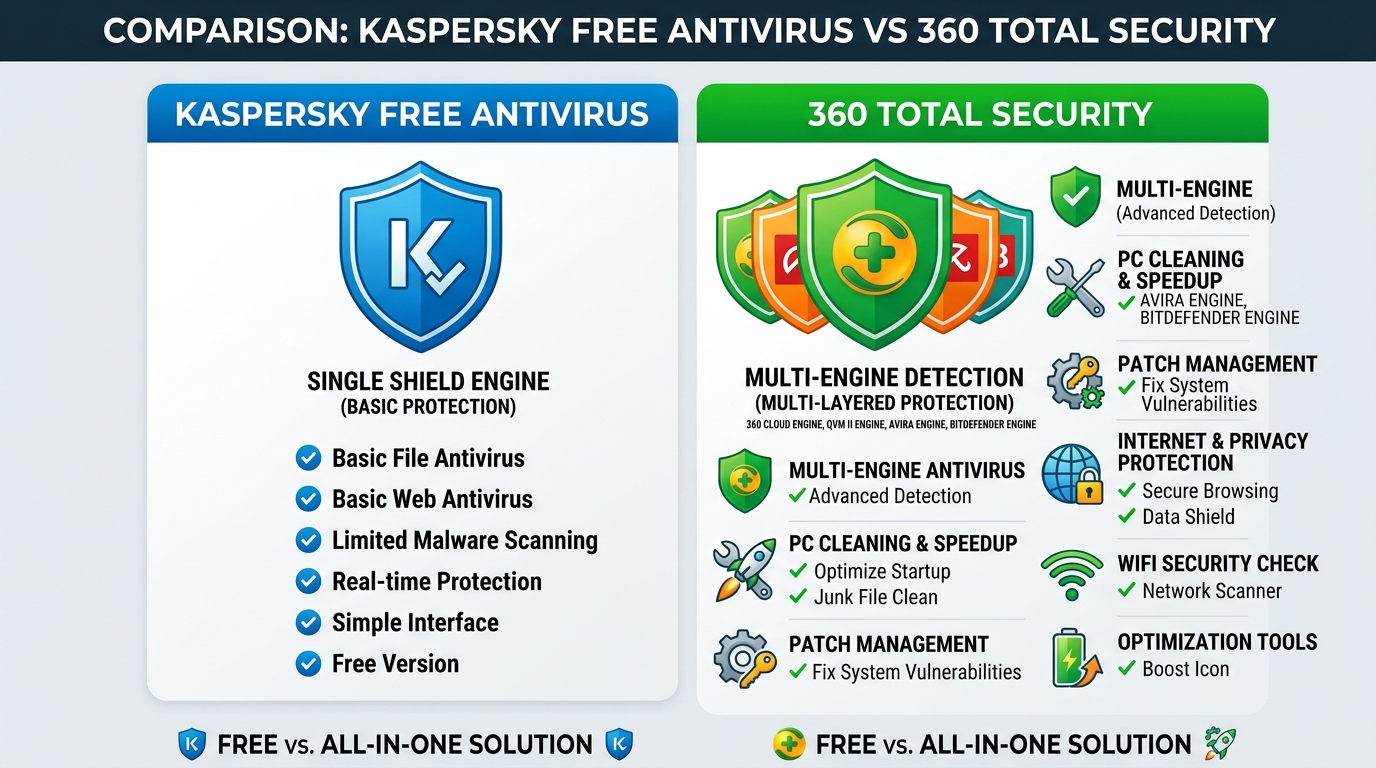
The free antivirus market has matured dramatically, and one competitor stands out as a particularly compelling alternative to Kaspersky Free: 360 Total Security. Developed by Qihoo 360, it is one of the world’s most widely used security platforms, with a user base exceeding 500 million globally according to a 2025 Cybersecurity Market Analysis Report.
The fundamental architectural difference between these two free products is significant. Kaspersky Free provides a single, highly capable detection engine with a deliberately limited feature set—no firewall, no optimization tools, no system maintenance utilities. It is a pure antivirus product, and a good one, but it addresses only the security dimension of PC health.
360 Total Security takes a fundamentally different approach. Its detection architecture integrates multiple engines simultaneously—including the Bitdefender engine (one of the industry’s highest-rated engines), the QVMII AI-powered engine, and 360’s own cloud-based detection system. This multi-engine approach creates overlapping detection coverage that catches threats that any single engine might miss. Beyond pure antivirus protection, 360 Total Security integrates a comprehensive suite of PC optimization and maintenance tools:
- Junk File Cleaner: Removes accumulated temporary files, cache data, and system detritus that slow performance.
- Startup Manager: Identifies and allows management of startup programs that extend boot times.
- Patch Management: Automatically detects and installs missing Windows security patches and software updates—a critical but often neglected security practice.
- Speed-Up Tools: Identifies performance bottlenecks and applies optimizations to improve system responsiveness.
- Real-Time Protection: Continuous monitoring against malware, ransomware, and malicious web content.
For users who want comprehensive PC protection and maintenance without paying a subscription fee, this combination is extraordinarily difficult to match. The value proposition is clear: where Kaspersky Free offers a premium detection engine with minimal extras, 360 Total Security delivers a holistic PC health platform—security and optimization—at no cost.
Final Recommendations: Is Kaspersky the Right Choice for You?
After this comprehensive examination of Kaspersky’s technical capabilities, usability profile, competitive positioning, and market context, the final question is the most personal one: is Kaspersky the right choice for you? The honest answer is that it depends entirely on which factors matter most in your specific situation. The following scenario-based guide is designed to help you map your priorities to the right decision.
Scenario-Based Buying Guide
For the Security-Conscious Power User: If your absolute top priority is deploying the most technically sophisticated malware detection engine available—and you are willing to pay for it, invest time in configuration, and are comfortable with the geopolitical context—Kaspersky’s premium suites remain a top-tier choice. The combination of its detection engine, System Watcher behavioral blocker, and Safe Money banking protection represents a genuinely elite security stack. Users in this category include security professionals, developers handling sensitive code, and individuals who conduct significant financial transactions online.
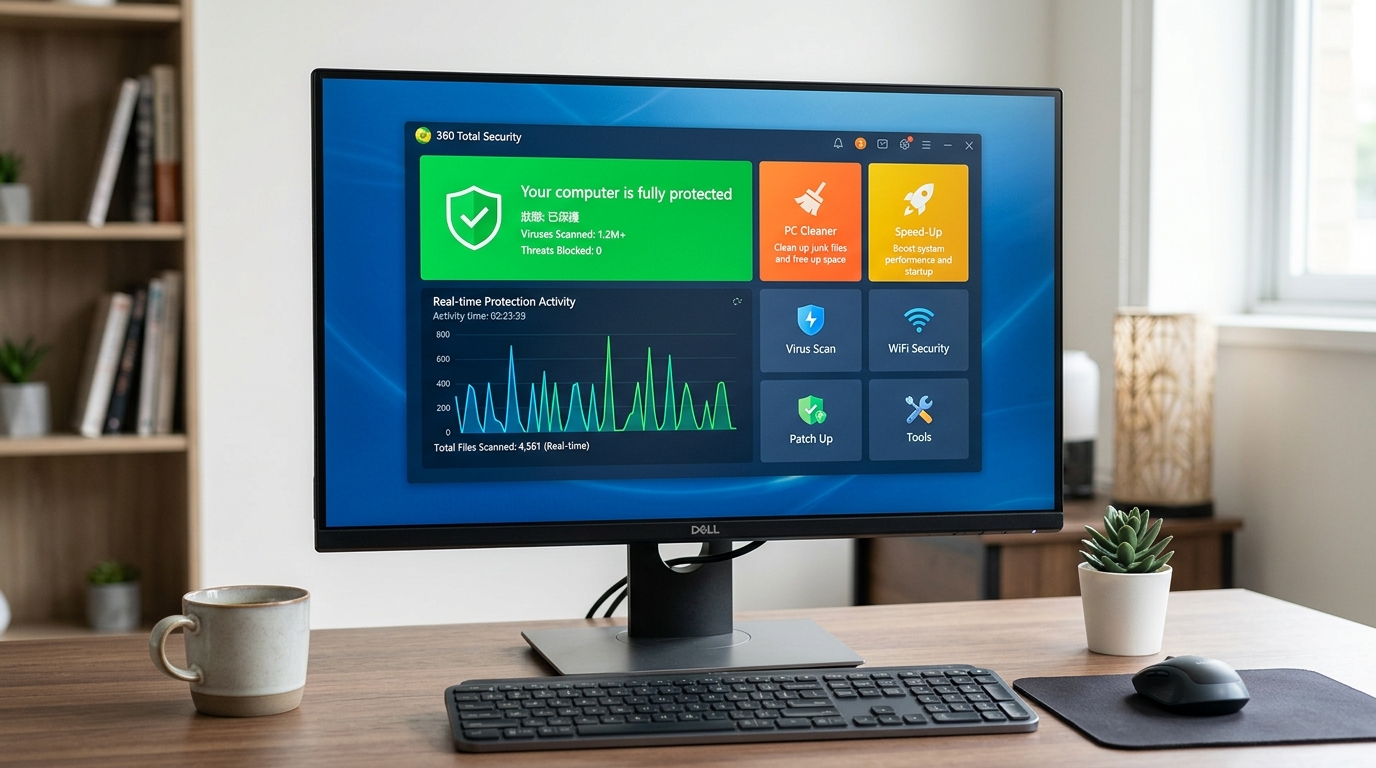
For the Budget-Conscious or Optimization-Focused User: If you need robust antivirus protection without the financial commitment of a subscription, or if you want your security software to also help maintain your PC’s performance and health, 360 Total Security is an excellent, comprehensive free solution. Its multi-engine detection architecture, combined with integrated cleaning, patch management, and speed optimization tools, delivers a level of holistic PC care that no other free product matches. This is particularly valuable for users who want a single solution that addresses both security and system maintenance.
For Users Seeking Simplicity & Lower Cost: If Kaspersky’s configuration complexity, notification verbosity, or price point creates friction, you are not forced to compromise on protection. Both Norton’s streamlined interface and 360 Total Security’s intuitive dashboard offer more accessible user experiences. For users who want effective protection that works reliably in the background without demanding technical engagement, 360 Total Security’s default configuration provides strong protection with minimal setup required.
For Users with Geopolitical or Regulatory Concerns: If you work in a regulated industry, hold government security clearances, or operate in a jurisdiction that has issued advisories regarding Kaspersky products, the prudent choice is to select an alternative. In this case, Norton 360, McAfee Total Protection, or 360 Total Security all represent strong options without the associated concerns.
Optimizing Your Security Setup Regardless of Choice
A critical insight that transcends any specific product recommendation is this: no antivirus software is a substitute for good security practices. The most sophisticated protection engine in the world cannot fully compensate for clicking on phishing links, using weak or reused passwords, or running an unpatched operating system. Regardless of which antivirus you choose, the following practices are non-negotiable:
- Keep everything updated: Enable automatic updates for your operating system, browsers, and all installed software. The majority of successful malware attacks exploit known vulnerabilities for which patches already exist.
- Practice cautious browsing: Verify URLs before clicking, be skeptical of unsolicited email attachments, and avoid downloading software from unofficial sources.
- Use strong, unique passwords: A password manager—whether the one bundled with your security suite or a dedicated tool—eliminates the excuse for password reuse.
- Maintain regular backups: An offline or cloud backup of critical files is your ultimate defense against ransomware and hardware failure alike.
For users who select a different primary antivirus but want to address the system maintenance and optimization dimension of PC health, 360 Total Security’s suite of cleanup and performance tools can serve as a valuable complementary utility. Its patch management feature alone—which actively monitors and prompts installation of missing Windows and software security updates—addresses one of the most common vectors through which malware gains entry to systems.
Whatever your final choice, the act of reading a comprehensive review like this one before installing represents exactly the kind of informed, deliberate approach to digital security that makes the difference between a protected system and a compromised one. We encourage you to explore 360 Total Security as a free, feature-rich option that may align perfectly with your needs—visit the official website to download and experience its multi-layered protection and optimization capabilities firsthand.
Frequently Asked Questions
Is Kaspersky antivirus still safe to use in 2025?
Kaspersky remains technically one of the most capable antivirus products available, with consistently top-ranked detection scores in independent lab tests. However, its safety from a data sovereignty perspective is a nuanced question. The U.S. government has issued restrictions on Kaspersky products for American consumers, and several European agencies have recommended evaluation of alternatives for critical infrastructure. For general home users outside regulated industries, the technical product itself is highly effective. Users in sensitive roles or jurisdictions with specific advisories should consider alternatives such as Norton, McAfee, or 360 Total Security.
Does Kaspersky significantly slow down your PC?
Based on independent performance benchmarks from AV-Comparatives and AV-TEST, Kaspersky has a below-average system impact for a full-featured security suite. In idle state, it consumes approximately 150–250 MB of RAM and under 2% CPU on modern hardware. Active scans will temporarily increase CPU usage to 20–40%, but intelligent scheduling minimizes impact during active user sessions. For users on older or lower-specification hardware, any full-featured antivirus will have some impact, and a lighter solution like 360 Total Security may be preferable.
What is the best free alternative to Kaspersky?
360 Total Security is widely regarded as one of the strongest free alternatives. It combines a multi-engine detection architecture—integrating the Bitdefender engine alongside its own QVMII AI engine—with comprehensive PC optimization tools including junk file cleaning, startup management, patch management, and speed optimization. This makes it a more holistic solution than Kaspersky Free, which offers strong detection but minimal additional features. You can download it free from the 360 Total Security official website.
How does Kaspersky’s System Watcher feature work?
System Watcher is Kaspersky’s behavioral monitoring module. Rather than relying solely on signature matching, it monitors the real-time behavior of all running processes and compares their actions against known malicious behavioral patterns. When a process exhibits suspicious behavior—such as attempting to encrypt large numbers of files rapidly (characteristic of ransomware)—System Watcher can terminate the process and, critically, roll back any changes it has already made using automatically created shadow copies. This makes it particularly effective against zero-day ransomware and novel malware variants that have not yet been catalogued in signature databases.
Is Kaspersky worth the money compared to free antivirus options?
The answer depends on your specific needs. Kaspersky’s premium suites offer genuinely advanced features—Safe Money banking protection, behavioral rollback via System Watcher, a hardened firewall, and a password manager—that justify the cost for users who will actively use them. However, for users whose primary need is reliable malware protection plus system maintenance, a free solution like 360 Total Security delivers exceptional value without any subscription cost. The multi-engine detection, combined with optimization tools, makes it a compelling choice for budget-conscious users who do not require Kaspersky’s more specialized premium features.
About the Author: This article was researched and written by a Senior Cybersecurity Content Analyst with over a decade of experience evaluating endpoint security solutions, threat intelligence platforms, and consumer antivirus products. Their work draws on independent lab test data, hands-on product evaluation, and analysis of cybersecurity industry reports to provide actionable, unbiased guidance for both technical and non-technical audiences.
Learn more about 360 Total Security